
Is your new site ready to launch
Launching a new website? Find out which relaunch risks apply to you
Launching a new website can lose the traffic the old one earned, usually because nobody planned the move, not because of the design. See which risks your relaunch carries.
Organic visits
ExampleDrop starts the day the new site went live. 212 old URLs have no redirect.
How much risk you carry
Three kinds of website relaunch, three levels of risk
Work out which of these you’re doing before deciding how much planning it needs. Teams often think they’re doing the first when they’re doing the second.
| Dimension | Same URLs, new design | New URL structure | New domain |
|---|---|---|---|
| Main risk | Content and internal links lost in the rebuild | Missing redirects and lost value from links | All of that, plus the trust built up by the old domain name |
| What you must plan | Matching templates, page speed, tracking that keeps working | A complete old-to-new URL map before any content freeze | The map, telling Google about the domain change, and a longer watch period |
| What usually happens after launch | Little movement if content and links were kept | Some movement for a few weeks while Google recrawls | A longer, bumpier settling period |
| Where teams underestimate it | Assuming the same URLs means the same pages | Finding old URLs that were never in the CMS | Treating it as a rebrand deadline and forgetting it’s a site move |
| How hard it is to roll back | Easy if you kept the old build | Harder once Google has crawled the redirects | Hardest, and a bad idea to try twice |
Where to go from here
Checklists and help for each stage of a website launch
This page tells you how much risk your launch carries. For step-by-step checklists and hands-on help, use the page built for that job.
Checklists to work through
- Tick through the interactive website launch checklistEvery check for before launch, launch day and after, as a working list.
- Migration checks by type of moveDomain change, new platform, new structure and more, compared.
- The checklist to finish before a redesign startsDecisions that are cheap now and expensive once templates exist.
The timeline
What has to happen before and after launch, and when
Launch risk is mostly about order. Most launch failures come from doing a step at the wrong time, not from a step nobody had heard of.
At the sitemap stage, before any design
Decide which pages will exist, what they’re called, how they’re grouped and what each URL will be. These are search and business decisions, and once templates are built around them they’re almost impossible to change.
You get: An agreed sitemap and URL structure
Six to eight weeks out: record the old site’s numbers
Record what the current site does before it’s gone: rankings for buying searches, organic visits and conversions by page, top landing pages by revenue, backlinks by page, and Core Web Vitals. Without this, you can’t tell a normal post-launch wobble from real damage.
You get: A dated record of the old site you can point to later
Four weeks out: build the redirect map from the old site
Use a full crawl of the old site, twelve months of analytics and Search Console data, server logs and a backlink export. Map every old URL to its closest new match, or to a relevant parent page. A map built by crawling the new site misses retired pages that still have links.
You get: A complete, checked old-to-new URL map
Two weeks out: test the move on staging
Run the redirects on staging and check them in bulk. Make sure titles, headings, structured data, canonical tags and internal links survived the content move. Confirm analytics and conversion tracking work on the new templates, on mobile and desktop.
You get: A tested set of redirects and signed-off tracking
Launch day: check the four things that sink sites without warning
Check the robots rules, noindex tags, canonical tags and sitemap, and make sure the staging block didn’t go live. Submit a sitemap that lists the new URLs, spot-check redirects on the live site, and launch mid-week, in the morning, with people on hand.
You get: A signed-off launch-day check
First thirty days: check things in the right order
In week one, look for crawl errors, server errors and indexing problems. In weeks two and three, compare rankings and traffic with your pre-launch numbers. In week four, check conversion rate, the thing most likely to have slipped while every technical check looked fine.
You get: A thirty-day log and a list of fixes
The dangerous ones
Three relaunch failures that look like a successful launch
A broken page or a form that won’t submit gets reported within hours. The expensive problems stay hidden for two weeks.
- The staging noindex went live with the site.
- During the build, the staging site is rightly blocked from search engines. Then the build goes live and the block goes with it. The site works perfectly for every visitor and drops out of Google over the next few days. One check prevents it.
- The redirect map was built from the new site.
- Someone crawls the new site, lists its pages and maps the obvious matches. That can’t find URLs that no longer exist: the retired service page with a dozen links from news sites, old campaign landing pages, blog posts that bring a steady trickle of good traffic. Those are the ones worth keeping.
- Nobody can prove what changed, because nothing was recorded before launch.
- Six weeks after launch, someone asks whether traffic is down. With no dated benchmark and a tracking tag that moved, broke or started firing twice, it becomes an argument between memories. Teams then undo decisions that were fine, or reassure each other through a real loss.
Why record the old numbers
Why a pre-launch record settles the “is traffic down?” argument
Some movement after any big change is normal and sorts itself out. A record of the old site lets you tell that apart from damage six weeks later, when nobody can agree what the old site was doing.
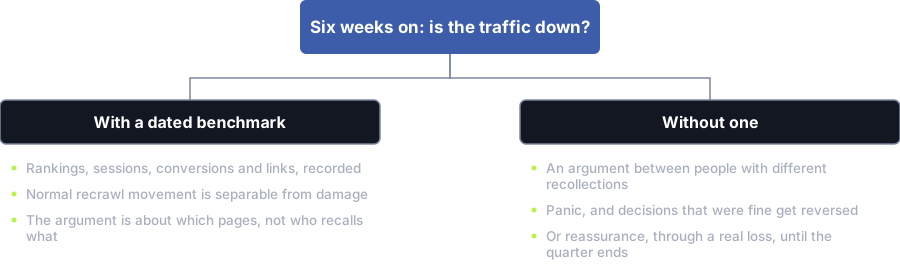
With a dated record
- Rankings, visits, conversions and links written down
- Normal settling can be told apart from damage
- The talk is about which pages, not who remembers what
Without one
- An argument between people who remember it differently
- Panic, and good decisions get reversed
- Or false comfort through a real loss until quarter end
After go-live
The first thirty days after launch, in order
Chasing rankings in week one just gives you noise. Checking conversion in week four catches the problem everyone else missed.
- Day one: confirm the site can be indexed, the sitemap is submitted and the staging block didn’t go live
- Day one: spot-check your most valuable redirects on the live site, not staging
- Week one: check server errors, crawl errors and soft 404s daily, and fix them as they appear
- Week one: confirm analytics and conversion tracking work on every key template
- Week two: watch the index report for pages found, pages indexed, pages left out and why
- Week two: compare rankings for buying searches with your pre-launch numbers
- Week three: compare organic visits and enquiries by landing page with your pre-launch numbers
- Week three: measure Core Web Vitals again on real devices now live traffic is arriving
- Week four: compare conversion rate with the old site, as well as traffic
- Week four: look for searches the old site ranked for that the new one doesn’t
- Keep the old site archived and restorable for at least a month after launch
Our conditions
What must be in place before we agree a launch date
We treat these as conditions. Meeting them can push a launch back a week, which costs far less than a recovery project.
What has to be in place
- A dated record of the old site’s rankings, traffic, conversions and backlinks
- A complete redirect map built from the old site and checked line by line
- Redirects tested in bulk on staging before go-live
- Analytics and conversion tracking checked on the new templates in advance
- A launch-day check of robots rules, noindex tags, canonical tags and the sitemap
- The old site archived and restorable for at least thirty days
What we will not agree to
- Launching on a Friday, or the day before anyone with access goes on leave
- Leaving redirects until after go-live
- Changing the domain, the design and the URL structure all at once
- Skipping the pre-launch record because the date is close
- Promising that no traffic will move. Nobody can promise that.
Related
Help before and after the launch
Before you launch
Questions
Questions to ask in the weeks before a relaunch
When should the SEO work on a new website start?
At the sitemap stage, before any design work begins. The biggest decisions come early: which pages exist, what they’re called, how they’re grouped and what each URL will be. Changing them once templates are built is very expensive.
Bring search in at the end and the site looks better but its structure can’t show what the business sells, and the redirect map gets thrown together in launch week.
How much traffic will we lose when we launch?
Nobody can promise a number, so be wary of anyone who does. A redesign that keeps the same URLs carries low risk. Changing the URL structure carries real risk, which a complete redirect map mostly contains. Changing the domain carries the most.
Some movement in the first weeks is normal while search engines recrawl and reassess the site. A record of the old site’s numbers taken before launch lets you tell that from real damage.
Do we need to redirect every old URL?
Every old URL that earns traffic, has links from other sites or still gets crawled. That list is longer than the pages in your CMS: old campaign URLs, retired pages that still have links, and paginated or filtered versions.
Build the map from the old site, using a full crawl, twelve months of analytics and Search Console data, server logs and a backlink export. A map built by crawling the new site misses the pages that mattered most.
What is the most common serious launch mistake?
A staging site blocked from search engines, then pushed live with the block still on. The site launches and drops out of Google over the next few days, because it’s telling search engines not to index it.
The second most common is the opposite: the staging site was never blocked, got indexed, and now competes with the live site as a copy. One check on launch day prevents both.
How long should we watch it after launch?
Watch closely for thirty days. Week one is about errors and indexing, weeks two and three about rankings and traffic against your pre-launch numbers, and week four about conversion. A site can hold its traffic and still convert worse than the old one.
Keep the old site archived and restorable for at least a month. Being able to compare a page with the old version, or roll back, is worth far more than the hosting cost.
Where to get help
Services that solve this
Website Redesign
Our website redesign services keep the pages that already bring you visitors and enquiries. We measure your traffic first, then map every old URL to its new home.Technical SEO
Technical SEO makes sure Google can crawl, read and index your pages, and that your site is fast. We fix what blocks them so the rest of your SEO can pay off.Website Design, Development & Conversion
Our web design agency builds fast, accessible websites you own, planned for Google and for enquiries before design starts.SEO & Organic Growth
Phone not ringing while competitors show up above you? Our SEO services fix your site, write the pages buyers search for and show you every call and form it brings in.Marketing Analytics & Attribution
Marketing analytics and attribution you can trust, with a written account of where the data is blind and tests for what attribution can’t answer.Conversion Rate Optimisation
Conversion rate optimisation that gets you more enquiries from the traffic you already have. We fix what stops visitors, and A/B test only when your traffic supports it.
Have your launch plan checked while there’s time to change it
If your launch is more than two weeks away, you can still avoid most of these risks. Send us the new sitemap and the current site, and we’ll tell you what’s missing from the plan.
Prefer to talk it over? Book a free call
Your BOOSTD score improves within 90 days, or your next month is free. After 6 months, more traffic or leads, or we keep working free (up to 6 free months in any 12 months). Read our guarantee
References
Sources for launch a new website
The official documents and research this page is based on. Platform rules change, so check the source before you act on a detail.
Last updated · Published by Zubair Afzal, responsible editor