
Diagnostics
Why did my organic traffic drop? Find the cause before fixing
Published by Zubair Afzal, responsible editor
First published Updated 9 min read
First rule
Hold off on fixes until you know the cause
Don’t fix anything yet. In the first hour after a traffic drop someone guesses what happened, everyone works from the guess, and the real cause can go unchecked for a fortnight.
Avoid two reflexes: rolling back the latest release, which wipes out the timeline you need, and blaming a Google update, which is easy to check against Google’s published dates.
The steps below follow the split in Google’s own guide to debugging traffic drops: technical issues, security and spam problems (including manual actions), algorithm updates, seasonal changes in interest, and reporting glitches. The cheap checks come first, and done in order, many drops can be traced to one cause within a day.
Step by step
Six checks to find out why your organic traffic dropped
Work through these in order, even if a later step fits your theory. The order rules out the cheap explanations first.
Confirm the drop is real
Rule out measurement first. Did a release remove a tag from a template, the consent banner change, or a filter, bot exclusion or internal traffic rule get added? Did the reporting property, time zone or channel definition change? Then compare analytics with Search Console clicks, which Google collects separately. Search Console flat and analytics down means a tracking problem.
You get: A yes or no on whether visitors fell
Look at the shape of the drop
Plot daily clicks for at least six months and name the shape. A cliff falls within a day or two and stays down; a step drops to a new level and holds; a bleed wears away a few per cent a week. A cliff points to an event with a date, a bleed to something building up over time.
You get: A start date for the drop
Narrow it down to one segment
Split the loss by branded and non-branded searches, page template, country, device and search appearance. Almost every drop is concentrated somewhere. If it’s confined to one template, look at a code change. If it’s confined to non-branded searches on sales pages, look at competition or relevance. If everything fell at once, suspect indexing, tracking or a broad ranking change.
You get: The segment carrying the loss
Match the start date to known events
Line up the start date with your deploy log, CMS releases, redirect changes, tag manager versions, hosting or CDN changes, and the confirmed update dates on the Google Search Status Dashboard. A match isn’t proof, but a drop that starts the morning of a release, only on the templates it touched, is unlikely to be a coincidence.
You get: A shortlist of likely events
Check the affected pages are indexed and served correctly
For the pages losing traffic, check they are still indexed and that a crawler gets the same HTML as a browser. Inspect a live URL. Look for a meta robots tag, canonical, staging canonical or X-Robots-Tag header added by the release, review robots.txt as it was on the day, and confirm redirects still resolve in one hop. Check the manual actions and security reports too.
You get: Confirmation that the pages can still appear in search
Write one cause down and test it
Write the cause as a sentence that could be wrong, for example: "The June release added a canonical from every product variant to the category page, and product pages have been dropping out since." Then look for evidence that would disprove it. If you can’t state the cause in one testable sentence, spending money now means paying for a guess.
You get: A written, testable cause
The same checks as a flowchart
Three questions that narrow down a traffic drop
Each answer rules out a whole group of causes. Asked in this order, they narrow most drops to one segment within a morning.
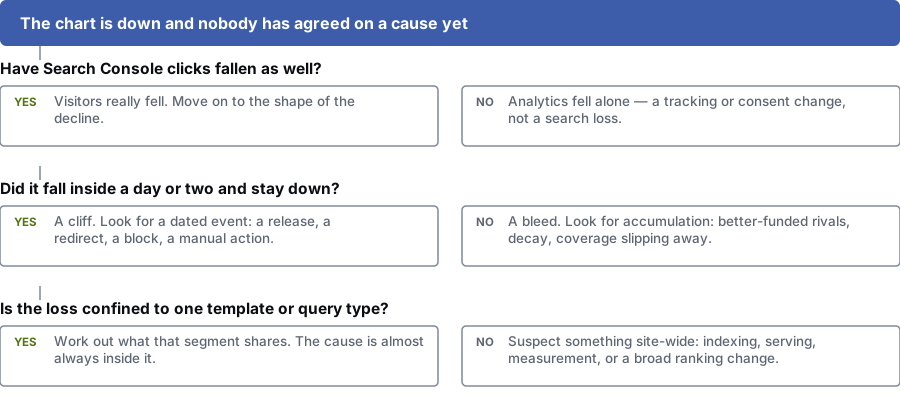
Have Search Console clicks fallen as well?
Yes: Visitors did fall. Move on to the shape of the drop.
No: Only analytics fell. That points to a tracking or consent change, and search is fine.
Did it fall inside a day or two and stay down?
Yes: A cliff. Look for a dated event: a release, a redirect, a block or a manual action.
No: A bleed. Look for slow change: stronger rivals, ageing content or pages dropping out of the index.
Is the loss confined to one template or query type?
Yes: Find what that segment has in common. The cause is almost always there.
No: Suspect something site-wide: indexing, serving, measurement or a broad ranking change.
A traffic chart can’t tell you the cause. A segment can. Until you’ve narrowed the drop to a page template, a type of search, a country or a device, every explanation is still a guess.
Sudden or slow
Sudden drop or slow decline: what does it tell you?
A sudden drop usually has a dated cause; a slow decline usually builds up. Mix them up and you’ll waste a week, or miss something you could have reversed.
| Dimension | Sudden cliff | Slow bleed |
|---|---|---|
| What it looks like | Traffic falls within a day or two and stays at the new level | Traffic wears away by a few per cent a week over two or three months |
| Usual causes | A deploy, a robots or canonical change, a migration with broken redirects, a manual action, a tracking break or a broad update landing hard | Competitors getting better, content going stale, lost links, changing buyer intent, or search features taking the clicks |
| First thing to check | The deploy log, and the indexing report filtered to the affected template | Impressions and average position by search, split into branded and non-branded, over twelve months |
| Typical time to diagnose | Hours. The cause is an event with a date on it. | Days, because several small effects need pulling apart |
| Most common misdiagnosis | Blaming an update that landed a week before the drop started | Blaming an update because nobody kept a change log and the drop has no clear start |
| What recovery looks like | Often quick once the cause is reversed, unless the site was rebuilt on top of it | Gradual, and only if you fix the underlying reason as well as the symptom |
Often missed
Six causes people often miss
- The traffic didn’t go anywhere. The measurement changed.
- A tag went missing from one template during a redesign, a consent banner started defaulting differently, a new bot filter removed traffic that used to be counted, or someone switched reporting properties. Search Console collects click data separately, so comparing the two is the fastest way to catch this.
- Impressions are flat and clicks have fallen.
- Google still shows your pages, but people click something else or get the answer without clicking. Look for a new feature above you, a rival with a better snippet, a title Google has rewritten, or a search that no longer needs a visit. Fix the snippet and the match to what searchers want; more links won’t help.
- A redirect chain lost its middle link.
- Sites pile up redirects across rebuilds, and a tidy-up removes an old rule that looked out of date, so a chain now ends in a 404 or loops. The affected URLs are usually the oldest and best-linked on the site, which is why the loss is so large for so few URLs.
- A release brought back a staging setting.
- A meta robots noindex, an X-Robots-Tag header, a canonical pointing at a staging hostname, or a robots.txt disallow copied from a test site. These are common, invisible in a browser, and can knock a site out of search within days while everything looks normal to your team.
- It’s seasonal, and you only have one year of data.
- Comparing with last month is how a normal seasonal dip gets treated as a crisis. Compare the last twenty-eight days with the same twenty-eight days a year earlier. If you don’t have that history, check whether search interest in your category moves the same way.
- One page was bringing in most of the traffic.
- Many sites have one article or landing page that brings in a large share of organic visits. If it slips a couple of positions, the whole-site chart falls hard though nothing else has changed. Break traffic down by landing page before you treat it as a site-wide problem.
Set-up
What to have open while you investigate
Having these open in the first hour is usually the difference between a one-day diagnosis and a three-week argument.
- The Search Console performance report in compare mode: the last twenty-eight days against the same period last year, with brand searches filtered out
- The Search Console page indexing report, filtered to the affected template or folder
- Your analytics landing-page report for the same window, using the same date logic
- Your deploy log and CMS release history, including tag manager versions
- Your robots.txt and XML sitemap as they were before the drop began
- The Google Search Status Dashboard, for confirmed ranking update dates
- Server log files showing crawler activity, if your host can supply them
- The Search Console manual actions and security issues reports
- A rank tracker set to the location and device your customers use
Questions
Google traffic drop: common questions
How big a drop is normal fluctuation?
Day-to-day swings of ten to fifteen per cent are normal on most sites, driven by weekends, holidays and paydays. Compare rolling twenty-eight-day windows with the same period a year earlier before you call anything a decline.
Duration and shape matter more than size. A fall that holds for two full weeks across several page templates needs investigating; a single bad Tuesday doesn’t.
Was it a Google update?
Only if the dates match. Google lists confirmed ranking updates on its Search Status Dashboard. If your drop didn’t start inside the announced rollout window, the update doesn’t explain it.
Updates also leave a typical pattern: broad movement across many searches and page types at once. A drop confined to one template or one country is almost never an update.
Should we roll back the release?
Only if you have evidence linking it to the drop, and rolling back is cheap. A blind rollback wipes out the timeline you need for diagnosis and adds a second change to untangle.
Compare the release with the previous one instead. Look for changes to robots rules, canonical tags, meta robots, internal links, redirects or server-side rendering, then test the affected template with a live inspection tool.
How long does recovery take?
It depends on the cause. A reversible technical error can recover within a recrawl cycle once it’s fixed. A drop caused by competitors becoming more relevant means your pages need to become the better result, which takes months.
Nobody can promise a return to your old numbers. The results page you fell out of has changed since.
Traffic fell but enquiries didn’t. Does it matter?
Sometimes not. Losing visitors who only wanted information and were never going to buy costs you nothing, and often happens when an answer box settles the question on the results page.
It does matter if those visitors were future buyers, or if the drop is an early sign of a decline that hasn’t reached your sales pages yet. Break it down by page type before you decide it’s harmless.
References
Sources for why did my organic traffic drop
The official documents and research this page is based on. Platform rules change, so check the source before you act on a detail.
- Google Search Status Dashboard (confirmed ranking updates)
- Google Search Central: robots.txt introduction
- Google Search Central: JavaScript SEO basics
- Google Search Central: Debug Google Search traffic drops
- Google Search Central: Google Search core updates and your website
- Google Search spam policies
- Search Console Help: Performance report (Search results)
- Search Console Help: Page indexing report
- Search Console Help: Manual actions report
- Search Console Help: URL Inspection tool
Start here
Get a second opinion on your traffic drop
Worked through the checks and still can’t see the cause? The loss may come from two things at once. Bring your charts to a call and we’ll suggest what to test next.
Rather check it yourself? Try our free SEO tools
Your BOOSTD score improves within 90 days, or your next month is free. After 6 months, more traffic or leads, or we keep working free (up to 6 free months in any 12 months). Read our guarantee