
Local search
Business not showing on Google Maps? Check these causes in order
Published by Zubair Afzal, responsible editor
First published Updated 9 min readWe check this page every three months. Next check: .
Define the problem first
Three different problems behind "not on Google Maps"
When your business isn’t showing on Google Maps, it’s usually one of three problems. 1. The profile doesn’t exist or isn’t live: verification or suspension. 2. It’s live but doesn’t appear when someone searches for your service: categories and relevance. 3. It appears, but not in the few results people look at: competition and distance.
To find which, search your exact business name plus your town in a private window. If the profile appears, it’s live, so skip verification and suspension. If it doesn’t appear even by exact name, fix that first.
Don’t trust your own phone. You’re signed in to the account that manages the profile, often at the address, and have clicked your own listing hundreds of times. That’s why "it shows for me" and "customers can’t find us" are so often both true.
Start here
Which of the three problems do you have?
Work down these in order. Each answer ends the search or tells you what to check next.
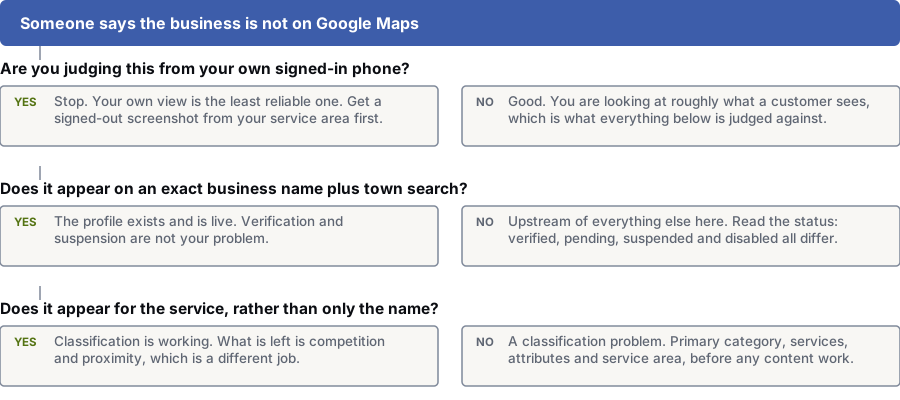
Are you judging this from your own signed-in phone?
Yes: Stop. Your own view is the least reliable one. Get a signed-out screenshot from your service area first.
No: Good. You’re seeing roughly what a customer sees, and that’s what you judge everything else against.
Does it appear on an exact business name plus town search?
Yes: The profile exists and is live. Verification and suspension aren’t your problem.
No: Fix this first. Check the status: verified, pending, suspended and disabled each need a different fix.
Does it appear when you search for the service, as well as the name?
Yes: Your categories are working. What’s left is competition and distance, which need a different plan.
No: A category problem. Fix the primary category, services, attributes and service area before any content.
Four minutes
Four quick checks before you change anything
Run these in order. They’re free and rule out most of the causes on this page.
- Open your Business Profile and read the status. Verified, pending verification, suspended and disabled are four different situations, each with its own next step.
- Search the exact business name plus the town in a private window, signed out. If it appears, the profile is live, and your problem is relevance or competition.
- Search in Google Maps itself as well as the web results. A profile can be healthy in Maps and still miss the three-result block on a web search.
- Ask someone who lives in your service area to search for your main service and send you a screenshot. That’s the only reliable picture of what customers see.
In order of likelihood
Why isn’t my business showing on Google Maps? Seven reasons
The first three stop the profile appearing at all, the next three change which searches it appears for, and the last one you plan around.
- The profile was never verified.
- A profile can look complete while still unverified, and an unverified profile gets very little visibility. It happens when a postcard never arrived, a video verification was never finished, or the business moved and verification reset without warning. Check the status; the dashboard looks almost the same either way.
- The profile is suspended or disabled.
- Suspension removes the listing from Maps entirely, and the dashboard notice rarely says why. Under Google’s guidelines, common triggers include keywords or locations in the business name, a virtual office or mailbox address, a service-area business showing an address it should have hidden, or a category for a regulated activity the business isn’t licensed for. Fix the problem before you appeal.
- There are two profiles, and the wrong one is winning.
- Duplicates get created by staff, data aggregators, a previous supplier, or a move that left the old address behind. They split your reviews, photos and other signals, and often the one you don’t manage is the one people find. Search your address and phone number as well as your name.
- The primary category doesn’t match the search.
- Google uses the primary category to decide which searches you can appear for, before it ranks you, so the wrong one can keep you out altogether. Choose the category for the service you most want calls about, not the one that describes who you are, and use secondary categories for the rest.
- The service area is configured wrongly.
- Two mistakes are common: a service-area business that still shows a street address, which risks suspension, and a service area covering a whole province or state, which won’t extend your reach and blurs where you’re based. List the areas you can reach, and back that up on your website.
- The business name contains keywords.
- Adding a service or a city to the name breaks Google’s guidelines, which say the name should match your real-world name, and it’s easy for a competitor to report. You risk a suspension, an unannounced edit, or a gradual loss of visibility. Use the name on your door.
- You’re too far away from the person searching.
- Google names three factors for local results: relevance, distance and prominence. Distance is the one nobody can change. A business on the edge of a city won’t appear for searches made in the centre, however good the profile. Plan around it: open a second staffed location, or compete for that area through your website.
Sequence
What order should you fix things in?
Ownership first, then categories, then content. Get the order wrong and a two-day fix becomes a two-month one.
Find out what customers see
Ask someone else to search while signed out, from the area you serve, and save screenshots with the exact words they used. Judge everything after this against those results.
You get: Screenshots of what customers see
Confirm ownership and status
Check whether the profile is verified, pending, suspended or disabled, and that your login is the owner, not only a manager. If a former supplier created the profile, Google has a request-ownership process.
You get: Confirmed owner access and a known status
Find duplicates before you edit anything
Search by name, address and phone number, in Maps and in the web results. If a duplicate is outranking the profile you manage, editing yours improves the listing customers don’t see.
You get: A list of every listing that refers to this business
Fix categories before content
Set the primary category, secondary categories, services, attributes and service area, which decide which searches you can appear for. Photos, posts and descriptions help you compete once you are in the results, but won’t get you in.
You get: Corrected categories and service settings
Test distance properly
Run the same search from three or four points across your service area and note where you disappear. That gives your actual radius, and shows which suburbs you can win on the map and which to target through your website.
You get: A map of where you can compete
Then build prominence
Ask for reviews steadily, as a routine, not in one-off campaigns. Use photos of your own business, keep your hours accurate, and make sure your website clearly serves the areas you claim. This takes longest, and only pays off once everything above is right.
You get: A repeatable process your team can run
The confusing part
Why your listing shows for you but not for customers
Two people searching the same words at the same moment often see different results.
| Dimension | Why your view differs | How to check it properly |
|---|---|---|
| Distance from the business | You’re usually at or near the address, which gives you the best possible result | Ask someone in each part of your service area to search and send a screenshot |
| Being signed in | Google treats a profile differently for the account that manages it, in search and in Maps | Search in a private window, signed out, with a fresh session |
| Exact wording of the query | You describe your service the way your team does. Customers use different words. | Ask three recent customers what they typed, and test their phrases |
| Device location settings | Precise location settings, a VPN, or a desktop guessing from its IP address all change the result | Test on a phone with location on, in the area you care about. An office desktop won’t show this. |
| Map zoom and panning | Map results change as you move the map, and a zoomed-in map shows fewer businesses | Compare like with like: same zoom, same starting point, and no panning before you read the results |
| Prior interactions | You’ve opened, edited and clicked your own listing many times, which no customer does | Use a device that has never opened the profile, owned by someone outside the business |
Questions
Google Maps listings: common questions
How long does verification take?
It depends on the method and your type of business. Video and instant methods can finish within days; postcard verification takes longer and sometimes needs requesting more than once.
If verification has been pending for several weeks, the usual cause is a mismatch between the profile and the documents or video you sent. Check the business name and address character by character before you try again.
My profile was suspended. What do I do?
Don’t edit anything else while an appeal is open, and don’t create a second profile. Compare Google’s guidelines for representing your business line by line with your profile; Google’s help page on suspended and disabled profiles explains how to get reinstated.
Common triggers include a name with keywords or a location in it, an address the business doesn’t staff, a virtual office or mailbox address, or a service-area business showing an address it should have hidden. Fix the cause, then appeal with evidence.
Can I appear in a city where I have no address?
Usually not to the same degree in Maps. Distance from the searcher counts, so a business with no presence in a city starts at a disadvantage against one that’s there.
You can still compete for that city in the regular web results, with a useful page about the jobs you do there. That’s the practical route when distance is against you.
Should I hide my address?
Hide it if you serve customers at their location, like a mobile mechanic, a plumber or a cleaning company; show it if customers come to you. Google’s guidelines say a business shouldn’t show an address where it doesn’t serve customers, and breaking that rule can lead to suspension.
Hiding your address doesn’t remove you from Maps. It changes how Google matches you, and it makes your service-area settings more important.
I merged a duplicate listing. Where did the reviews go?
Reviews are meant to carry across when duplicates merge, but that isn’t guaranteed and it isn’t always immediate. Export or screenshot both profiles in full before you request a merge.
If reviews are still missing once the merge settles, contact support with your record of what each profile held. Without that record, there’s very little to work from.
References
Sources for business not showing on Google maps
The official documents and research this page is based on. Platform rules change, so check the source before you act on a detail.
- Google Business Profile Help: Guidelines for representing your business on Google
- Google Business Profile Help: Tips to improve your local ranking on Google
- Google Business Profile Help: Verify your business on Google
- Google Business Profile Help: Fix suspended or disabled profiles
- Google Business Profile Help: Manage your service areas for service-area and hybrid businesses
- Google Business Profile Help: Request ownership of a Business Profile
Related
Keep reading on business not showing on Google maps
- how to optimise a Business Profile, step by stepThe fuller guide once the profile is live and eligible.
- what to do when a Business Profile is suspendedSuspension causes and the reinstatement process in detail.
- keeping your name, address and phone consistent across listings
- getting into the map pack
- local versus national search
- review and reputation work
- diagnosing a drop in website traffic
- multi-location search
Start here
Find out which of these is your problem
A Maps problem usually has one specific cause. Bring your profile and service area to a strategy call and we’ll check which of the three problems you have.
Rather check it yourself? Try our free SEO tools
Your BOOSTD score improves within 90 days, or your next month is free. After 6 months, more traffic or leads, or we keep working free (up to 6 free months in any 12 months). Read our guarantee