
Local search
Google Business Profile optimization guide, field by field
Published by Zubair Afzal, responsible editor
First published Updated 9 min readWe check this page every three months. Next check: .
How it works
Google Business Profile optimization starts with two jobs
Your profile has two jobs: helping Google decide whether to show you, then helping customers decide whether to call you.
Google Business Profile Help names three factors behind a local result:
1. Relevance: how well your profile matches the search.
2. Distance: how far you are from the person searching.
3. Prominence: how well known you are, including links to your site and your reviews.
Only a few fields feed those: categories, services, address or service area, and reviews. You can’t change distance at all.
Everything else (hours, photos, description, attributes, products, posts) helps you win the call but won’t move your position. Expecting it to is why so much profile effort seems to go nowhere.
The same Help page says there’s no way to request or pay for a better local ranking.
Field by field
What each Google Business Profile field does
Column one: does it help you show up? Column two: why fill it in anyway?
| Dimension | Does it help you show up? | What it does for customers | How often to update it |
|---|---|---|---|
| Primary category | Yes, more than any other field. Google says categories affect local ranking, and some features depend on them. | It’s the label under your name. It’s the first thing a new customer reads. | Once, with care. Then only when the business changes. |
| Additional categories | Yes, for the services they describe. They help you show for more searches. They don’t boost your primary category. | Not much. They switch on some extra features and booking types. | When you add or drop a service. |
| Business name | It’s matched to searches for your brand. Adding a service or city breaks the guidelines. | Helps people recognise you. A name that doesn’t match your signs makes people unsure. | Never, unless your legal or trading name changes. |
| Services list | Yes. Google suggests services for your type of business and lets you add your own. It says a service may be highlighted when someone searches for it. | Shows customers you do what they need, without a phone call. | When your offer changes. Read it through once a year. |
| Address or service area | Yes, strongly. Google measures distance from it, and distance is the one factor you can’t influence. | Tells customers whether you come to them or they visit you. | Only when you move. Changing it casually risks a suspension. |
| Reviews | Yes. Google names review count and rating as part of prominence. | The biggest single reason one of three results gets the call. | All the time. Make asking for reviews a habit. |
| Business description | We know of no reliable source that says it does. | Customers read it when comparing. Say what you do, who for, and what makes you different. | Once, then again when your positioning changes. |
| Photos and video | We know of no reliable source that says they move your position. Google does encourage a complete profile. | A lot. Your frontage, inside, team and finished jobs say more than any words. | When your premises, team or typical jobs change. |
| Attributes | Some feed search filters. They don’t affect ordinary matching. | They answer small questions before anyone asks: step-free access, parking, payment, languages. | Once, properly. Then whenever something changes. |
| Regular and special hours | Not a ranking factor. But if you show as closed, people ready to buy now will skip you. | Accuracy matters most here. Wrong holiday hours can lose you a customer for good. | Before every public holiday. |
| Posts | Google has never said they do. Posts expire, so they need a regular rhythm. | A shop window for anything with a date: an offer, an event, a seasonal change. | Once a month with real news. Empty weekly posts don’t help. |
| Questions and answers, where shown | No. But where Google still shows it, anyone can post, including a competitor. | Clears up the doubt that stops someone calling. Answer real questions properly. | If your profile still shows it, check it and reply within a day. |
| Products | Only in categories that support products, and then only a little. | Useful when range and price decide the sale, which covers most of retail. | Whenever your range changes. |
| Website link, booking and messaging | No. But without tracking tags on the website link, profile visits vanish from your reports. | This is how customers contact you. Messaging you never check is worse than none. | Add campaign tags to the link once, then leave it. |
The rules
What the Google Business Profile guidelines don’t allow
Break one of these and you can lose your profile. That’s worse than a lower position.
Google’s help page on suspended profiles says it may suspend or disable profiles that break its guidelines. Treat each rule below as a condition of showing up at all.
- Use your real-world name, as on your shopfront, paperwork and branding. Don’t add services or place names.
- Use an address where staff work during your hours. No rented mailing addresses or virtual offices. A co-working desk only counts if it has signage and staff, and you see customers there in business hours.
- If you visit customers, set a service area. Don’t publish an address you can’t staff. Google explains how service-area businesses should be set up.
- Keep one profile per location. The guidelines say duplicates cause problems on Maps and Search. They also split your reviews and photos.
- Own your profile. If an agency or ex-employee holds the only owner account, you could lose control. Google has a request-ownership process if you’ve lost access.
- Never buy reviews or reward them. The Maps content policy bans payment, discounts or free goods for posting, changing or removing a review. Ask every customer, not just the happy ones.
- Categories, services and attributes must match what that location offers. A branch can’t claim the whole group’s services if it doesn’t provide them.
Before you edit
Three questions to ask before you change a field
Four fields work like switches. They decide which searches you can show for. Get their rules wrong and the profile can be removed.
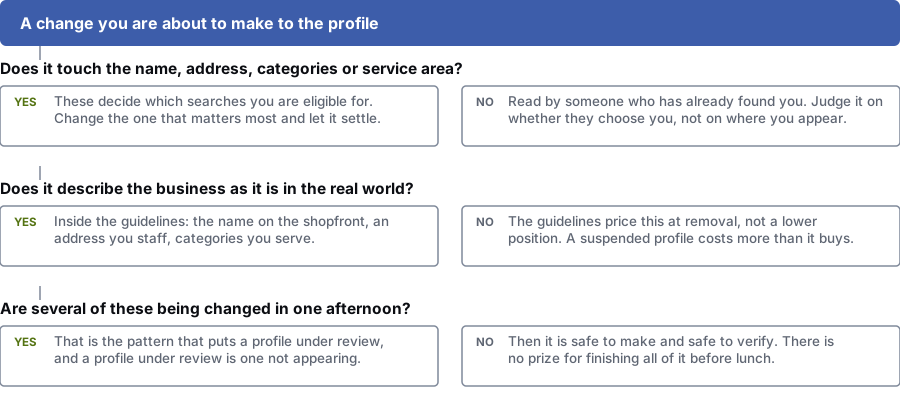
Does it touch the name, address, categories or service area?
Yes: These decide which searches you show for. Change the most important one first and let it settle.
No: Customers read this field after they find you. Judge it by whether they pick you.
Does it describe the business as it is?
Yes: You’re within the rules: your shopfront name, a staffed address, categories you serve.
No: Google can remove a profile for this. A suspension costs more than the change could win.
Are you changing several of these fields in one afternoon?
Yes: Lots of changes at once can put the profile under review. While it’s under review, it doesn’t show.
No: The change is safe and easy to check. Spread the rest over the next few weeks.
Common mistakes
Four profile changes that push you down
These mistakes come from trying hard. The profile looks more complete, but it does worse.
- Your primary category describes the company, not what customers search for.
- A firm that mostly replaces boilers picks “plumber” because that’s what the van says. The right category matches how customers search. It’s the most valuable half hour you’ll spend on your profile, and it’s usually picked in five minutes at setup.
- You’ve added every category on offer.
- Eleven categories don’t make you eleven times easier to find. You show up for jobs you’ll turn down, and you drift from the rule that categories must match what that location offers. Removing some is often a useful fix.
- Your service area covers the whole county.
- A service area tells customers where you’ll travel; it doesn’t change where you appear. Google measures distance from your location. An unrealistic area looks less credible and can count against you if Google reviews the listing.
- You changed everything on the same afternoon.
- Editing name, address, category and hours in one go is the surest way to trigger a review, and a profile under review doesn’t show. Fix the most important field first, let it settle, then do the next.
Searches and fields
Which field answers which kind of search?
Four types of local search and the part of your profile each one relies on. These are examples only. We make no claims about how often they’re searched.
Searches for a type of business
Mostly decided by your primary category and distance. Descriptions and posts make no difference here.
- plumber near me
- dentist open now
- accountant in the city centre
- best physio nearby
Searches for a specific service
Your services list and extra categories handle these. A well-written services list pays off here.
- boiler replacement quote
- invisalign consultation
- emergency locksmith 24 hours
- sports massage for sciatica
Searches for your name
They’ve already chosen you. Hours, attributes, photos and answers decide whether they turn up.
- business name opening hours
- business name phone number
- business name parking
- business name reviews
Searches made while choosing
This is about winning the customer. Attributes and answers stop them calling a competitor.
- is there parking at business name
- does business name take card
- business name wheelchair access
- how busy is business name
These are example searches from keyword research and public search data. Before we suggest anything, we check how often people search for them in your area.
Questions
Google Business Profile optimization: common questions
Which profile fields affect where I appear?
Only a few: your primary category, extra categories, services list, address or service area, and reviews. Customers read the other fields, but Google doesn’t use them to match you to a search.
Google Business Profile Help names three ranking factors: relevance, distance and prominence. Read that Help page before you pay anyone for profile work.
How many categories should I add?
Add one primary category that matches how customers search. Then add extra categories only for services you offer at that location.
Ticking everything means you show up for jobs you can’t do, and you drift from Google’s rules on describing your business accurately. Breaking those can get your profile suspended.
Do posts affect ranking?
Google has never said they do. Weekly posts done “for ranking” are a common way to burn agency hours.
Posts are a shop window: they expire, and only people already on your profile see them. Use them for anything with a date, such as an offer, an event or a new service. One monthly post with real news beats four with nothing to say.
Does putting my city or service in the business name help?
No. It breaks Google’s guidelines, which ask for the name on your signs, stationery and legal documents. You risk an edit by Google or the public, or a suspension.
Competitors doing it only shows Google enforces the rule unevenly. You can report their listing. Keep your own name clean.
Do photos help my ranking?
We know of no reliable source that says photos move your position, though Google encourages a complete profile. What photos clearly change is whether customers pick you.
Quick test: can a stranger tell from your photos what the place looks like outside and inside, what your work looks like, and who they’ll meet? Ten photos that do that beat sixty that don’t.
How often should I update my profile?
Change your category, name, address and service area only when the business changes. Changing them often makes the profile look unstable to Google.
Check your hours before every public holiday; Google’s special-hours help says to confirm them even if nothing has changed. Update photos when your premises or team change, and services when your offer changes.
References
Sources for Google business profile optimization guide
The official documents and research this page is based on. Platform rules change, so check the source before you act on a detail.
- Google Business Profile Help: Tips to improve your local ranking on Google
- Google Business Profile Help: Guidelines for representing your business on Google
- Google Business Profile Help: Manage your business category
- Google Business Profile Help: Manage your services on your Business Profile
- Google Business Profile Help: Manage your business attributes
- Google Business Profile Help: Edit your Business Profile
- Google Business Profile Help: How to set special hours
- Google Business Profile Help: Tips for business-specific photos on your Business Profile
- Google Business Profile Help: Create and manage posts on your Business Profile
- Google Business Profile Help: Manage your service areas for service-area and hybrid businesses
- Google Business Profile Help: Tips to get more reviews
- Google Business Profile Help: Fix suspended or disabled profiles
- Google Business Profile Help: Request ownership of a Business Profile
- Maps User Generated Content Policy Help: Prohibited and restricted content
- Google Analytics Help: URL builders — collect campaign data with custom URLs
Related
Keep reading on Google business profile optimization guide
Start here
Not sure which fields are costing you calls?
Send us your profile link and the searches you want to show up for. Our specialists will show you what to fix and what to leave alone.
Rather check it yourself? Try our free SEO tools