
Local search
Local SEO checklist: every step, in the right order
Published by Zubair Afzal, responsible editor
First published Updated 8 min read
Read this first
Why the order of your local SEO checklist matters
Order matters because about half the tasks only work once an earlier one is done. Work in the right order and your effort pays off.
Eight area pages written before your category is right, or reviews collected on a profile that turns out to be a duplicate, go nowhere.
So the steps are split into four sittings, each ending with something you can check. Finish one before you start the next.
The steps
The local SEO checklist in four sittings
Times assume you’ve got your logins. If not, getting access back comes first.
Half an hour: see what customers see
Check how you look from outside before you change anything. Ask two people in your area to search your main service on their own phones and screenshot the first screen. Search your business name signed out, and on Google Maps. Search your name, old name, old address and old number to find duplicate listings.
You get: Three screenshots from phones in your area, plus a list of every listing you found
One hour: set your profile basics, then leave them
Make sure your profile is verified and owned by your business, not a former supplier. Pick a primary category that matches how customers search, and only the extra categories you serve. Use your real trading name. Set an address you staff, or a service area if you visit customers. Fill in the services list. Then leave these fields alone.
You get: A profile you could explain to anyone, with no duplicate listings
Two hours: make your website clear about where you work
Create one page per real location, written about that place. Include the address, parking, team, hours, services and nearby jobs. Add LocalBusiness structured data that matches the page exactly. Make your phone number tappable on mobile. Put the address in text, not just an image. Then check Google can reach and index the page.
You get: A location page you’d be happy for a customer to read, with markup that matches it
Ten minutes a week, for good: reviews, questions and hours
Ask every customer for a review the same way, at the same point in the job. Don’t pick who you ask, and don’t offer anything in return. Reply to every review, including bad ones. If your profile still shows questions, answer within a day. Confirm special hours before every public holiday. This part never ends.
You get: A written routine for asking, so it keeps going when someone’s on holiday
Sorting the tasks
Local SEO tasks to fix once, keep doing, or skip
Read the third column first. Knowing what to stop is often worth more than adding tasks.
| Dimension | Fix once, properly | Keep doing | Not worth your time |
|---|---|---|---|
| Profile basics | Verification, ownership, name, primary and extra categories, address or service area, services list. | Nothing regular. Revisit only when the business changes. | Swapping categories to see what happens. Constant changes make the profile look unstable. |
| Accurate business details | Fix the fifteen or so third-party pages that show when you search your name and main service. | Update everywhere when your number, address or hours change. | Bulk submission to hundreds of directories nobody visits. |
| Location pages on your website | One well-written page per real location, with matching structured data. | Refresh it when your offer, team or premises change. | A page for every neighbouring town you can name. |
| Reviews | Decide when in the job you ask, and who asks. | Ask every time, reply to every review, and share bad ones with the team. | Rewards or bought reviews, which Google’s content policy bans. Or choosing who gets asked. |
| Photos | A full set: frontage, inside, team, vehicles, finished jobs. | Add new ones when something changes. | Adding location data to image files before uploading. |
| Profile posts | Nothing to set up. | Post when you’ve got something with a date on it. | An empty weekly post just to keep a schedule. |
| Links and mentions | Claim the memberships, accreditations and supplier listings you already qualify for. | Local sponsorships, partnerships and press coverage when they come up. | Paid link packages sold by volume. They break Google’s policies and put your site at risk. |
| Measurement | Add campaign tags to your profile’s website link. Set up call and form tracking. | Check enquiries by source each month. Note which searches bring them in. | Checking your position daily from your own device at your own address. |
| Structured data | LocalBusiness markup on the location page, matching what visitors see. | Update it when the page changes. | Marking up reviews, offers and services that aren’t on the page. |
What to stop
Seven local SEO tasks you can skip
These are still on most checklists because they’re easy to sell and tick. Nobody can show what they change.
- Bulk directory submission. What matters is that the sites showing for your name agree. Fifteen correct listings beat three hundred automated ones.
- Geotagging photos before upload. Platforms usually strip location data on upload. No official Google documentation treats it as a ranking input.
- Adding your city or main service to your business name. It breaks the guidelines and risks the profile.
- A map on every page of your site. It’s a heavy add-on on pages that don’t need it. One lazy-loaded map on your contact page is enough.
- Weekly profile posts with no news. Posts expire, and only people already on your profile see them.
- A page for every suburb within thirty miles. If they only differ by place name, they compete with each other and with your real location page.
- Fixing your details on dead directories that get no traffic and don’t rank. Fix the ones people and search engines still use.
When nothing changes
Made a change and seen no result?
Some changes show within days. Others build over months. Judge both after two weeks and you might quit the part that was working.
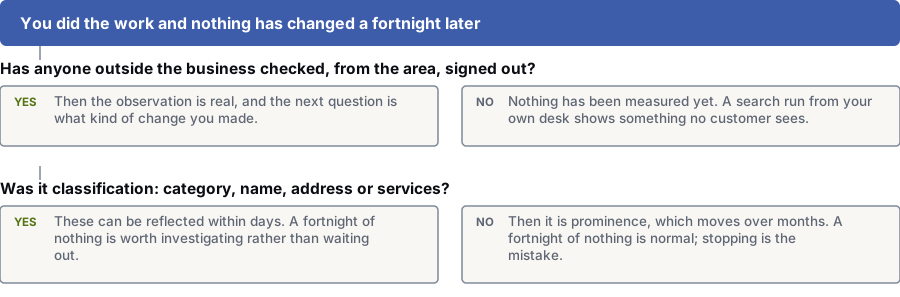
Has someone outside the business checked from your area, signed out?
Yes: Then the result is real. Next, ask what kind of change you made.
No: You haven’t measured anything yet. A search from your own desk shows what no customer sees.
Was it a profile basic: category, name, address or services?
Yes: These can show within days. Two weeks with no change is worth a look.
No: Then it’s prominence, which builds over months. Two weeks with no change is normal. Keep going.
Common mistakes
Four ways people misuse a local SEO checklist
- Tasks get ticked without being checked from outside.
- Done means someone changed a field. Checked means someone in your area saw the result on their own phone, signed out. Months can slip by in that gap.
- The list is treated as a project with an end date.
- Three quarters of the list does finish. The last quarter is a habit: reviews, questions, hours and photos. When that habit stops, it looks like a competitor slowly pulling ahead.
- Nobody decided which searches to compete for.
- A checklist has no target. If you haven’t named the four or five searches that bring enquiries, you can’t tell if anything helped. Write them down before the first sitting and judge everything against them.
- An admin limit is confused with a competitive one.
- If the list is done and you’re still low, you’re usually too far from where people search, or competitors have built prominence over years. More admin won’t fix either. Your options: compete in a market you can win, build prominence over time, or pay for ads.
Want help with local SEO?
Questions
Doing local SEO yourself: common questions
How long before local SEO changes show up?
Changes to your category, services or service area can show within days. Prominence, which Google says includes links and reviews, moves over months. Nobody can promise you a position or a date.
A fixed primary category with no change after two weeks is worth a look. A new review habit with no change after two weeks is normal.
Do I need to pay for a citation submission service?
Almost never. What matters is that your name, address and phone number match on the sites people and search engines use: the big map and review sites, your industry’s key directories, and any page that ranks for your name.
Search your business name and main service, and fix every third-party page that shows up. It’s usually under fifteen listings.
How many location pages does a single-location business need?
One. It should say where you are and what you do there. A page for every nearby town is the most common way small sites end up with near-identical pages that help nobody.
Only add a second page when you’ve got different things to say: different jobs, rules, customers or local examples. If you can’t write four paragraphs that would be wrong on the other page, don’t create it.
We visit customers instead of seeing them at our premises. What changes?
You set a service area and hide your address, as Google documents for service-area businesses. Distance is still measured from your registered location; the service area shows where you’ll travel, not where you appear.
So your website has to work harder: cover the areas you serve, jobs you’ve done there, and how you get to customers.
Can I do local SEO myself?
Yes. Most of this list is careful admin, clear writing and a steady habit.
A specialist helps with judgement calls: which category when two could fit, how many pages an area can support, why a competitor with fewer reviews ranks above you. If you’ve done the list and still aren’t showing, talk to one.
What’s the single most valuable item on the list?
Picking a primary category that matches how customers search. It decides which searches you can show for, it’s free, and it’s easy to get wrong.
A close second: ask someone who lives in the area to run your main search on their own phone. It takes a minute and can change what you believe about how visible you are.
References
Sources for local SEO checklist
The official documents and research this page is based on. Platform rules change, so check the source before you act on a detail.
- Google Business Profile Help: Tips to improve your local ranking on Google
- Google Business Profile Help: Guidelines for representing your business on Google
- Google Business Profile Help: Manage your business category
- Google Business Profile Help: Manage your service areas for service-area and hybrid businesses
- Google Business Profile Help: How to set special hours
- Google Business Profile Help: Tips to get more reviews
- Maps User Generated Content Policy Help: Prohibited and restricted content
- Google Search Central: Local business (LocalBusiness) structured data
- Google Search Central: Creating helpful, reliable, people-first content
- Google Analytics Help: URL builders — collect campaign data with custom URLs
Related
Keep reading on local SEO checklist
- what each Google Business Profile field does
- which citations to correct and which to ignore
- how to reply to reviews
- recovering a suspended Business Profile
- the five places local visibility comes from
- whether you compete in local search at all
- when your listing is missing from Maps
- getting reviews within Google’s rules
- local SEO for several branches
Start here
Done the checklist and still not showing up?
Then only a few causes are left. Tell us the searches that matter and where you’re based, and our specialists will find what’s holding you back.
Rather check it yourself? Try our free SEO tools