
SEO
Website migration SEO checklist for six types of move
Published by Zubair Afzal, responsible editor
First published Updated 8 min read
What counts as a migration
What is a website migration, and why does the type matter?
A website migration is any change to what lives at an address. The word covers at least six different projects, which is why generic checklists disappoint.
Moving to HTTPS and merging two brands both need a redirect map, but share almost nothing else: one is a settings change, the other a big content rebuild. Your type of move tells you the main risk, the checks that matter, and which tools apply.
One thing is the same for all six. Your search value is tied to your addresses, and your job is to carry it from the old ones to the new ones without losing any. Design, platform and content are separate projects running at the same time. Treat them as one and you’ll lose traffic nobody can explain.
From Google’s documentation
What Google says about site moves
Six points from Google worth pasting into your project plan.
- Keep redirects as long as possible, generally at least a year, says Google’s guide to site moves with URL changes.
- A small to medium-sized site can take a few weeks for most pages to move; larger sites take longer, depending on the number of addresses and server speed.
- Visibility may go up and down for a while. A dip is expected; a dip that doesn’t start to recover is a fault.
- The Change of Address tool is only for moves between domains or subdomains. You don’t need it for HTTP to HTTPS, www changes on the same domain, or path changes.
- The tool only works on domain-level properties, both verified under one account, used once per subdomain.
- Google treats a redirect to an unrelated page as a “soft not found”, not a move, so sending everything to the homepage does more harm than good.
Types of move
Six types of website migration and the main risk of each
Find your row first. Those checks decide how your move goes.
| Dimension | The main risk | The check that matters most | Change of Address tool |
|---|---|---|---|
| Redesign on the same addresses | Lost content and features. Nothing moved, so nobody built a map, and pages got thinner without anyone noticing. | Before launch, compare word count, internal links and structured data for each template, old against new. | Not needed. |
| New platform with new addresses | The redirect map, plus content structure changing at the same time as addresses. | Every valuable old address redirects in one hop to a page that answers the same question. | Not needed, because the domain stays the same. |
| Domain change or rebrand | Everything at once: addresses, brand recognition, existing links, and results still showing the old brand. | Both properties verified, redirects live, and a Change of Address submitted for every subdomain. | Yes. This is what the tool is for. |
| HTTP to HTTPS | Mixed content and half-updated internal links, leaving two live copies of the site. | Every internal link, canonical, sitemap entry and hard-coded file uses the secure address. | No. Google says it’s not needed. |
| Subdomain to subfolder, or the reverse | Broken analytics and reporting, and assuming a folder gains authority straight away. | Redirects, a full update of internal links, and tracking set up before the move. | Yes for a subdomain change, if it’s a domain-level property. |
| Merging two sites, or splitting one | Two pages now competing for one search, or one audience split across two thinner sites. | A decision for every duplicate pair: which stays, which redirects, and what the survivor must take on. | Only if a domain is being retired. |
Hidden migrations
Four projects that are secretly migrations
These start with no plan, no benchmark and no redirect map, because nobody said “migration”. They fail the same way.
- You tidy up the URL pattern across a whole section.
- Someone drops the dates from blog addresses, or a category level from product paths, in an afternoon. Every address in that section has changed: a migration, usually with nothing to compare against afterwards.
- You add a second language.
- A new language usually adds a prefix to your existing pages, which moves every one. It also adds hreflang tags, which only work if each version links back. That’s two changes on every address, filed as a content project.
- You move the blog onto the main domain.
- Often the right call, but rarely treated as a move. Content changes address, internal links change shape and analytics splits. If the blog held most of your external links, you’re re-pointing them all in one release.
- You remove a section without deciding what happens to its addresses.
- Dropping a product line removes pages that may have links and steady search demand. Delete them without a plan and you get “not found” pages where value used to be. Redirect to the nearest relevant page or return a planned “gone”, but decide.
The redirect map
How to decide where each old address should go
Run every address through these steps in order. Write the rules down so someone else can check them.
Is there a page that answers the same question?
Redirect to it permanently, in one hop. This covers most addresses. Judge by the visitor’s question, not the page title: a product replaced by a newer model answers the same question; a product page sent to its category doesn’t.
You get: A one-to-one match for every address with a true equivalent
Does it have value but no equivalent?
Value means external links, steady search clicks, or revenue. Redirect these to the nearest relevant page (the parent category, replacement service or follow-up article) and write down why. Never send them to the homepage.
You get: A mapping with a written reason for each address that someone else can review
Is it clutter your site created automatically?
Filter combinations, sort options, session IDs, internal search results and paginated pages after page one rarely need a rule each. Handle them with a pattern. Use the move to stop your site creating them.
You get: Pattern rules that cover all the automatically created addresses
Is the page finished for good?
Discontinued products, past events or filled jobs. Where you’re sure, return “gone” (410), not “not found” (404); it’s clearer, and Google stops retrying. First check no valuable links point to it.
You get: A list of pages to remove, checked for external links before anything is deleted
Check the map on the live site
After launch, request your most valuable addresses (by clicks, revenue and links) on the live site and check the status code, number of hops and where each lands. A rule that works on staging can clash live, and in the first hour that’s cheap to fix.
You get: A tested sample of your most valuable addresses, checked live on launch day
After launch
Why your redirects need to outlast the project
Most plans end two weeks after launch. Google asks for redirects to stay at least a year. They need to survive your next platform change too.
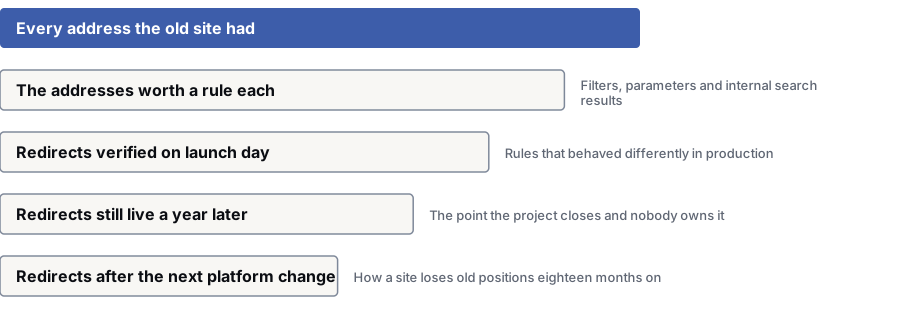
- 1Every address the old site had — Your search value is tied to these. Carry it to the new ones without losing any.
- 2Addresses worth their own rule — Pages with links, steady clicks or revenue. Auto-created addresses get a pattern rule.Filters, parameters and internal search results
- 3Redirects checked on launch day — Your most valuable addresses tested live, not on staging: status code, hops and destination.Rules that behaved differently on the live site
- 4Redirects still live a year later — Google asks for redirects to stay as long as possible, generally at least a year.The project closes and nobody owns the redirects
- 5Redirects after the next platform change — They must survive a move they weren’t built for. Keep them in version control, not a plugin.How a site loses old rankings eighteen months later
Questions
Website migration SEO: common questions
How long should redirects stay in place?
At least a year, and longer if you can. Google’s site move guide says to keep redirects as long as possible, generally at least a year.
Treat them as a permanent part of your site that must survive your next platform change. Keep them in version control, not in whatever plugin was handy on launch day.
Do we need the Change of Address tool?
Only if you’re moving between domains or subdomains. Search Console says you don’t need it for HTTP to HTTPS, for www changes on the same domain, or for path changes within one domain.
It only works on domain-level properties. Verify the old and new properties under one account and get your redirects live first. Use the tool for each subdomain.
How long does a site move take to settle?
A few weeks for most pages on a small to medium-sized site, according to Google; larger sites take longer, depending on how many addresses you have and your server speed. Google says visibility may go up and down for a while.
If clicks on your best pages haven’t started to recover within a few weeks, start looking for the cause.
The developers are handling the redirects. What’s left?
The redirect map. Developers build the rules; the hard part is deciding where each old address should point: which had value, which have links, and which have no match.
And checking: a rule that works on staging can behave differently live. Test your most valuable addresses on the live site on launch day.
We’re keeping every URL the same. Do we still need this?
Yes, but less of it. When addresses stay the same, the risk moves to your templates: content cut for a cleaner design, internal links and structured data lost, staging “noindex” settings gone live.
Tracking often breaks too. If analytics changes at the same time, you can’t tell whether anything went wrong.
Can we redirect everything to the homepage?
No. Google treats a redirect to an unrelated page as a kind of “not found”. The old page’s value is lost, and the visitor lands somewhere that doesn’t answer their question.
If there’s no matching page, redirect to the nearest relevant parent, like a category page, or let the address return “gone”. A planned 410 beats a misleading redirect.
References
Sources for website migration SEO checklist
The official documents and research this page is based on. Platform rules change, so check the source before you act on a detail.
- Google Search Central: Site moves and migrations (moving a site with URL changes)
- Google Search Central: Changing your web hosting (site moves without URL changes)
- Search Console Help: Change of Address tool
- Google Search Central: redirects and Google Search
- Google Search Central: consolidate duplicate URLs
- Google Search Central: localized versions of your pages
- Google Search Central: debugging drops in Google Search traffic
Related
Keep reading on website migration SEO checklist
Start here
Planning a website move?
Tell us what’s changing and your launch date. Our specialists will show you the main risk and what to settle before you commit to a date.
Want to see how your own site stacks up? Get my free SEO audit