
Websites
Webflow vs WordPress vs Next.js: which one suits the team that runs it
Published by Zubair Afzal, responsible editor
First published Updated 10 min read
Start here
Who each platform is built for
Most of the Webflow vs WordPress vs Next.js debate goes away once you know what each was designed to do, and who it expects to look after it.
Webflow
A visual website builder with hosting included. It suits marketing sites where a small team wants to change layouts as well as words, without booking a developer. Editing is pleasant and the platform maintains itself. It struggles with custom server logic, complex data and anything beyond a simple checkout.
WordPress
A publishing system with by far the most people who can work on it. It suits content-heavy sites, and businesses that want to replace their developer quickly and cheaply. Less of the cost goes on the build and more on upkeep: updates, plugin licences and the security work both create.
Next.js
A framework for building a site, not a finished product. You get the code and full control. That’s the right trade when the site behaves like software, with integrations, logged-in areas, large sets of generated pages or strict speed needs. It needs a developer all the time, not now and then.
Webflow, WordPress and Next.js compared side by side
This isn’t a scorecard. In every row, each platform gives up something the others keep.
| Dimension | Webflow | WordPress | Next.js |
|---|---|---|---|
| Who edits a page day to day | A marketer, unaided. Words, images and layout all change in the browser, and what you see is what goes live. | A marketer, for words and images. Layout depends on the theme and page builder chosen at build time. | A marketer, only if a CMS was set up for them. Without one, every edit is a code change and a deployment. |
| Where the money goes | A moderate build, then a predictable licence and hosting fee. Costs rise with editor seats and traffic tiers, not with upkeep. | A cheaper build and higher running costs. Licences, updates, patching, and the odd emergency when an update breaks something. | The most expensive build. Routine upkeep is light, but someone has to plan and do the framework upgrades. |
| Maintenance | Almost none. The platform updates itself, and nothing you install can break it. | Constant. Core, theme and plugin updates, plus a plugin list that grows until nobody knows what half of it does. | Occasional and technical. Package upgrades and build tools, handled by a developer. |
| Core Web Vitals out of the box | Reasonable. Clean code and a decent delivery network, though heavy visual builds and third-party embeds still slow pages down. | Depends entirely on the theme and plugins. A lean build is quick. A page builder plus a dozen plugins rarely is. | The highest ceiling, and easy to waste. Image handling and code splitting are built in, but a careless build is still slow. |
| Redirects | Built in and editable in the dashboard. Fine with hundreds of rules, awkward with thousands. | Handled by a plugin. It works well, and it’s one more thing that has to survive every update. | Set in configuration or at the edge. Version-controlled and easy to review, which is what a migration needs. |
| Structured data | Possible through custom code, and fiddly to keep in step with the content it describes. | Well served by plugins. That’s handy until two of them output conflicting markup on the same page. | Generated from the same data that builds the page, so it stays in line with what the reader sees. |
| Multiple languages and hreflang | Built-in localisation works well for a handful of languages. Larger set-ups get costly and rigid. | Mature plugins that have solved years of edge cases, and a reputation for slowing sites down. | Full control over routing and language versions. You build all of it yourself. |
| Canonical tags | Set page by page. Fine for normal cases, limited when you need one rule across a pattern of addresses. | Handled by the SEO plugin, which usually gets it right and now and then gets it wrong with confidence. | Whatever you write. Full control, and full responsibility for mistakes. |
| Hosting | Included. You don’t choose it, and you can’t move it elsewhere. | Anywhere. Managed hosts, cheap shared plans or your own servers. Quality varies hugely, and it matters. | Any capable host. Portable in principle, though some hosting features are easier to start using than to leave. |
| Lock-in | High. You can export static pages, but not the editor, forms or interactions. | Low for your data, high for habits. Content exports cleanly. Theme and plugin behaviour doesn’t come with it. | Low. It’s your code and your content, which is the main reason to choose it. |
| When it’s the wrong choice | Complex online shops, large multilingual sites, logged-in users, or anything with serious custom logic. | Teams with nobody responsible for updates, and sites where speed is a must-have for competing. | Small marketing sites with no developer. You pay for features you never use and queue for every wording change. |
What you’re deciding
Half of this choice is about people, not technology
Everyone compares the technology side. The biggest cause of regret sits on the other side: who will look after the site. Few businesses decide that on purpose.
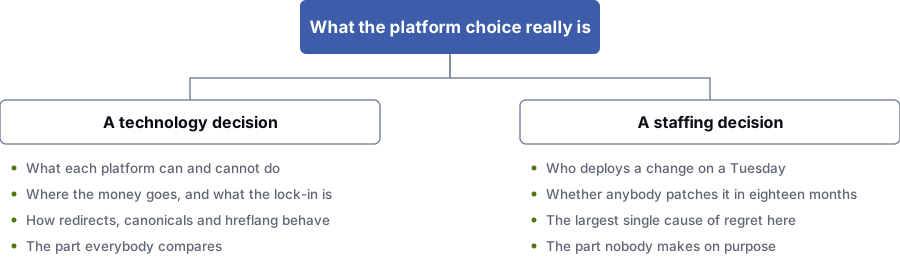
A technology decision
- What each platform can and can’t do
- Where the money goes, and how locked in you are
- How redirects, canonicals and hreflang work
- The part everyone compares
A staffing decision
- Who makes a change on an ordinary weekday
- Whether anyone patches it in eighteen months
- The biggest single cause of regret
- The part few people decide on purpose
Where it goes wrong
Four common mistakes when choosing a website platform
Platform regret rarely comes from picking the wrong technology. It usually comes from choosing the technology before settling more important questions.
- The platform is chosen before anyone decides who maintains it.
- A codebase handed to a business with no developer becomes a site nobody can change. A plugin-heavy site with no maintenance plan becomes a security incident eighteen months later. Neither is a technology failure. Both are staffing decisions nobody made on purpose.
- A pile of plugins is mistaken for a build.
- Every need gets solved by installing something. Each choice makes sense on its own. Together they give you overlapping scripts, two plugins writing the same markup, and a site nobody can fully explain. It was assembled, not built, and the assembly still has to be maintained.
- A green score in a testing tool is taken as proof the site is fast.
- Lab tools run one simulated visit on a simulated connection. Core Web Vitals are assessed from real visits on real devices, so a build can pass every synthetic test and still fail. Judge a platform on how the site performs on ordinary phones.
- Nobody prices the exit.
- The build and the hosting are quoted. The cost of leaving never is. Yet leaving is a proper project: restructuring content, deciding what happens to every old address, rebuilding templates and rewriting integrations. Ask what it involves before you commit, while the supplier still has a reason to answer carefully.
Our position
How we make a platform recommendation
What we do
- Build on all three. We recommend the one that fits your team and your needs, whatever our own preference.
- Ask who will be changing the site in eighteen months, and write the answer down before we talk about technology.
- Cost the first three years, not just the launch, and show what upkeep looks like on each option.
- Tell you when the platform you already have is fine and the problem is somewhere else.
- Hand over documents and logins, so moving to another supplier later is easy.
What we won’t do
- Recommend a rebuild when a redesign on your current platform would do the same job for less.
- Put a business with no technical staff on a platform that needs a developer for routine edits.
- Quote a platform move without a full address map and a redirect plan in the scope.
- Suggest that changing platform will lift your search rankings on its own. It won’t.
A method
Five steps to a platform decision you can explain
Work through these in order. The shortlist usually narrows to one before you compare a single feature.
Name the person who maintains it
Name a person, not the agency. Is there someone in the business who can publish a change, or will every change queue with an outside supplier? The answer rules out at least one option straight away.
You get: A named maintainer, internal or contracted, written into the brief
List what the site must do besides publish pages
Accounts, bookings, quotes, stock, gated documents, a customer portal, several languages, feeds into other systems. Mark each one as required or nice to have. A site that only publishes has a very different answer from one that also sells or takes bookings.
You get: A capability list split into required and optional
Let the person who will edit try each editor
Ask them to change a headline, swap an image and add a section on each platform, unaided. Twenty minutes of this beats any feature list. It shows the gap between “the CMS supports it” and “our marketer can do it”.
You get: A short recorded editing test on a representative page
Cost three years, not the launch
Add up licences, hosting, upkeep, security work and developer time for each option over three years. The cheapest build is often the most expensive site.
You get: A three-year total per option, upkeep included
Write down how you would leave
Where does the content live? Who holds the accounts? What exports cleanly and what doesn’t? Roughly what would a move cost in two years? Agreeing this at the start costs nothing. Finding out during a dispute costs a lot.
You get: An exit and handover note attached to the build agreement
Questions
Questions to ask before you commit to a platform
Which is the best CMS for SEO?
None of the three ranks better by default. Search engines judge the pages they receive, whatever software produced them. A well-built site on any of them can compete; a badly built one won’t.
What differs is control and defaults. Next.js gives you full control and full responsibility. WordPress gives you control through plugins, which usually works and now and then surprises you. Webflow gives you good defaults, with a lower ceiling once your needs get unusual.
Is WordPress bad for performance?
No, WordPress itself isn’t slow. The slow parts are a page builder stacking layout wrappers, a dozen plugins each loading their own scripts on every page, and a cheap shared host that takes a while to respond.
A careful WordPress build on decent hosting passes the thresholds easily. The trouble is that nothing stops a careless one, and years of additions tend to make it careless.
Can you do proper technical SEO on Webflow?
Yes, for most business sites. You can edit titles, descriptions, canonical tags, redirects, sitemaps and robots settings, and the code it produces is clean.
The limits show up at scale and at the edges. Large redirect lists get hard to manage. Structured data has to go in through custom code and be kept in step with the content by hand. Sites in more than a few languages get expensive and rigid.
Do I need Next.js?
Only if your site works more like a product than a brochure. That means custom integrations, logged-in areas, complex data, thousands of generated pages, or speed as a competitive must-have.
If none of those apply and you don’t have a developer, it’s the wrong choice. You’ll pay for features you never use and wait on someone for every text change.
How hard is it to move platforms later?
Harder than most sales conversations suggest. The content usually exports. The content structure, templates, forms, integrations and URL structure don’t, and that’s where the build budget went.
The biggest risk in any move is URL mapping. Every old address needs a decision: keep it, redirect it or remove it on purpose. Getting that wrong is a common cause of traffic collapsing after a relaunch. Google’s site-move guidance is built around this mapping.
What happens if the person who built it disappears?
Ask this before you sign. On WordPress you can hire a replacement quickly and cheaply, because so many people know it. On Next.js you need a developer who can read someone else’s code, a smaller and more expensive pool.
On Webflow the site keeps running, because hosting and updates are the platform’s job. That’s a big plus for a small team with no technical staff; weigh it against the ceiling you accept in return.
References
Sources for Webflow vs WordPress
The official documents and research this page is based on. Platform rules change, so check the source before you act on a detail.
- web.dev: Web Vitals
- Chrome for Developers: Chrome UX Report (CrUX) documentation
- Google Search Central: Introduction to structured data markup
- Google Search Central: Tell Google about localized versions of your page
- Google Search Central: Site moves with URL changes
- Google Search Central: Redirects and Google Search
- Google Search Central: What’s URL canonicalization
Start here
Not sure which of the three fits your business?
Tell us who maintains the site, what it has to do besides publish pages, and what you have now. We’ll say which option fits your situation, including when the best answer is to keep what you have.
Rather check it yourself? Try our free SEO tools