
Cost and budget
How much does a website cost? Why quotes vary and how to read yours
Published by Zubair Afzal, responsible editor
First published Updated 7 min read
Why prices differ
Why did three quotes come back at three different prices?
Because each supplier guessed differently. Every quote is a bet on how much of your brief’s vagueness will turn out to be expensive, and four gaps explain most of the difference.
- Nobody agreed who writes the content.
- One supplier assumed you’d supply finished copy for every page; another priced a writer, interviews and two rounds of changes. That one assumption can be a large part of the project, invisible in a headline price.
- Suppliers read "custom design" differently.
- Adapting a theme to your brand and designing a system from scratch are different jobs with very different day counts. A proposal can fairly call either one "custom design", so the phrase tells you almost nothing.
- One quote left out migration and redirects.
- Moving existing content, pointing old URLs to new ones and protecting your search rankings is necessary on any rebuild. If a quote leaves it out, it comes back as a change request, or gets skipped and costs you traffic.
- Nobody said how many revision rounds or approvers.
- A site signed off by one decision-maker and one signed off by a committee of eight are different projects. When nobody states the approval rounds, the most optimistic supplier looks cheapest.
The variables
What drives the cost of a website? Ten things
Check your own project against these. Most of the gap between a modest build and an expensive one comes from the first four.
- Number of unique templates and components, far more than page count. Each unique layout has to be designed, built, made to work on mobile, tested and documented.
- How much design is new. Setting up an existing theme, adapting a design system and creating one from nothing are three different jobs with very different effort.
- Content. Who writes, who takes photos, who supplies product data, and how many approval rounds sit between draft and publishing.
- Integrations. Every connected system (CRM, payments, booking, ERP, product feeds, marketing automation) adds planning, building, error handling and testing, and behaves worse than its documentation suggests.
- Ecommerce complexity. Catalogue size, product variants, pricing rules, tax and shipping logic, and how much of it’s custom-built.
- Migration. Moving existing content, mapping redirects and protecting search rankings. Essential when you change platform, and often missing from quotes.
- Accessibility and compliance. Meeting a recognised standard such as the W3C's WCAG 2.2 takes design decisions, careful building and testing. A plugin won’t do it.
- Speed targets. Passing Google's Core Web Vitals thresholds on mobile limits your images, fonts, scripts and third-party tags, and working within those limits takes time.
- Languages and regions. Each extra language or region adds content, testing and technical set-up.
- Approvals and sign-off. Approval rounds, legal review and brand sign-off cost money, even though they produce nothing you can see.
Template, adapted design or fully custom: which do you need?
Proposals often use the same words for all three, so check which one you’re being quoted.
| Dimension | Template build | Adapted design system | Fully custom build |
|---|---|---|---|
| What you get | An existing theme set up with your brand, content and structure. | An existing component library restyled and extended for you. | Design and front end built from scratch around your brand and needs. |
| Where the effort goes | Content, set-up and working within the theme's limits. | Restyling, a handful of custom components, and integrations. | Research, creating the design system, building, testing and documentation. |
| Time to launch | Shortest. | Moderate. | Longest, and most affected by slow approvals. |
| Right when | Speed matters most, your needs are standard, and your brand doesn’t compete on looks. | You want a distinctive brand without building everything from scratch, and most needs are standard. | The site must do something specific, or the brand experience gives you a real edge over competitors. |
| Where it goes wrong | Fighting the theme on every page once you outgrow it. | Scope drifting into custom without the budget growing to match. | Cost and timeline growing because of indecision more than complexity. |
| Long-term cost | Cheap to build, can be expensive to move away from. | Moderate, and usually the best value over several years. | Expensive to build, cheapest to extend if the system was built well. |
Two costs, one website
Build costs and running costs of a website
A website keeps costing money after launch, whether or not you planned for it. Most quotes only show the first of these two columns.
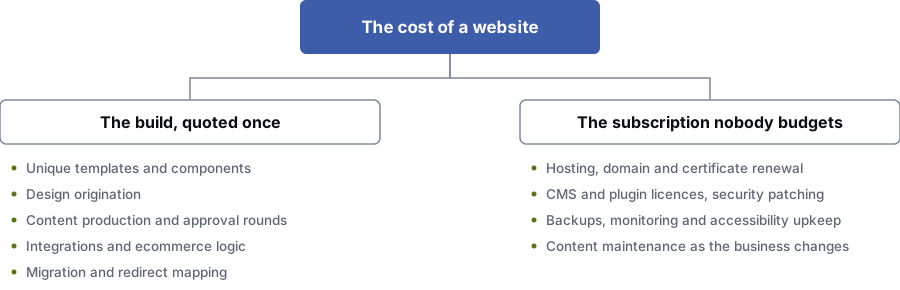
The build, quoted once
- Unique templates and components
- How much design is new
- Content and approval rounds
- Integrations and ecommerce logic
- Migration and redirect mapping
Running costs, often unbudgeted
- Hosting, domain and certificate renewal
- CMS and plugin licences, security updates
- Backups, monitoring and accessibility upkeep
- Content updates as the business changes
Left off the quote
What does a website cost after launch?
More than most people plan for. Budget for year two before you sign off year one.
The running costs are dull, and you can’t skip them: hosting, domain and certificate renewal, CMS and plugin licences, security updates, backups, monitoring, accessibility upkeep and keeping analytics working.
Then there’s content. Services change, prices change and staff leave, and your best example project is now three years old. Keeping content current is what makes a site pay for itself over five years.
When you compare quotes, ask each supplier what the first twelve months after launch cost and what that covers. The answers vary as much as the build prices do.
Practical
Want quotes you can compare? Do these three things
Price by page template
List the page types you need, such as home, service, location, article, contact, product and checkout, and ask for a price for that set. Every supplier then prices the same thing, and you can see where one has included more.
Name who writes each page
Before you ask for quotes, write down who produces the words and images for each page. It takes about an hour and prevents the most common overrun in website projects.
Ask what’s left out
What a quote leaves out tells you more than what it includes. The usual gaps are migration, redirects, content, photos, third-party licences, training, support after launch and accessibility testing. A supplier who lists them is easier to trust than one who gives a single number.
Questions
Website cost: common questions
Why do website quotes vary so much for the same brief?
Because most briefs are vaguer than they feel. Each supplier prices its own guesses about content, revisions, integrations, migration, testing and support after launch, and those guesses differ enormously.
The cheapest quote usually guessed the least, which is rarely dishonest. Pin down the vague parts before you ask for prices.
Is a template site ever the right choice?
Often, yes. If your brand doesn’t stand out on looks, your content needs are modest and you need to launch quickly, a well-chosen template built properly will serve you better than a custom build you can’t afford to finish.
It stops being right when your site needs to do something specific, such as an unusual booking flow, a complex catalogue or a distinctive brand experience, or once you’ve outgrown the theme and fight it on every page.
What is the biggest hidden cost in a website project?
Content: words, photos, product data and the approvals around them. Each side often assumes the other is handling it, and the gap shows up after the design is signed off, when the timeline is already set.
Agree in writing who writes each page, who supplies images, and how many rounds of approval there are. That one conversation prevents most website overruns.
Does page count determine the price?
Much less than people expect. The number of unique templates and components drives the price, because each one has to be designed, built, made to work on mobile, tested and documented.
A large site built from a good set of templates can cost less than a small site where every page is one-off. When comparing quotes, ask how many unique templates are included.
What should I budget for after launch?
Hosting, domain renewal, CMS and plugin licences, security updates, backups, monitoring, accessibility upkeep and content updates. You can’t skip any of these, and they all come back every year.
Treat a website as a subscription. Far more sites fail because nobody paid for their upkeep than because they were badly built.
How do I make quotes comparable?
Write a brief that covers what suppliers would otherwise guess: the number of unique templates, who produces content, which systems must connect, how many revision rounds, whether migration and redirects are included, and what support after launch means.
Then ask every supplier to price that same brief. Any gaps left come down to approach and seniority, which are useful to compare.
References
Sources for how much does a website cost
The official documents and research this page is based on. Platform rules change, so check the source before you act on a detail.
Related
Keep reading on how much does a website cost
Start here
Want a second opinion on a website quote?
Send it over. Our specialists will point out what looks missing and which assumptions are likely to turn into change requests later.
Rather check it yourself? Try our free SEO tools