
Free tool · no sign-up
Website launch SEO checklist: 40 checks for before and after go-live
A free website launch SEO checklist: forty checks to keep your search traffic through a redesign, platform move or domain change. Your ticks stay in your browser.
Website Launch SEO Checklist
Your progress
0 of 40 checks complete across 8 stages.
Your ticks are saved in this browser only. Nothing is uploaded, and clearing site data clears them.
Before you touch anything: benchmarking
A launch that loses traffic is only diagnosable against a record of what you had. Capture these while the old site is still live.
0 of 5 done
Why: You cannot verify a redirect map later against a list of old URLs you never saved.
Why: Sitewide totals hide the pattern; a launch problem almost always shows up on specific templates first.
Why: Search Console only retains 16 months, and the "why excluded" reasons are the fastest post-launch comparison you have.
Why: Rewriting metadata during a redesign is one of the most common causes of unexplained ranking loss.
Why: Content gets cut for design reasons and nobody notices until the rankings that depended on it are gone.
Staging hygiene
Almost every catastrophic launch is caused by a staging setting that travelled to production, or a production setting that never arrived.
0 of 5 done
Why: A robots.txt disallow does not prevent a URL being indexed if something links to it; a password does.
Why: An x-robots-tag left in a shared config is the single most damaging launch mistake, and it is invisible in page source.
Why: One staging canonical on a template can deindex every page that uses it.
Why: Every hop through a redirect is wasted crawl budget and a slower page for the person clicking.
Why: A dummy contact number that reaches nobody costs more in a week than the launch did.
Redirects
If URLs are changing, the redirect map is the launch. Build it as data you can test, not as a list someone works through by hand on the night.
0 of 5 done
Why: Bulk redirects to an irrelevant page are treated as soft 404s and pass nothing on.
Why: A temporary redirect tells search engines to keep the old URL, which is the opposite of what a migration needs.
Why: Chains accumulate across successive migrations and eventually stop being followed.
Why: Real inbound links and bookmarks use the messy variants, and those are the ones that 404 in week one.
Why: This is the only step that proves the redirect map works rather than assuming it does.
Indexing and robots
Getting these wrong does not degrade performance gradually. It removes the site from search.
0 of 5 done
Why: It is a two-character difference between a normal launch and a site that disappears within days.
Why: Blocked assets stop the page being rendered as a visitor sees it, which distorts how it is assessed.
Why: Cross-domain or protocol-mismatched canonicals are the most common cause of "duplicate, Google chose a different canonical".
Why: Four accessible versions of the homepage split every signal the old site earned.
Why: A sitemap full of redirects and noindexed URLs slows discovery and hides real coverage problems.
Analytics and tracking
Measurement is what turns a launch from a leap of faith into something you can respond to. It has to be right before traffic arrives, not after.
0 of 5 done
Why: Weeks of data in the wrong property cannot be moved into the right one afterwards.
Why: Single-page submissions silently stop being counted when the form component is rebuilt.
Why: Broken links between platforms show up as missing conversions and lead to the wrong campaign being paused.
Why: A consent change and a site launch on the same day makes any drop impossible to attribute.
Why: Six months later nobody remembers whether the dip started before or after launch.
On-page and content
The redesign is where content quietly gets lost. This group is about making sure it did not.
0 of 5 done
Why: Design systems often turn the logo into an H1 across the whole site.
Why: Duplicate titles across a template are the fastest way to make a large site look thin.
Why: A page that ranked on 900 words rarely holds the position on 200.
Why: A link that only exists as a click handler is not a link anything can follow.
Why: Markup describing content that is not on the page is a policy problem, not just an invalid one.
Performance and Core Web Vitals
Measure on a mid-range phone on a throttled connection. A new site is almost always faster on the machine that built it.
0 of 5 done
Why: A lazy-loaded hero image is the most common self-inflicted LCP problem.
Why: Layout shift is judged on the real visit, and late-loading media is the usual cause.
Why: Tag managers accumulate scripts nobody has owned for years, and each one competes with your content.
Why: Shipping a 3000px image into a 600px slot wastes most of the mobile page weight.
Why: Launch day is the worst possible time to discover the origin is serving everything uncached.
The first eight weeks
Most migration damage is fixable if you find it quickly. Nearly all of it is permanent if you find it in the next quarterly report.
0 of 5 done
Why: Errors found on day one cost an afternoon; the same errors found in month three cost rankings.
Why: Coverage reports lag by days, so the first week of data is not the verdict.
Why: Logs show what crawlers actually did, which is often not what the sitemap asked for.
Why: Ranking fluctuation after a migration is normal for weeks; a sustained drop at week eight is not.
Why: Redirects removed after a few months break the external links that were the point of keeping them.
What this tool does and doesn’t do
- Covers the search and tracking work around launching or replatforming a website, from recording your old site’s numbers to the first eight weeks after.
- Keeps your ticks in this browser only. Nothing is uploaded and you don’t need an account. Clearing your site data clears them.
- Doesn’t check your site for you. It can’t tell you whether a check passes. You or your developer need to confirm each one.
- Doesn’t cover design checks, accessibility testing, legal or privacy review, or the content plan behind the redesign.
- Doesn’t replace a full migration plan for a large or multi-country site, where URL mapping, hreflang and staged rollouts each need their own process.
The right order
Website launch steps in the right order
Site moves go wrong more often from work done in the wrong order than from work left undone.
Record what you have before it disappears
Crawl the live site, export your analytics and Search Console data, and save the titles, descriptions and page text of anything that brings in traffic. This is the only step with a hard deadline tied to the old site.
You get: A crawl export, a titles and descriptions export, and your analytics starting numbers
Map the URLs while the new structure can still change
Build the redirect map as a spreadsheet with old URL, new URL and status as soon as the new structure is agreed. Wait until the build is done and you’ll find pages with nowhere sensible to go when it’s too late to add them.
You get: A one-to-one redirect map, saved with version history
Set up the staging site properly
Put a password on it, and make sure every setting that keeps staging out of search is removed on the live site. Here, one missed line can wreck everything.
You get: A written list of the differences between staging and live settings
Check on launch day, not the morning after
Check the live site’s response headers and robots.txt, submit the new sitemap, test twenty redirects by hand and make sure conversion tracking works. An hour here is the cheapest hour in the project.
You get: A signed-off set of launch-day checks
Watch for eight weeks, then judge it
Crawl the site within 24 hours, then compare against your old numbers at two, four and eight weeks. Don’t change things in week one: you’d be reacting to normal movement while Google recrawls, and couldn’t tell which change did what.
You get: A weekly monitoring routine with a set end date
The usual causes
How a good redesign can lose a year of search traffic
- The noindex setting came with it.
- The staging site is kept out of search by a server setting. If the live site copies it, the whole site tells search engines to remove it, invisibly to anyone reading the page code. The site can all but vanish from search within a week.
- Nobody wrote down the old URLs.
- Once the old site is switched off, the list of what existed is gone unless someone exported it. Analytics shows pages that had traffic, not pages that had links, and pages with links but little traffic are often the most valuable.
- The text got shorter because the design looked better that way.
- Design reviews favour pages with little text. A page that ranked for its useful depth rarely keeps its position once cut to two paragraphs and a photo, and nobody links the drop to what was a design decision.
- The new site is slower on a phone than the old one.
- Modern build tools make it easy to ship a lot of JavaScript, and everyone reviews the site on a fast desktop connection. The slowdown only shows in real-user data weeks later, competing with a dozen other post-launch jobs.
After a drop
Four questions that explain most traffic drops after a launch
People tend to blame whatever changed most visibly. Search engines have no opinion about your colour scheme. Work down these questions instead. The causes are mechanical, not about looks.
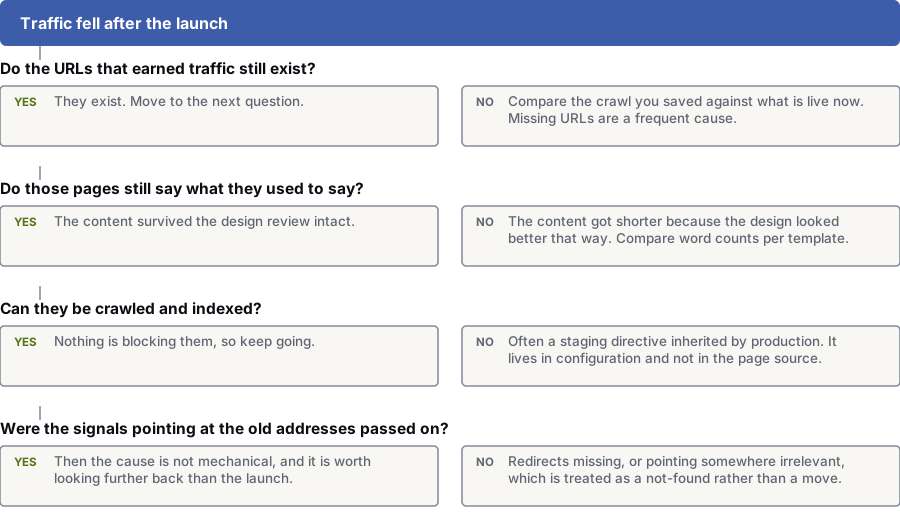
Do the URLs that brought in traffic still exist?
Yes: They exist. Move on to the next question.
No: Compare the crawl you saved with what’s live now. Missing URLs are a common cause.
Do those pages still say what they used to?
Yes: The text survived the design review intact.
No: The text was cut to make the design look better. Compare word counts for each page type.
Can they be crawled and indexed?
Yes: Nothing is blocking them, so keep going.
No: Often a staging setting copied to the live site. It sits in the settings, not the page code.
Was the value pointing at the old addresses passed on?
Yes: Then the cause isn’t mechanical, and it’s worth looking back before the launch.
No: Redirects are missing, or point somewhere irrelevant, which Google treats as page-not-found.
Another way to look at it
The design is almost never why traffic drops after a launch
The most visible change is rarely the cause. The pages that lose traffic usually aren’t the ones that changed most in looks.
What changed underneath is what counts: which URLs exist, what they say, whether they can be crawled and whether the value pointing at the old ones was passed on. The checks above answer all four.
That’s good news: there’s a set list of things to check, most give a clear yes or no, and the ones that fail can usually be fixed in days, with no months-long rebuild.
Know which one you’re doing
Which carries more risk: a redesign, a new platform or a new domain?
The checklist is the same for all three. How much of it matters depends on which one you’re doing.
| Dimension | Redesign on the same URLs | New platform with new URLs | Domain change |
|---|---|---|---|
| Redirect work | Very little. Confirm nothing moved | The biggest single task in the project | The whole site, plus telling Google about the change of address |
| What usually breaks | Titles reset, text cut, slower site | Unmapped URLs, redirect chains, duplicate canonical tags | All of the above, plus links and listings pointing at the old domain |
| Usual level of risk | Low, and mostly self-inflicted | Moderate to high | High, and slowest to recover |
| Time to settle | Two to four weeks | Four to eight weeks | Eight weeks or more on a large site |
| The check that matters most | Page text and titles match the old pages | Every redirect tested one by one after launch | Response headers and canonical tags checked on the new domain |
If you’d rather not do this yourself
How we run a website launch when it’s our responsibility
What we do
- Build the redirect map as a tracked spreadsheet, and test it by re-crawling the saved list of old URLs after launch
- Export and save the old crawl, titles and analytics numbers before anything is switched off
- Check the response headers on the live site on launch day, as well as the page code
- Compare the new pages with the saved old ones and flag any text that was dropped
- Set a monitoring period with agreed check dates, so nobody reacts to normal week-one movement
What we will not do
- Sign off a launch where the redirect map hasn’t been tested against the real old URLs
- Send a batch of retired pages to the homepage to save mapping time
- Tell you a drop is normal without showing you the crawl and index data behind that view
- Promise a recovery timeline, because how fast Google recrawls depends on things nobody controls
- Keep a launch date when a check that could remove the site from search hasn’t been done
Questions
Questions to ask before and after a website launch
We are keeping the same URLs. Do we still need most of this?
Yes, though the redirect section gets short. Redesigns that keep the same URLs still lose traffic, usually through titles reset by the new CMS, page text cut for design reasons, links rebuilt as buttons and a heavier, slower site.
The sections on recording old numbers, staging, page content and monitoring all apply as written. Treat the redirect group as a five-minute check that nothing moved.
How long after a launch should traffic take to recover?
There’s no fixed timeline. Google’s own guidance on site moves says most pages on a small or medium site can take a few weeks to move, and larger sites longer, because recrawling every URL takes time. As a rough guide, expect movement for the first few weeks and judge the result at about week eight.
A drop still getting worse at week eight isn’t normal fluctuation. Stop waiting and find the cause, starting with the redirect map and the indexing report before content.
What is the single most damaging launch mistake?
A noindex setting carried over from staging to the live site. It’s usually set in the server settings, not the page code, so viewing the page won’t reveal it.
It can remove a site from search results within days, and getting back takes far longer. Checking the live site’s response headers as well as the page code takes five minutes, so do it on launch day.
Can we redirect all our old URLs to the new homepage?
You can, but it’s close to the worst option. Google tends to treat a redirect to a page that isn’t a fair match as a "soft 404", so the old URL passes on nothing and the visitor has to start searching again.
The standard is to redirect each old page to its closest match. Where there’s no match, a relevant category page is a fair second choice. A deliberate 410 (page gone) is better than a misleading redirect.
Does my progress on this checklist get saved anywhere?
Only in your own browser. There’s no account or server behind it, and your ticks are never sent to us, so they won’t follow you to another device and clearing your site data removes them.
If your browser blocks saving, the checklist still works but won’t remember your ticks after a refresh, and it tells you so.
References
Sources for website launch SEO checklist
The official documents and research this page is based on. Platform rules change, so check the source before you act on a detail.
Last updated · Published by Zubair Afzal, responsible editor
Related
More free tools and guides
- redesigns and replatforms we runWhere this list stops being your job and becomes ours.
- working out which relaunch risks you carryStart there if you’re not sure how risky your launch is.
- the site migration SEO checklist, by type of moveFor domain changes, new platforms and new URL structures.
- the website redesign checklist for before work starts
- the technical side a site move depends on
- performance and Core Web VitalsA new site is almost always fast on the computer that built it.
- build a tagged campaign link
- recovering traffic that has already gone
Start here
Launching soon, or already launched and watching traffic fall?
Before a launch, we can review your redirect map and staging settings. After one, we work through the four questions above to find the cause.
Your BOOSTD score improves within 90 days, or your next month is free. After 6 months, more traffic or leads, or we keep working free (up to 6 free months in any 12 months). Read our guarantee