
Free tool · no sign-up
UTM builder: tag campaign links so results land in the right report
Build clean, tagged campaign links in your browser with this free UTM builder. It keeps existing query strings, removes duplicate tags and keeps casing consistent.
UTM Campaign URL Builder
The page you want people to land on. Paste it exactly as it appears in the browser.
Where the click comes from: google, newsletter, linkedin, partner-site.
The kind of traffic: email, cpc, social, referral, affiliate, qr.
The specific push this link belongs to: spring-service-plan, q3-webinar.
Optional. The keyword, for manually tagged paid search.
Optional. Which creative or link position, so two links in one email stay separable.
GA4 does not normalise these values. Facebook, facebook and FaceBook arrive as three separate sources and split one campaign across three rows of your report. Consistent lower case is the cheapest way to stop that happening. Turn this off only if you have a naming convention that deliberately uses capitals.
Your tagged URL
Everything on this page happens in your browser. The URL is never sent to us, logged, or stored.
What this tool does and doesn’t do
- Adds utm_source, utm_medium, utm_campaign, utm_term and utm_content to your web address, formatted the way browsers expect.
- Keeps any query string already on your address, and replaces an existing utm_ tag so you don’t end up with a second copy.
- Runs entirely in your browser. Nothing you type is sent to us, logged or stored anywhere.
- Doesn’t shorten links, make QR codes or keep a history of what you’ve built.
- Doesn’t check that the page exists, loads properly or isn’t itself a redirect. Open the finished link before you send it.
- Doesn’t connect to your analytics, so it can’t tell you whether a source or campaign name is already in use.
Why tag your links
Why untagged links show up as "direct" traffic
Every analytics account has a big, unexplained chunk of direct traffic. Some is people typing your address. Most is a newsletter link sent without tags, a QR code on a leaflet, a link pasted into a group chat, or a PDF opened three weeks later.
UTM parameters fill that gap for the links you send out. They’re five optional bits of text added to the end of a web address, which your analytics tool reads to file the visit under the campaign you named. The value comes from doing it the same way every time.
So your naming rules matter more than the tool. A builder stops you mistyping an ampersand; naming rules stop four colleagues describing the same email campaign four different ways.
What goes wrong
Four UTM tagging mistakes that make your reports wrong
A broken link gets noticed straight away. The costly mistakes are links that work but give you the wrong numbers.
- One campaign shows up as four.
- In any team bigger than one, capitals and spellings drift. Facebook and facebook are two sources; spring_sale and spring-sale are two campaigns. Each version looks smaller than the whole, and none compares with last quarter.
- The tagged link broke the page.
- This happens when tags are added with a question mark to an address that already has one, creating two query strings the server can’t read, or when a value with a space or ampersand isn’t encoded. Building the link properly avoids both.
- Links between your own pages are resetting the source.
- Someone tags the link from the homepage to the offers page to count clicks. From then on, every visitor who clicks it is credited to that internal campaign, and the organic search visit that led to the sale vanishes from the report.
- Two links in the same email look identical in reports.
- Without utm_content, the header button and the footer text link report the same way, so you know the email worked but not which part. One extra field fixes that.
Reference
What each UTM parameter is for
Source and medium cause most confusion. Remember the question each answers, and the choice usually becomes obvious.
| Dimension | The question it answers | A good value | The common mistake |
|---|---|---|---|
| utm_source | Which exact place did this click come from? | newsletter, linkedin, partner-blog, yelp | Putting a channel name like "social" here, when it belongs in medium |
| utm_medium | What type of traffic does that place send? | email, cpc, social, referral, affiliate, qr | Making up a new medium for each campaign, which breaks channel grouping |
| utm_campaign | Which campaign does this link belong to? | spring-service-plan, q3-webinar, black-friday-2026 | Naming it after the asset instead of the campaign, so nothing adds up |
| utm_term | Which keyword triggered this, for paid search you tag by hand? | emergency plumber | Filling it in on channels where it means nothing, which adds clutter |
| utm_content | Which ad, link or position within the same send? | header-button, footer-link, variant-b | Leaving it blank, then being unable to tell two links in one email apart |
The part that lasts
UTM naming rules your whole team can follow
Decide these once and write them down where the whole team can see them.
- Everything in lower case, always, including brand names
- Hyphens between words, never spaces or underscores. Spaces have to be encoded, and underscores are harder to read
- A short, fixed list of allowed mediums: email, cpc, paid-social, organic-social, referral, affiliate, qr, display. Add a new one only for a good reason
- Campaign names written as theme then date, so spring-service-plan-2026 sorts and groups neatly a year later
- utm_source is always the platform or publication, never the channel type
- utm_content is a must whenever one send has more than one link to the same page
- No UTM tags on any link between pages on your own website, ever
- Keep every link you build somewhere shared, even a spreadsheet, so nobody tags the same campaign two ways
- Once a quarter, check your traffic report for near-duplicate values, and fix the rules as well as the data
What the numbers miss
What UTM tags can track, and what they miss
Tags cover far less of your marketing than a campaign report suggests. Knowing the gap stops your team trusting the half it can see too much.
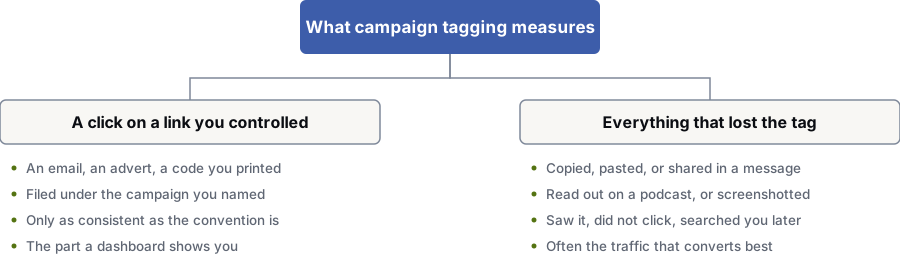
A click on a link you sent out
- An email, an ad, a code you printed
- Filed under the campaign you named
- Only as consistent as your naming rules
- The part your dashboard shows you
Everything that lost the tag
- Copied, pasted, or shared in a message
- Read out on a podcast, or screenshotted
- Seen, not clicked, then searched for later
- Often the traffic that converts best
The limits
What UTM tracking can never tell you
Tags measure a click on a link you sent out, and nothing else.
Links that get copied and pasted lose their tags. A recommendation in a private message, a link read out on a podcast or a screenshot in a group chat all show up as direct traffic, or not at all, and that is often the traffic that converts best. Anyone who sees the campaign, doesn’t click and searches for your brand two days later counts as organic search, with no credit to the campaign.
Privacy features in email apps, browsers that strip tracking tags and cookie consent choices in Europe all cut what reaches you. None of this makes tagging pointless. Treat it as a minimum, not a total: a reliable count of traffic you can prove, beneath a larger amount of demand you created but can’t list.
Questions
Common questions about UTM tags and campaign links
What is the difference between utm_source and utm_medium?
Source is the exact place the click came from, such as google, linkedin, mailchimp or a partner site’s name. Medium is the type of traffic that place sends, such as cpc, email, social, referral or affiliate.
A quick test: swap the source for a rival of the same kind, and the medium should stay the same. A click from LinkedIn and a click from X are different sources with the same medium.
Does casing matter in UTM parameters?
Yes, in your reports. Google Analytics 4 doesn’t merge upper and lower case, so Facebook, facebook and FaceBook are stored as three sources and your campaign shows as three smaller rows.
Most teams settle on lower case everywhere. The builder above uses lower case by default, and you can switch it off if your naming rules use capitals on purpose.
Should I add UTM parameters to links between pages on my own site?
No. A tagged link between your own pages starts a new campaign mid-visit, moving the credit for anything that happens next away from whatever first brought the person to your site.
To see which banner or promotion on your site works, track the click as an event instead, and leave your traffic source data alone.
Do I need UTM tags on my Google Ads links?
Usually not for source, medium and campaign. Google Ads auto-tagging adds a gclid that sends campaign details to Analytics more accurately than tagging by hand. Manual tags can override it if they’re set up to.
Manual tags are still worth using for platforms with no auto-tagging, for printed QR codes, for email, and whenever you need more detail than the platform passes on.
Is anything I paste into this tool sent to your servers?
No. The link is built in your browser with its standard URL tools. Your web address and tag values are never sent, logged or saved.
If you’ve accepted analytics cookies, the page records that a tool was used, as it records a page view. That event holds the tool’s name only, not your link, your tags or anything you typed. Decline analytics and even that doesn’t happen.
Will tagging a link change how the page ranks?
No. UTM tags are for measuring and don’t affect rankings. One side effect is worth knowing: search engines can crawl a tagged URL and treat it as a separate address.
That’s what canonical tags are for. Point the page’s canonical tag to its clean URL and tagged links won’t cause indexing problems.
References
Sources for UTM builder
The official documents and research this page is based on. Platform rules change, so check the source before you act on a detail.
Last updated · Published by Zubair Afzal, responsible editor
Start here
If the numbers in your reports don’t agree
Tagging is the easy half of tracking. The hard half is getting your ad platform, analytics and CRM to count the same lead once. If yours don’t agree, talk to us.
Your BOOSTD score improves within 90 days, or your next month is free. After 6 months, more traffic or leads, or we keep working free (up to 6 free months in any 12 months). Read our guarantee