
Free tool · no sign-up
SERP preview tool: see where your title and description get cut off
Paste your title tag and meta description into this SERP preview tool to see where each gets cut on desktop and mobile. Search results cut by pixel width, not character count.
Title & Meta Description Preview
0 characters
Title on desktop: Nothing to measure yet
Title on mobile: Nothing to measure yet
0 characters
Description on desktop: Nothing to measure yet
Description on mobile: Nothing to measure yet
Only used to draw the breadcrumb line above the title. The page is never fetched.
This is a guide, not a guarantee. Search engines rewrite title links and generate their own snippets whenever they judge that another wording matches the query better — Google documents this behaviour openly, and it happens to a large share of pages. Treat what you see here as the best version of what you control, not a preview of what will be displayed.
example.com › services › page
Your title tag will appear here
Your meta description will appear here.
Both fields fit within the usual limit at this size.
example.com › services › page
Your title tag will appear here
Your meta description will appear here.
Both fields fit within the usual limit at this size.
Your browser did not make text measurement available, so these estimates fall back to character counts. They are more conservative and less accurate than the width method.
What this tool does and doesn’t do
- Estimates how many pixels wide your title tag and meta description are, and shows where each would be cut.
- Shows a desktop and a mobile preview side by side, using a font and width close to a typical search result.
- Runs entirely in your browser. It doesn’t fetch, crawl or load your page. It only measures the text you paste in.
- Doesn’t predict what will be shown. Search engines rewrite titles and write their own snippets to match each search.
- Doesn’t score, grade or rank your text, or check keywords, duplicates or whether the page matches what people want.
- Doesn’t spot another page on your site using the same title, which is a separate and more common problem.
Titles aren’t cut off at 60 characters. They’re cut off when they run out of room, and every letter is a different width.
That sounds fussy until you compare two titles of about the same length. "Will Willow Windows Wow?" and "little lily lillian lit" have almost the same number of characters. In the font search results use, the first is roughly half as wide again as the second.
That’s why a title that passed a character check still gets cut, and another that failed fits perfectly. The character rule was only a rough guide to the real limit, which is easy to measure directly.
What you control
Your title tag versus what Google shows in search results
A preview shows the version you wrote. The search results page may build its listing from somewhere else entirely, and it decides for each search, not once per page.
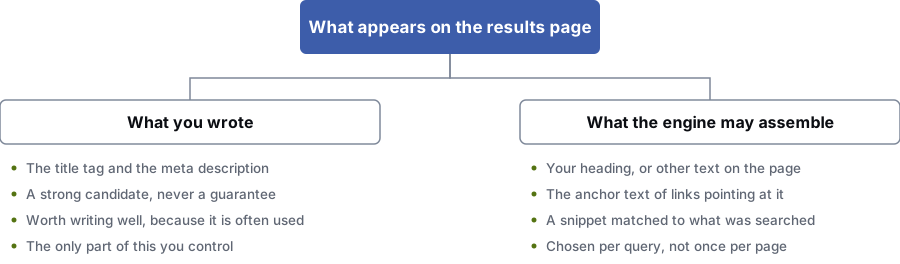
What you wrote
- The title tag and the meta description
- A strong option, never a guarantee
- Worth writing well, as it’s often used
- The only part of this you control
What the search engine may build
- Your heading, or other text on the page
- The wording of links pointing to it
- A snippet matched to what was searched
- Chosen for each search, not once per page
Read this before you rely on the preview
Search engines rewrite many titles and snippets
Nothing above predicts what will be shown. Google builds the title link from your title tag, your H1, other visible text on the page and the wording of links pointing to it, and picks whichever works best for that search. You control the description even less: the snippet is often taken from the part of the page that matches the search.
This preview helps with the part you do control: making sure the version you wrote is a strong option, and that if it’s used, it isn’t cut in the middle of the important word.
So make your H1 and opening paragraph good too, and any wording Google picks for a rewrite will be a decent one. That pays off more than editing the same title tag for the fifth time.
How to write them
How to write a title tag that still works when it’s cut
Assume the last third might get cut. Write it so the first two thirds still do the job on their own.
- Start with the specific thing the page is about, before the broader category it belongs to
- Put your brand name last, or leave it off pages nobody searches for by name
- Use one separator style across the whole site, so your titles are easy to scan in a list of ten results
- Don’t repeat a word you’ve already used in the title. The second one almost never earns its space
- Include the detail that matters to the searcher, such as a place, a price level, a timescale or a format
- Write the description as two short sentences, so that a cut still leaves one whole sentence
- Use the words people type, in the order they type them, without piling up synonyms
- Give every page its own title. Near-copies across a template hurt more than any length problem
What each part is for
What your title, description and URL each do
The title link
The only one of the three that directly affects relevance. It tells search engines and people what the page is, in very little space.
The description
It doesn’t affect rankings. Its job is to get someone who has already found you to pick you over the results either side, so write it like an ad.
The URL and breadcrumb
The least noticed, yet people read it to decide whether a result looks trustworthy. Short, readable paths work better than keywords crammed into a URL.
What audits keep finding
The title and description problems that cost the most
- Two hundred pages share one title pattern.
- A CMS template that outputs "Product Name | Category | Brand" for every item makes titles that are technically unique but read the same. They compete with each other, give search engines nothing to tell them apart and are the most likely to be rewritten.
- The brand name comes first on every page.
- Brand-first titles spend the most valuable third of the space on something the searcher already knows or doesn’t care about. On a phone, nothing that sets the page apart may be left.
- The description was written to be exactly 155 characters.
- Padding a description to hit a length gives you a sentence that trails off. Cutting a good one short to hit it throws away half your point. Length is a limit, not a goal.
- A redesign reset every title to the page name without anyone noticing.
- The version that costs real money. A new CMS or theme drops the title field, pages go live with a default, and traffic falls for a reason nobody links to the launch. That’s why saving the old titles before a site move is a step of its own.
Questions
Questions about title tags and meta descriptions
How long should a title tag be?
Short enough that the part that matters is still visible after it’s cut. On a desktop result that’s usually about 580 to 600 pixels, or roughly 50 to 65 characters, depending on the letters.
Word order matters more than length. Put the words that set the page apart first, the qualifier second and your brand name last, and it hardly matters where the cut falls.
Why is Google showing a different title from the one I wrote?
Because it decided another wording matched that search better. Google builds title links from your title tag, your H1, other text on the page and the wording of links pointing to it, then picks whichever it thinks is most useful for that search.
Common triggers are a keyword-stuffed title, the same title on lots of pages, a title that’s half template, or one that doesn’t mention what the person searched for. Fixing those improves your chances; nothing removes the possibility.
Does the meta description affect rankings?
No. It isn’t a ranking factor. It affects whether someone who has already seen your result clicks it, or the one above or below.
That matters in its own right: a page can hold the same position for a year and get more or less traffic depending on how the snippet reads.
Why does this tool measure pixels instead of characters?
Text gets cut when it runs out of room across the line, and a capital W is about three times as wide as a lower-case l. A character count treats them the same, which is why titles that pass a character check still get cut.
This tool measures with your own browser’s text measuring, using a font close to the one search results use. If your browser blocks that, the tool falls back to a careful character estimate and tells you.
Should I write a meta description for every page?
Write one for every page that matters to your sales, and let the rest be generated. A bad description on a page that ranks costs you clicks.
On very large sites, write descriptions for your top pages and use a sensible template for the rest. Leaving an important page blank is the mistake to avoid.
References
Sources for serp preview tool
The official documents and research this page is based on. Platform rules change, so check the source before you act on a detail.
Last updated · Published by Zubair Afzal, responsible editor
Related
More free tools and guides
- organic search workTitles and descriptions are the last step of a much bigger job.
- a full site auditWhere we find duplicate and template titles across a whole site.
- the website launch SEO checklistLosing titles and descriptions in a redesign is a top-three cause of traffic drops.
- why organic traffic falls
- the technical side underneath
Start here
If your pages rank and nobody clicks
Ranking and getting clicks are different problems with different fixes. On a strategy call we look at where you rank and the results around you, and tell you whether the gap is visibility or persuasion.