
Website Migration SEO
SEO website migration service for domain, platform and URL changes
Our SEO website migration service plans your move to a new domain, platform or URL structure, with every redirect mapped and a written way back.
Organic visits
ExampleDrop starts the day the new site went live. 212 old URLs have no redirect.
Managed SEODone by our specialist team on top of the platform, with a monthly meeting and a price agreed with you.
See Managed SEOWhat counts as a migration
More projects are site migrations than people think
A migration is any change to the web addresses Google already knows, or to what they show. That includes a new domain, a new platform, a subdomain moving to a subfolder, restructured navigation, two sites merged into one, one split into two, or a template system that renames every page.
It matters because rankings belong to URLs. Links and search history build up against one address. Change the address without telling Google, and you are asking it to start again.
The steps and the common mistakes are well known. Almost all of the risk sits in decisions made before launch.
Before anything moves
Building a full list of your URLs
A redirect map is only as good as the URL list behind it, and one crawl of the live site never finds them all.
- A full crawl of the current site, including pages with no links to them that still get visits
- Every XML sitemap, including old ones nobody has updated in years
- Server logs, which show every URL Google requests, including ones you forgot about
- Search Console pages by clicks and impressions, exported before anything changes
- Analytics landing pages by visits and revenue, so your most valuable pages stand out in the map
- External links grouped by the page they point to, so no valuable link gets redirected carelessly
- Files and other non-page URLs: images, PDFs, product feeds, RSS, downloads and API endpoints the site calls
- URLs with parameters or page numbers, and any filtered pages you chose to let Google index
- Existing redirects, so new rules point straight to the final page and don’t stack on old ones
- robots.txt, canonical tags, hreflang and structured data as they stand today
- Internal links, because they need updating to the new URLs and shouldn’t be left to redirect
Where things go wrong
Each stage can only work with what the stage before it passed on
A migration narrows as it goes. A URL missing from the list can never be mapped. A mapping choice can’t be revisited once the old site is gone.
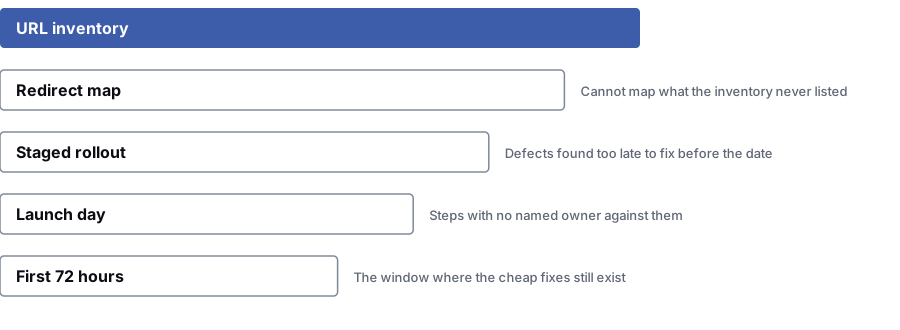
- 1URL list — Every URL the site has ever served, gathered from crawls, sitemaps, server logs, Search Console and analytics.
- 2Redirect map — Each old URL sent to one new page, chosen page by page. No bulk rule pointing everything at the home page.Anything missing from the list can’t be mapped
- 3Test-site rollout — We crawl the new build the way Google would, checking the index block, canonicals, rendering and one-step redirects.Faults found too late to fix before launch
- 4Launch day — The launch plan: go live, remove the block, submit sitemaps, register the change of address and check a sample of redirects by hand.Steps nobody was named to do
- 5First 72 hours — Error codes, redirect chains added by caching or server rules, crawl volume, indexing and the pages that bring in revenue.The window when fixes are still cheap
Timeline
The website migration plan, counted back from launch day
Six weeks out: benchmark
We record what normal looks like: rankings and traffic by page type, URL and search topic, plus crawl stats, indexing and conversion rate by landing page. Without it, every debate after launch is guesswork.
You get: A dated benchmark to compare against later
Four weeks out: map
We match every old URL to one new page. Where there is no match, we choose carefully: the closest page, the parent category, or a 410 "gone" response. Sending everything to the home page is not a mapping decision.
You get: A one-to-one redirect map, with the top pages checked line by line
Two weeks out: check the test site
We crawl the test build the way Google would, checking it is blocked from Google, canonicals point to the live URLs, pages render on the server and redirects work in one step.
You get: A test-site report with faults assigned to developers
Launch day: follow the plan
A written launch plan with a named owner for each step. Go live, remove the block, check robots.txt and submit new sitemaps. Register the change of address if the domain is moving, and test a sample of redirects by hand.
You get: A completed plan with times and initials against each step
First 72 hours: watch the key signals
Server errors, redirect chains added by caching or server rules, crawl volume, indexing of new URLs and the pages that bring in the most business. Fixes are still cheap here.
You get: A daily problem report for three days
Weeks two to twelve: judge the result
We compare against the benchmark, and not against last year. We separate URLs that are recovering from URLs Google never picked up. The rollback option stays open for as long as the agreed window allows.
You get: A keep-or-roll-back recommendation with the evidence behind it
The first month
How to tell a normal dip from a problem
Both look like a drop on a graph. You can usually tell them apart within days if you know what to check.
| Dimension | Normal settling | Something is wrong |
|---|---|---|
| Shape of the drop | A dip that levels off and starts to climb within a few weeks | A drop that keeps going, or a cliff on launch day that doesn’t move |
| Which pages | Spread across all page types, roughly in proportion to the site | Focused on one section, one page type, or the pages with the most links |
| Indexing | New URLs being found and indexed steadily | New URLs not indexed, or old URLs still indexed next to them |
| Response codes | Clean one-step redirects from old URLs | Chains, loops, soft 404s or unexpected 302s |
| Impressions and clicks | Impressions holding while clicks lag a little | Impressions falling fast, which means Google has stopped showing the pages |
| What to do | Nothing drastic. Keep watching and avoid changing anything else | Find the cause within days, fix the specific fault and check the rollback window before it closes |
Common mistakes
What goes wrong in a migration, most common first
- Every moved page was redirected to the home page.
- It is quick and clears the error report, but it throws away what each page was relevant for. A redirect tells Google this address is now that address. Pointing 400 product pages at the home page tells it nothing useful.
- The redirects chain together.
- New rules stack on rules from past migrations, so an old URL passes through three or four hops. Each hop can fail, and Google may give up. We flatten every chain to a single step.
- The test site got indexed.
- A test site left open to Google, or a launch that keeps the test-site block on, are the same mistake at opposite ends. One check prevents both.
- Content and URLs changed at the same time.
- When URLs and content change together, nobody can tell which caused a rise or fall. If the timeline allows, move the URLs first and change the content later.
- Nobody kept the old site.
- You can only roll back while the old build still works and the DNS change can be undone. Deciding on day nine to go back, then finding the old site was switched off on day two, is painful.
Questions
Questions to ask before you move your site
How long does traffic take to settle after a migration?
It depends on the size of the site and how much changed. A small site with clean one-to-one redirects often looks normal within a few weeks. A large catalogue with new URLs can take much longer, because Google has to crawl and assess everything again.
Nobody can know the number in advance. At each check-in, we tell you whether the pattern looks like normal settling or a fault.
The developers are handling redirects. What is left to do?
Deciding which old page goes to which new one. That is a content and search decision. Setting up the redirects is the last and easiest step.
The usual failures are bulk rules that send whole sections to the home page, chains of old and new rules, and images, PDFs and feeds nobody put on the list.
We are keeping our URLs. Do we still need this?
Yes, but less of it. If templates, internal links, headings or page content change a lot, the pages are different even at the same address. A benchmark lets you tell what caused any change.
You can usually skip the redirect map and the change of address step. The benchmark, the test-site checks and the first week of monitoring are still worth doing.
What does a rollback plan mean?
It is a written answer to three questions. What evidence would make us go back? Who decides? How long does the old site stay ready to switch back on?
It is rarely used, but it turns launch into a decision you can undo, which keeps everyone calmer in the first week.
Can you join a project that launches in two weeks?
Often, yes, with a smaller scope. With two weeks we focus on the URL list, the redirect map and the benchmark. Those are the things you can’t rebuild after launch.
If the date looks too risky, we will name the parts we would push back and explain why.
Bring us in before your launch date
Tell us what is moving and when. We will tell you what has to happen before launch, what can wait until after, and whether we would change the date.
Prefer to talk it over? Book a free call
References
Sources for SEO website migration service
The official documents and research this page is based on. Platform rules change, so check the source before you act on a detail.
Related
More on website migration
- website redesigns planned as migrationsMost redesigns change URLs, even when nobody planned to.
- the technical SEO underneathCrawling, indexing and rendering choices the move depends on.
- our website launch checklistThe free version of our pre-launch list.
- launching a new website
- a full SEO audit before you commit
- working out why traffic fell
- website migration SEO checklistThe checklist, if your own team is running the move.
- how canonical tags choose the version that ranksAfter a move, every redirected or duplicate URL needs one clear canonical.
More SEO services services
Last updated · Published by Zubair Afzal, responsible editor