
Ecommerce SEO
Ecommerce SEO for large catalogues: get the right pages found
Ecommerce SEO for stores with large catalogues. We decide which filter, category and product pages Google should index, merge or redirect.
Your free checkup
ExampleScore 58 out of 100. Could reach 74
Tap a check to see what we’d fix first. Anything big waits for your approval.
Google Business ProfileNeeds work
Pick the main category people search for and list every service you offer.
Mentioned in AI answersMissing
Answer the questions customers ask, clearly, on the pages AI tools read.
Speed on phonesGood
Nothing to fix now. We keep an eye on it as you add pages.
Pages Google can findGood
All found. New pages get linked from your menu so they stay that way.
In every planIncluded in Local or Growth, from $149 a month. Every plan has every feature; they differ by size.
Compare plansWhy stores are different
Why ecommerce SEO starts with your URLs
A small business site might have forty pages, each chosen by someone. A store's templates, categories and filters create thousands of URLs that nobody chose.
So the first job in ecommerce SEO is deciding which pages should exist at all. Better product copy comes later.
- Filters have turned one category into forty thousand URLs.
- Colour, size, price, brand, rating and sort order combine into pages no merchandiser meant to publish. The harm is rarely duplicate content. Google spends its time crawling these combinations, and the fifty pages that bring in revenue get checked less often.
- The collection page and the category page compete for the same search.
- Merchandising built the categories and a campaign built the collections. Both target the same search and neither has enough links. Google picks one, often the weaker. Merging them properly is usually worth more than any amount of new content.
- Every product variant has its own thin page.
- Twelve colours become twelve URLs with the same forty words and a different swatch. Together they weaken the one page that could rank. The fix is one main variant and a rule for how the others show, made once in the template for every product.
- Your product descriptions come straight from the manufacturer feed.
- If your page says what nineteen other shops say, neither Google nor shoppers have a reason to pick yours. What sets you apart is what only a seller who handles the product can add: fit notes, your own photos, sizing based on returns, compatibility, and what it is not good for.
- Discontinued products get deleted.
- A product that sold for three years has built up links, internal signals and relevance. Delete the page and all of that goes. Over a few years of catalogue changes, this can remove a big share of your site's authority, and nobody links the decline back to it.
Two different jobs
Category pages and product pages serve different shoppers
Most stores spend their writing time on product pages and their navigation time on categories. The searches that bring in money usually point the other way.
| Dimension | Category and collection pages | Product detail pages |
|---|---|---|
| What the shopper is doing | Still choosing. They know the type of product they want, but not which one. | They have already chosen, or they are checking price and stock for one item. |
| Typical search | A category plus a detail: material, use, size, price range or who it is for. | A model number, a brand and product name, or a barcode. |
| What the page has to prove | That you have a good range and help people narrow it down with filters, buying advice and comparisons. | That this item is the right one, in stock, and worth buying from you. |
| Who you compete with | Other shops, review round-ups and marketplaces with a bigger range. | Every other seller of the same item, including the manufacturer and the marketplaces. |
| Most common mistake | A grid of products with a heading and no text, or three near-identical pages splitting the same searches. | Manufacturer copy, no photos of your own, and variants spread across a dozen URLs. |
| Where the long-term value is | High. People keep searching for the category long after single products are discontinued. | Lower for each page but high in total, and it disappears when the product is retired. |
How we work
We sort out the store structure before writing any copy
Content written before the URL decisions usually has to be moved, merged or thrown away.
List every URL
A full crawl plus your log files and Search Console data show what your navigation links to, what Google crawls and which pages earn anything. Often this is the first time anyone has seen how big the site is.
You get: A URL list grouped by template and catalogue level
Set the filter rules
Each filter is either indexed with its own content, crawled but kept out of the index, or blocked. We base the decision on whether people search for that combination, not on a blanket rule.
You get: A written filter policy for each attribute, with how to set it up on your platform
Merge the category layer
Where two or more pages target the same search, we keep the one with the best links, history and fit, and map redirects for the rest. On an established store, this is often where the biggest gains are.
You get: A merge and redirect map, ready for release
Fix the templates once
Variant canonicals, structured data, breadcrumbs, pagination, and links from category to subcategory to best sellers. A template change updates the whole catalogue at once, the only way to keep up past a few thousand products.
You get: Template specs your developers can build from
Split the content effort into tiers
Write properly for the categories and top products that bring in searches. Use a structured content model for the middle of the catalogue. Stop spending money on the deepest part, which will not bring in search traffic.
You get: A content tier plan, plus written pages for the top tier
Set the product lifecycle rules
Decide what happens when a product goes out of stock, is discontinued, or returns next season. Agree it with merchandising and automate it in the platform, so it does not depend on someone remembering.
You get: A product lifecycle policy and redirect rules
Product lifecycle
Where the URL goes when a product is discontinued
Most stores never write down their lifecycle rules, and this is where built-up value leaks away. These are the questions the rules have to answer, in the order they come up.
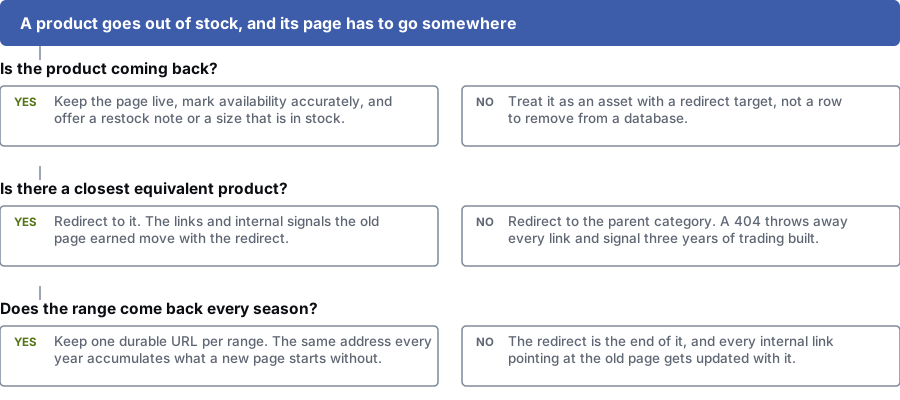
Is the product coming back?
Yes: Keep the page live, show the correct stock status, and offer a restock alert or a size that is in stock.
No: The page still has value. Give it a redirect target before anything is deleted.
Is there a close match?
Yes: Redirect to it. The links and signals the old page earned move across with the redirect.
No: Redirect to the parent category. A 404 throws away every link and signal from years of trading.
Does the range come back every season?
Yes: Keep one permanent URL for the range. The same address every year keeps what a new page has to rebuild.
No: The redirect finishes the job. Update every internal link that pointed at the old page as well.
What is included
What our ecommerce SEO service covers
Scope depends on the size and state of your catalogue. Two hundred products and two hundred thousand need different work.
- Crawl, log file and index coverage checks across every URL on the store
- A filter audit and a written indexing rule for each attribute
- Merging categories, subcategories and collections, with a full redirect map
- A category page content model that says what each page needs beyond a product grid
- Product template review covering canonicals, variants, media, specs and reviews
- Product, Offer and BreadcrumbList structured data, set up and tested
- Rules for out-of-stock, discontinued and pre-order products
- Permanent URLs for seasonal ranges, so they are not rebuilt every year
- Pagination and infinite scroll set up so crawlers can still reach every product
- Internal links from categories to subcategories, best sellers and buying guides
- Sitemaps split up so you can track indexing for each part of the catalogue
- Site search and zero-results reports, which are the cheapest demand research a store has
How shoppers search
The searches an online store needs to cover
Example patterns, not a keyword list. Each group lands in a different part of the catalogue, and a store that covers only one leaves the others to competitors.
Category-level buying searches
The most valuable searches, and the ones most stores handle worst. They need a category page with advice on top of the product grid.
- waterproof hiking boots wide fit
- commercial coffee grinder for a small cafe
- best office chair for lower back pain
- stainless steel garden furniture uk
Product and model searches
You are up against every other seller of the same item. What you add beyond the feed is your whole case.
- brand name model 3200 review
- part number cross reference chart
- model x replacement filter compatible
- buy specific product name in stock
Questions and comparisons before buying
These bring people in earlier. They are often the only searches where a shop can beat a marketplace.
- difference between ceramic and cast iron pans
- what size mattress fits a standard uk double bed
- is this compatible with my machine
- how long does delivery take on furniture
These are example searches from keyword research and public search data. Before we suggest anything, we check how often people search for them in your area.
Questions
What store owners ask first
Should faceted navigation URLs be indexed?
Only where the filter combination matches something people search for. A page like "womens running shoes size 8" may deserve indexing. A page mixing four filters and a price band almost never does.
We decide filter by filter. Searched combinations get crawled and indexed with proper titles and copy. The rest are closed off, so they do not eat crawl time or compete with the category page above them.
What should happen to a product page when the product is out of stock?
If the product is coming back, keep the page live and mark it out of stock in the structured data. Offer a restock alert, a size that is in stock, or the closest alternative.
If the product is gone for good, redirect the page to the closest match or to its parent category. Deleting it and showing a 404 throws away every link and signal the page built up.
Do we need unique descriptions for 40,000 products?
No, and trying to is usually a waste of money. Write properly for the products that bring in revenue and searches. Use a structured template for the long tail, with useful attributes, comparisons and specs. The deepest part of the catalogue will never pull in search traffic.
What matters is saying something the other sellers do not: fit notes, your own photos, sizing advice, compatibility and known limits. A reworded manufacturer paragraph does not.
Category page or collection page: which should we use?
Pick one. Most stores have both because merchandising built one set and a campaign built another, and now they split the same searches.
The page with the links, history and better search match becomes the main one, and the other redirects to it. On an established store, this is often one of the most valuable changes you can make.
How do you handle seasonal ranges?
We keep one permanent URL for each range that returns every year. The same address builds links and relevance over time. A new page each season starts from zero.
Out of season, the page stays live, says what is coming and links to what is available now. When the season starts, it becomes the landing page again.
Will this work on Shopify, or do we need to replatform?
It will almost always work on Shopify, and you rarely need to replatform. Every big platform has limits, such as fixed URL prefixes, little control over filters, or rules on how variants appear. All of them can be worked around.
If a limit is costing you sales, we flag it. If it is only untidy, we leave it. A badly run migration costs more than the problem it was meant to fix.
Find out how many URLs your store has
Before a strategy call, we crawl your store and count the filter combinations, competing category pages and orphaned products. The number shows you where to start.
Prefer to talk it over? Book a free call
Your BOOSTD score improves within 90 days, or your next month is free. After 6 months, more traffic or leads, or we keep working free (up to 6 free months in any 12 months). Read our guarantee
References
Sources for ecommerce SEO
The official documents and research this page is based on. Platform rules change, so check the source before you act on a detail.
Related
More on ecommerce SEO
- how long SEO takesWhat speeds SEO up or slows it down.
- technical SEO for large cataloguesHow Google crawls, indexes and renders your store sits under all of this.
- marketing for online retailers
- growing online salesThe business result this service is for.
- how the platform works for an online store
Where ecommerce SEO matters most
More SEO services services
Last updated · Published by Zubair Afzal, responsible editor