
Headless CMS Development
Headless CMS development: when it pays off and when it doesn’t
Headless CMS development that starts by checking whether you need it. It pays off when you publish to several channels; for one site and one team, it usually adds cost.
Proposed change
ExampleHomepage headline
- Loads fast on phones
- Clear call button
- Quote form works
- Easy to read
New website serviceFast, search-ready websites built in Next.js, with hosting and care included. Your checkup says plainly whether you need one.
See the new-website serviceThe short version
What a headless CMS is
A traditional CMS stores your content and builds your pages. A headless CMS only stores the content and hands it through an API to whatever front end you build. Everything else follows from that.
The benefit is reuse. Content isn't tied to a page, so one product description can appear on your website, in an app, on a shop screen and in a partner feed, edited in one place. If you publish to several channels, that is worth a lot.
The surprise is who does the platform's old jobs. A traditional CMS handles preview, routing, redirects, pagination, canonical tags, sitemaps, status codes, site search and media for you. With headless, each becomes a task for your developers: small enough to forget, big enough to matter.
Trade-offs
Traditional, headless and hybrid CMS compared
| Dimension | Traditional CMS | Headless CMS with a custom front end | Hybrid or decoupled with rendering built in |
|---|---|---|---|
| Reusing content across channels | Awkward, because content belongs to pages | The main reason to choose it | Possible, with some limits |
| Editorial preview | Included | Has to be designed and built | Usually included |
| SEO settings and metadata | Mostly handled by the platform and its plugins | Entirely up to your own code | Shared between the platform and your code |
| Who you need for a change | An editor, for most things | A developer, for anything structural | An editor for most things, a developer for the rest |
| Costs | Cheaper to start, with ongoing licence and plugin costs | Dearer to build, and you maintain a front end for good | In between, with fewer new problems to solve |
| What usually goes wrong | Too many plugins and a theme nobody can safely update | A content model shaped like pages, and no preview | Sold as headless when it isn't, which pleases nobody |
Before you commit
Three questions to answer before going headless
Headless is right for some organisations and expensive for most. These three questions settle it. A "no" to any of them is worth hearing before you spend the money.
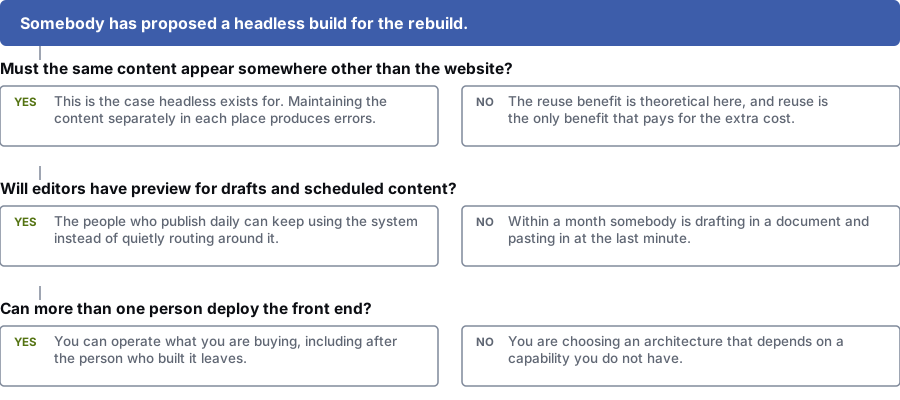
Does the same content need to appear somewhere other than the website?
Yes: This is what headless is for. Keeping content separately in each place leads to mistakes.
No: You won't get much from reuse, and reuse is the one benefit that pays for the extra cost.
Will editors have preview for drafts and scheduled content?
Yes: The people who publish every day can keep using the system.
No: Within a month, someone is writing drafts in a document and pasting them in at the last minute.
Can more than one person deploy the front end?
Yes: You can run what you are buying, even after the person who built it leaves.
No: You are choosing a setup that needs skills your team doesn't have.
In short
If you have one website, one team, no second channel planned, and your main complaint is that the site looks dated, headless is an expensive fix for a problem you don't have.
We say this on a page selling headless development on purpose. Handing a small team a setup they can't run leaves them stuck, and we don't want that project.
The key test is whether your content needs to exist apart from pages. If it does, the cost is worth it and the benefit grows over time. If not, a modern traditional CMS does everything you need, and you can spend the difference on marketing.
What goes wrong
Four common reasons headless projects disappoint
- The content model is a set of page templates.
- Someone builds a "homepage" type, an "about page" type and a "landing page" type, each with fields for its sections. That is a page-based system with extra steps. Nothing can be reused, so the main reason for going headless is lost on day one.
- Preview never got built.
- It was on the list, it slipped, and now editors publish first and check afterwards. Within a month someone is writing in a document and pasting in at the last minute, and the workflow you paid for has stopped working.
- Nobody owns redirects, sitemaps and status codes.
- Redirects have no home. The sitemap was generated once. Canonical tags are hard-coded. Pagination returns a status code nobody checked. Deleted pages show "not found" while telling search engines everything is fine.
- Only one person can maintain the front end.
- A build only its author can deploy is a risk, however good it is. Headless means owning more custom code, so decide who else can run it before you sign.
Scope
What a finished headless CMS build includes
This list separates a project that works from one that just launched. Most of it is invisible to whoever signed off the budget.
- A content model built from things like people, products, locations and policies, not from page layouts
- Roles, permissions and an approval flow that match how your team publishes
- Working preview for drafts and scheduled content, usable without a developer
- Server-side rendering for every page that needs to be indexed, checked in the rendered output
- A place to manage redirects, so adding one doesn't need a deployment
- Sitemaps generated automatically from what is published today
- The right status codes for removed, moved and missing pages, tested and confirmed
- Metadata and canonical tags handled in code, with editors able to override them where it matters
- One central system that handles image sizes, formats and lazy loading
- A plan for more languages, if you may need them, made before launch
- Moving content across, including archives, redirects from old URLs and the parts nobody wants
- Documentation, and a second person who can deploy the front end
How we run it
How we plan and build a headless CMS
Check whether you need it
We look at your current and planned channels, your editorial team, how often you publish, your in-house skills and what is wrong with your current setup. This step ends in a yes or no.
You get: A written recommendation, including the case against
Model the content with your writers
In workshops with your editors and developers, we model the things your business talks about, test the model with awkward examples, and check that no fact needs editing in two places.
You get: A content model and editorial workflow plan
Give every platform job an owner
Routing, redirects, canonical tags, sitemaps, status codes, pagination, search and media. Each gets an owner and a plan before front-end work starts.
You get: A table showing who owns each platform job
Build the site and the editor experience together
We build preview, drafts and scheduling alongside the public pages, because daily users are the ones most likely to give up on the system.
You get: A working front end with preview from the first release
Migrate and launch carefully
A replatform changes URLs, so we run it as a migration: a URL list, a redirect map, a baseline, a staged release and monitoring.
You get: Content moved, redirects live and a post-launch report
Hand over properly
We train your editors, document the build for developers and make sure a second person can deploy. A system only one person can run isn't finished.
You get: Training, documentation and a tested second deployer
Questions
Questions teams ask before choosing a headless CMS
Is a headless CMS better for SEO?
Not by itself. It is neutral, and it can be worse if pages only render in the browser or nobody owns redirects, canonical tags and sitemaps.
Well-built headless and traditional sites both work fine. The difference is that a traditional platform does much of this for you. With headless, your team builds it.
When is headless clearly the right choice?
When the same content has to appear in several places, such as a website, a mobile app, in-store screens or a partner feed, and keeping separate copies already causes mistakes.
It also makes sense when several front ends share one editorial team, or when your publishing workflow has outgrown a page-based system.
When would you tell us not to do it?
When you have one website, one small team, no second channel planned, and the problem is the design. A modern traditional CMS does everything you need and keeps preview, editing and publishing simple.
We would also advise against it if nobody on your team can deploy a front end. A setup that needs skills you don't have makes you dependent on outsiders.
What happens to preview?
It has to be built. Editors need to see drafts, scheduled and unpublished content as it will appear, which needs a front-end preview route that reads drafts safely.
We treat preview as a must-have for launch. Teams that publish daily stop using a system that makes them guess.
How do you model content properly?
We model the things your business talks about, like a person, a product, a location, a policy or an event. A page is then an arrangement of those things.
A simple test: if you have to edit a fact in two places when it changes, the model describes pages, not your business.
Get a headless CMS recommendation you can show your board
Tell us how many channels you publish to, how many people edit and what is going wrong. We will tell you in writing whether headless is worth the cost, even if the answer is no.
Prefer to talk it over? Book a free call
References
Sources for headless cms development
The official documents and research this page is based on. Platform rules change, so check the source before you act on a detail.
Related
More on headless CMS
- replatforming an established siteMost headless projects are also migrations, with the same risks.
- crawling, rendering and indexingThe jobs a headless build hands to your developers.
- SEO for large organisations
- marketing for technology companies
- what a build like this costs
More web design & development services
Last updated · Published by Zubair Afzal, responsible editor