
SEO
What is technical SEO? A plain-English guide
Published by Zubair Afzal, responsible editor
First published Updated 7 min read
Definition
What is technical SEO?
Technical SEO is everything that helps Google find, read and show your pages. It’s about access; what your pages say is a separate job.
Quick test: if the question is “can this page compete?”, it’s technical. If it’s “does this page deserve to win?”, it isn’t.
Google describes three stages: crawling (downloading your pages), indexing (reading and storing them) and serving (showing them in results). Google says indexing isn’t guaranteed for every page it processes. Technical SEO works mostly on the first two.
There’s a hidden fourth stage inside indexing: rendering. Many modern pages build themselves in the browser, so what Google downloads and what a visitor sees can differ. Most dashboards won’t show you that gap.
The line matters because audit tools keep adding findings, and a list of three hundred issues looks the same as a list of three that matter. For each finding, ask: does it change whether the page can be crawled, rendered, indexed or delivered? If not, it’s a different job.
How it works
The four stages every page must pass to show up
A page only reaches search results if it passes all four. Most technical faults are one stage failing silently.
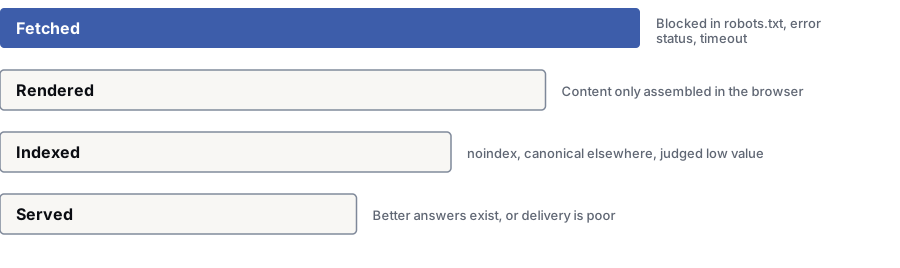
- 1Fetched — Google asked for the page and got a usable response.Blocked in robots.txt, error status, timeout
- 2Rendered — Google keeps the content that exists after the page’s scripts run.Content only built in the browser
- 3Indexed — Google judged the page worth storing and didn’t merge it into a duplicate.noindex, canonical elsewhere, judged low value
- 4Served — The page can show for a search and loads well enough.Better answers exist, or the page loads poorly
Scope
What technical SEO covers
If something sold as technical SEO doesn’t fit one of these four areas, it’s a different kind of work.
Access
Can Google reach the page, and what is it told? Robots rules, status codes, redirects, server reliability and speed, logins that block public pages by mistake, and addresses your site creates from filters. One wrong line here can hide a whole section.
Rendering
What content exists once the page has built? Are text and links in the first response, or added later by scripts? Are files needed to build the page blocked? Does navigation create real addresses?
Understanding
Can Google work out what each page is and how pages connect? Canonical tags, duplicates, sitemaps, internal links, pagination, and language and region tags. Structured data that describes what’s on the page, and nothing that isn’t.
Delivery
Does the page load well on a visitor’s own device? Core Web Vitals from real visits, images, fonts, script weight and layout stability. This one has the clearest business case outside search.
Key terms
Technical SEO terms in plain English
Know these and you can read any technical SEO proposal with confidence.
- Crawling: Google requesting your pages. Crawled doesn’t mean indexed, and neither means ranked.
- Rendering: running the page’s scripts to build the content that gets indexed. It can be skipped, for example when the first response already says not to index the page.
- Indexing: reading and storing the page. Google says this isn’t guaranteed for every page it processes.
- robots.txt: a file telling crawlers which addresses not to request. It stops fetching, not indexing. A blocked page can still appear as a bare result.
- noindex: an instruction saying the page shouldn’t be listed. Google must crawl the page to see it, so it fails if robots.txt blocks the page.
- Canonical: a tag saying two pages are the same and which is the main one. Google treats it as a hint and may choose differently.
- Status code: what the server says about an address. 200 is fine, 301 is a permanent move, 404 is not found, 410 is removed on purpose, and 5xx is a fault on your server.
- Redirect chain: one address pointing to a second, which points to a third. Each hop adds delay and risk.
- Soft 404: a page that returns a success code but says nothing’s there. Common in apps that handle missing content in the browser.
- XML sitemap: a list of the addresses you want crawled, with change dates. Google treats it as a suggestion. Never list pages you’ve told Google to ignore.
- Crawl budget: how much crawling your server can handle, plus how much Google wants to crawl. Google says it’s a concern for large sites, not most sites.
- Structured data: code that describes what a page contains. It makes some result types possible but doesn’t guarantee them. It must match what visitors see.
- hreflang: tags linking versions of a page in different languages or regions. Each version must link back. Google generally ignores one-way tags.
- Index bloat: thousands of low-value addresses indexed because your site creates them, usually from filters, internal search, sorting or session IDs.
- Log file analysis: reading your server’s record of what crawlers requested. It’s the only way to see what they did, not just what you asked.
Technical SEO vs other SEO
How technical SEO differs from content and off-site SEO
| Dimension | Technical SEO | Content SEO | Off-site SEO |
|---|---|---|---|
| The question it answers | Can this page be reached, understood and delivered? | Is this the best answer to the search? | Do other sites treat this one as credible? |
| What it produces | Written specs, fixes and settings that stay fixed. | Pages, site structure, and choices on what to write and skip. | Coverage, citations, mentions and relationships. |
| Who does it | A specialist finds the problem and developers build the fix. | Writers and subject experts, guided by search research. | People who build relationships with publishers, event organisers and partners. |
| What neglect looks like | Pages missing from the index, unexplained drops, content Google can’t see. | Pages that rank for nothing, because nobody searched for them. | A perfect site that no well-known source has ever mentioned. |
| What it can’t do | Create demand, or make a thin page worth ranking. | Rescue a page Google can’t reach. | Make up for a page that doesn’t answer the question. |
| How you know it worked | Indexed pages, crawl errors, rendered content and real-visit speed all change within weeks. | Your target searches start bringing enquiries over months. | Mentions build up from sources you’re proud to sit beside. |
Limits
What technical SEO can’t do
Technical SEO can’t give anyone a reason to choose your page. It clears the path. A crawlable page with nothing useful to say still has nothing useful to say.
Any crawler will list hundreds of “issues” on any site, graded by a score the tool made up. A supplier who leads with the issue count is selling volume.
Ask one question of every finding: what does fixing it unblock? A blocked folder, a rendering failure, a wrong canonical or a redirect chain on your most-linked page all unblock something. Missing alt text on a decorative image doesn’t (though there may be an accessibility reason to fix it).
Once the path is clear, Google judges your pages on their merits. Sometimes traffic bounces back fast; sometimes it shows the pages were never going to win, and the next job is content.
Questions
Technical SEO: common questions
What is technical SEO, in one sentence?
Technical SEO is everything that decides whether Google can fetch, read, understand and show your page. Other SEO work decides whether the page is worth showing.
Crawl access, status codes, rendering, canonical tags, sitemaps, structured data, international setup and page speed all answer one question: can this page compete at all?
Is technical SEO a one-off project or ongoing?
It’s both. Finding and fixing problems is a project with an end. Stopping them coming back is ongoing, because every site update can break something you can’t see.
For most businesses, that means one proper check and the fixes, then a small check each time you update the site.
Do we need technical SEO if our site is small?
Usually not as an ongoing service. A forty-page site on a mainstream platform usually has a handful of technical issues, most fixable in a day.
The exceptions need technical work whatever their size: sites that build content in the browser, that just moved or are about to, that create new addresses from filters, or that lost traffic for no clear reason.
Is site speed part of technical SEO?
Yes, because speed affects whether a page is served well. Google documents Core Web Vitals as part of how it assesses page experience. The numbers come from real visits, not a testing tool.
Speed as a ranking factor is modest and debated. Speed as a driver of sales isn’t, and most speed work pays for itself on sales alone.
Should our developers do this, or an agency?
Usually both. An SEO specialist finds the problem and writes the fix. Your developers build it.
It works best with a short written brief for each issue: what to change, where, why, and how you’ll check it. Whoever owns the code builds it; whoever wrote the brief checks it.
How do I know if we have a technical problem?
Three signs tell you more than any audit tool:
1. A big gap between the pages you publish and the pages Google has indexed.
2. Content you can see in a browser that’s missing from the page source a crawler gets.
3. A traffic drop that falls off a cliff on one date, instead of sliding slowly.
If none apply, your problem is more likely content: your pages may not be the best answer to the searches you want.
References
Sources for technical SEO
The official documents and research this page is based on. Platform rules change, so check the source before you act on a detail.
- Google Search Central: Google Search Essentials
- Google Search Central: in-depth guide to how Google Search works
- Google Search Central: robots.txt introduction
- Google Search Central: block search indexing with noindex
- Google Search Central: consolidate duplicate URLs
- Google Search Central: JavaScript SEO basics
- Google Search Central: understanding Core Web Vitals and Search results
- Google Crawling Infrastructure: crawl budget management for large sites
Start here
Not sure if your problem is technical?
Send us your site and what you’re seeing. Our specialists will tell you which of the four stages is failing, or confirm none is.
Rather check it yourself? Try our free SEO tools