
SEO
JavaScript SEO: how Google reads your scripts, and where it fails
Published by Zubair Afzal, responsible editor
First published Updated 7 min read
Signs of a problem
Four signs you’ve got a rendering fault
Rendering faults are hard to spot because everything works in a browser, so people look in the wrong place for weeks.
- Search results show your title and a description that isn’t on the page.
- If scripts load the page body, Google can index an empty shell and build the snippet from whatever text was there, often a menu label. If your results read oddly generic, check the response before scripts run.
- Only a fraction of your pages are indexed.
- Views with no real address, or listings that load only on scroll, may never be found. The site looks complete to visitors, but there was never a link for a crawler to follow.
- A section stopped working after a front-end change.
- Often it’s an old robots.txt rule blocking script or data paths, added years ago to cut crawler requests. Google won’t render JavaScript from blocked files, so the pages load fine for Google but contain nothing.
- Pages that don’t exist return a success status.
- Apps that handle missing content in the browser often send a 200 and then show an error: a soft 404. On a catalogue where products come and go, that can mean thousands of empty addresses.
Finding the cause
Three questions to find a rendering fault
Work through these in order. Each answer ends the search or tells you where to look next.
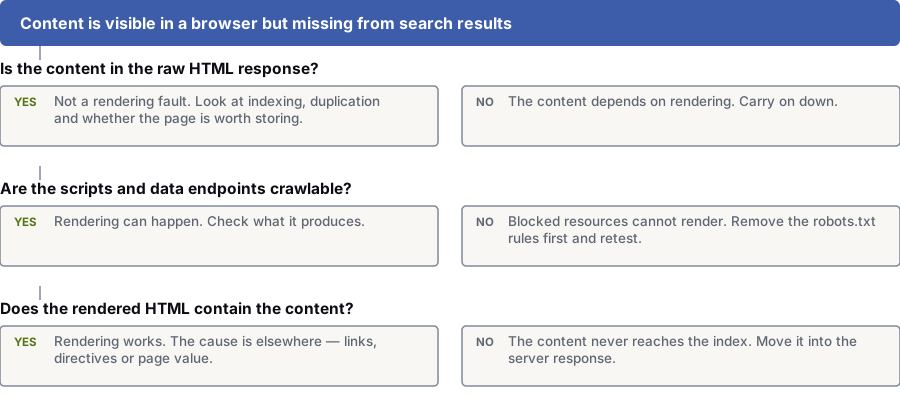
Is the content in the raw HTML response?
Yes: It’s not a rendering fault. Look at indexing, duplicates and whether the page is worth storing.
No: The content relies on rendering. Go to the next question.
Can crawlers reach the scripts and data endpoints?
Yes: Rendering can happen. Check what it produces.
No: Blocked files can’t render. Remove the robots.txt rules first, then test again.
Does the rendered HTML contain the content?
Yes: Rendering works. Look elsewhere: links, tags or page value.
No: The content never reaches the index. Move it into the server response.
How it works
How does Google handle JavaScript pages?
Google handles JavaScript pages in three phases:
1. Crawl: Googlebot fetches the address and reads the response for links.
2. Render: the page joins a queue, and the scripts run.
3. Index: Google stores what’s there after rendering.
The key word is queue: rendering happens, but not always straight away.
Google names two cases where rendering may be skipped: a non-200 status, and a noindex tag in the original HTML. So a template that ships with noindex and removes it in the browser is unreliable.
Google also won’t render JavaScript from blocked files or on blocked pages. If robots.txt blocks your scripts folder, bundle path or content API, the page loads fine for Google and is empty.
Routing matters too. Google asks sites to use the History API and avoid # fragments, which can’t be reliably fetched. If your product pages only exist after a #, there’s nothing for a crawler to request.
Server vs browser
Server-side vs client-side rendering for SEO
Neither suits every page. Ask what needs to be found, and how much you want to rely on a step you don’t control.
| Dimension | Rendered on the server | Rendered in the browser |
|---|---|---|
| What a crawler gets first | The content and links, in the response, ready to go. | An empty shell. Content only exists once scripts are fetched and run. |
| If something fails | A script failure breaks interactive parts. The content’s still there. | A script failure, blocked file or slow data call leaves an empty page. |
| Effect on crawling | Normal. One request returns everything needed. | Heavier. Google must fetch and run the page, scripts and data. |
| Effect on loading speed | Usually better, because the largest element arrives in the first response. | Usually worse on a first visit, and it depends on the visitor’s device. |
| Page addresses | Every view gets a real address automatically. | Views only get real addresses if developers use the History API on purpose. |
| When to use it | Anything people need to find: articles, products, categories, locations, services. | Anything behind a login, or interactive views nobody searches for. |
| The usual mistake | Server-rendering everything, even views nobody will search for. | Building the public marketing site the same way as the logged-in app. |
How to check
How to see what Google gets from your site
No special tools needed, and faster than any framework debate.
- Read the raw response, not the browser inspector. The inspector shows the page after scripts run.
- Load the page with JavaScript off. Anything that disappears relies on a step you don’t control.
- Run a live URL inspection in Search Console. Read the rendered HTML and the list of files it couldn’t load.
- Check robots.txt for rules covering script paths, bundle folders or content APIs.
- Search a distinctive sentence from a page in quotes, limited to your site. If the page is indexed but the sentence isn’t found, that text never reached the index.
- Click through your site with scripts off. If navigation stops working, crawlers can’t follow it either.
- Request an address that doesn’t exist and check the status code. A 200 with an error message is a soft 404.
- Compare pages published with pages indexed in Search Console. On a JavaScript site, a big gap usually means Google can’t find the pages, less often a quality problem.
Keeping it in proportion
Most sites don’t have a JavaScript SEO problem
The main frameworks now render on the server by default. Sites with rendering faults fit a short list; check before you assume you’re on it.
The list: apps built before server rendering was the default. Content that only shows after a click, tab or scroll. Listings with no paginated pages behind them. Views with no real addresses. Scripts setting the indexing tags. An old robots.txt rule blocking your own files.
If none fit, the ten-minute check above rules the subject out. Do it before paying for a rendering project, which is a big engineering job.
Server rendering makes your content reliably available and usually speeds up loading. It won’t make a page more useful or more trusted.
Questions
JavaScript SEO: common questions
Can Google index content that JavaScript creates?
Yes, in general. Google documents three phases for JavaScript apps: crawling, rendering and indexing. In the rendering phase, it runs your scripts before indexing the content.
The conditions matter more than the yes. Rendering is queued, so it’s not instant. It won’t happen for pages or files blocked in robots.txt, and may be skipped if the first response has a non-200 status or a noindex tag.
Do we have to server-render everything?
No. What matters is that the content and links that define the page are in the first response, and anything Google needs to find has a real address.
Render the parts that define the page on the server and leave interactive parts to the browser. A dashboard behind a login doesn’t need server rendering; a product listing does.
Why is our content in the browser but not in search?
Usually one of four causes, and each takes minutes to check.
1. Your scripts, or the data they fetch, are blocked in robots.txt.
2. The content only appears after a click or tab change.
3. The page has no real address because it uses a # fragment.
4. The first response says “noindex”, and the browser fix comes too late.
Read the raw response, then compare it with the rendered result in a live inspection tool.
Is infinite scroll a problem?
Yes, if scrolling is the only way to reach the content. Crawlers don’t scroll, so anything that only loads on scroll may never be found.
You don’t need to remove it. Add real paginated pages behind it and link to them, so crawlers get normal links.
Does rendering cost us crawl budget?
Yes. Google’s crawl budget documentation says resource-heavy sites can use up crawl capacity faster. On a small site it doesn’t matter; on a large site it adds up.
A site with hundreds of thousands of pages that all need rendering gets crawled less thoroughly than a similar site with content in the first response.
Can we set the canonical or robots tag with JavaScript?
You can, but it’s fragile. Google says a noindex in the original HTML may cause rendering to be skipped, so the tag you meant to remove in the browser is the one that sticks.
Let the server set any tag that decides indexing or the canonical version.
References
Sources for JavaScript SEO
The official documents and research this page is based on. Platform rules change, so check the source before you act on a detail.
Start here
Not sure if rendering is your problem?
Send us your site and the pages that are missing. Our specialists will check whether the content reaches Google’s index, and where it stops if it doesn’t.
Rather check it yourself? Try our free SEO tools