
Website not generating leads
Website not generating leads? Find where visitors drop off
If your website is not generating leads, test your contact form first, because broken forms are common. Then check who visits and what your pages answer.
Where enquiries leak
ExampleThe quote form fails on some phones. Fix this before buying more traffic.
Start here
Check your contact form first. It takes twenty minutes.
Lots of empty inboxes come down to emails that never arrive. The site looks fine the whole time.
A broken form is invisible from the inside. The visitor sees a thank-you message, your analytics counts a conversion, and nothing reaches anyone.
Work through this list on your own phone, off the office wifi. If enquiries start arriving at step four, you’ve saved yourself a redesign.
- Send a test enquiry from your phone on mobile data, from an email address nobody at work knows
- Put an unusual word in the message so you can search for it afterwards
- Check the inbox it should reach, then its spam folder, then any shared mailbox it forwards to
- Check whether the form plugin saved the enquiry even though no email arrived
- Make sure the alert address isn’t a former employee or a mailbox nobody opens
- Check whether your email settings changed the last time anyone edited your domain
- Test again in another browser with an ad blocker on, as some forms break when blocked
- Time how long the page takes to work on an ordinary phone
- Count the form fields and cut any you don’t need to call someone back
- Compare last month’s conversion count with the enquiries your team saw
Why it happens
Why your website isn’t generating leads
- The wrong people visit.
- The visitor count looks fine, but few are buyers: blog readers, students, competitors, people in other countries, spam, or buyers out of your area or budget. The sign is a healthy total with few visits to your service pages. Fix the traffic first; page changes won’t help.
- The right people visit and leave.
- Your service pages get visits, people leave fast, and nothing happens, because the page didn’t answer their question. Usually that’s price, often proof, sometimes whether you cover their area. On a phone, the page may have been too slow.
- People try to enquire and can’t.
- The most damaging cause and the hardest to spot. The form shows an error, the button fails with an ad blocker on, or the thank-you message appears but no email is sent. Form analytics or a session recording shows it in an afternoon, but it’s often been broken for weeks before anyone looks.
Narrow it down
Four questions that show where you lose leads
These causes look the same on a dashboard. Each question checks a different point in the visit.
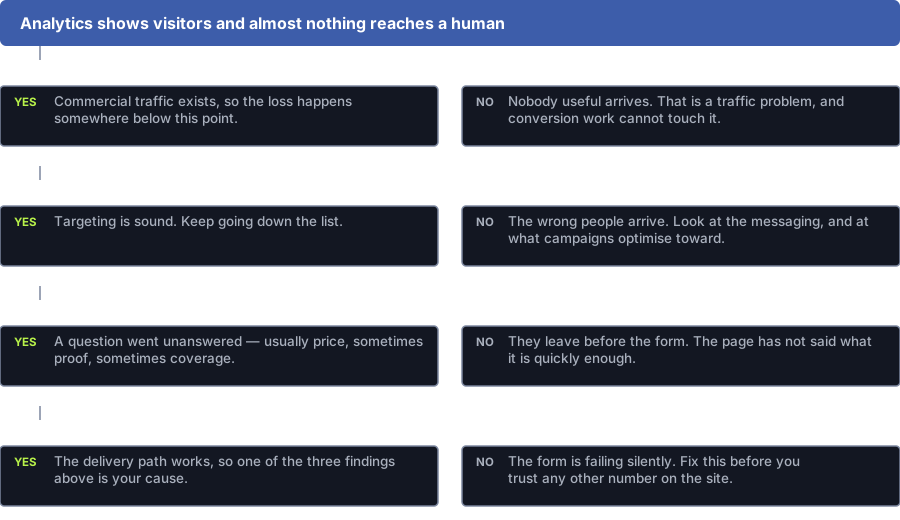
Do your service pages get a fair share of visits?
Yes: Buyers are visiting. You’re losing them further on.
No: Nobody useful arrives. Fix the traffic first. Page changes won’t help.
Do the few enquiries you get match what you sell?
Yes: Your targeting is fine. Keep going.
No: The wrong people arrive. Look at your message and what your ads aim for.
Do people reach the form and then give up?
Yes: A question went unanswered. Usually price, sometimes proof or area.
No: They leave before the form. The page didn’t say what it offers fast enough.
Does a test enquiry reach someone’s inbox?
Yes: Delivery works. One of the answers above is your cause.
No: The form is broken. Fix it before you trust any other number.
How we fix it
How we fix it, cheapest first
Start with the cheap fixes. A rebuild comes last, and only if the checks point there.
Make sure enquiries reach your team
We run the form check above for every way in: form, phone, chat and email link. Until it passes, no other number on the site can be trusted.
You get: A tested path from enquiry to your team
Find which pages convert
We split your service pages from everything else and work out the rate for each. This often shows the pages you planned to rebuild are fine.
You get: Conversion rates by page group
Watch people use it
Session recordings and form analytics on the pages that matter show where people stop scrolling and which field they quit on. Twenty recordings usually beat a full audit report.
You get: A short list of problems we saw happen
Remove friction
Cut fields you don’t need, fix the mobile page, put the phone number where a thumb can reach it, and answer the price question as openly as you can. None of this needs a test.
You get: Changes made, with a dated before-and-after
Improve the offer
What do you ask visitors to do, and what do they get? A page asking a stranger to book a sixty-minute call may do far worse than one offering a small, useful first step.
You get: A new main and backup call to action
Only then think about a rebuild
A rebuild makes sense if the pages you need don’t exist, the site can’t be safely edited, or the mobile version can’t be fixed.
You get: A case for a rebuild, backed by the steps above
What good looks like
What a page that gets enquiries does
Forget design taste for a moment. A service page has four jobs.
Says what it is straight away
People from Google decide in seconds if the page is about their problem. A slogan and a stock photo make them work it out, and many won’t.
Answers the question that stops people
Usually price; sometimes your area, or whether you handle jobs like theirs. You don’t need a price list, but dodge the question and they’ll call a competitor who answered it.
Shows proof people can check
Show your work, with names where you’re allowed, plus specific detail and credentials. Vague praise reads as filler.
Makes the next step small and easy
One clear action. A phone number they can tap, a short form, and a second option for people who aren’t ready to talk.
Next step
Where to go from here
If the site is the problem
If the traffic is the problem
If you can’t trust the numbers
Questions
Common questions about websites that don’t get leads
How do I know if my contact form is working?
Test it like a stranger would: your phone on mobile data, off the office wifi, from an email address nobody at work knows, with an unusual word in the message so you can search for it.
Then check the inbox it should reach, its spam folder, your CRM, and whether the form plugin saved it. If the plugin has it but no inbox got it, your email delivery is broken, which is a different fix.
What is a reasonable conversion rate for a website?
There’s no single number you can trust. Rates vary hugely by industry, price, urgency and where visitors come from. A cross-industry average is full of businesses nothing like yours.
Compare yourself with yourself. Split your service pages from your blog, find your own starting rate and track change from there.
Do we need a full redesign?
Usually not, and it’s the most expensive thing to get wrong. You need one when the site can’t hold the pages you need, doesn’t work on a phone, or can’t be safely edited.
If the problem is an unclear offer, a long form, missing proof or a broken email alert, a redesign fixes it by accident at ten times the cost, and often loses pages that were working.
We do not have much traffic. Can we still improve conversion?
Yes, but not with A/B tests. With fewer than a few hundred conversions a month, a split test won’t finish before the market changes.
Watch session recordings, check where people give up on the form, and ask recent customers what nearly put them off. Fix the obvious problems and save testing for when you have more traffic.
Our analytics shows conversions but sales sees nothing. How?
Your analytics is almost certainly counting visits to a thank-you page, not emails that reach your team. When the email alert breaks, the tracking keeps reporting success.
Bots, test submissions and double counting cause it too. Compare last month’s conversion count with what your team saw in their inbox or CRM before you trust either number.
Where to get help
Services that solve this
Conversion Rate Optimisation
Conversion rate optimisation that gets you more enquiries from the traffic you already have. We fix what stops visitors, and A/B test only when your traffic supports it.Website Design, Development & Conversion
Our web design agency builds fast, accessible websites you own, planned for Google and for enquiries before design starts.Marketing Analytics & Attribution
Marketing analytics and attribution you can trust, with a written account of where the data is blind and tests for what attribution can’t answer.
Find where you lose leads before paying for a rebuild
Send us your site and read access to your analytics. We’ll run these checks and tell you which cause you have, even if it’s just a broken email alert.
Prefer to talk it over? Book a free call
Your BOOSTD score improves within 90 days, or your next month is free. After 6 months, more traffic or leads, or we keep working free (up to 6 free months in any 12 months). Read our guarantee
Last updated · Published by Zubair Afzal, responsible editor