
Paid search
Why are my Google Ads not converting? How to find the problem
Published by Zubair Afzal, responsible editor
First published Updated 9 min readWe check this page every three months. Next check: .
Name the problem first
What "Google Ads not converting" can mean
Three different problems, plus a fourth that sits outside the ads. Working out which one you have takes about an hour and saves weeks of effort in the wrong place.
- Clicks arrive and nothing is submitted.
- The platform shows traffic but few or no conversions. The people arriving may not want what you offer, the page may not answer what they searched for, or the form may be failing unnoticed. The fault most likely sits between the search and the page, not in bidding or budget.
- Enquiries arrive and none of them are usable.
- The mechanics work, but the wrong people are submitting: out of your area or budget, wanting a service you don’t offer, or looking for a job. This is almost always a problem with which searches you pay for, and the evidence is in the search terms report.
- The platform reports conversions the business has never seen.
- The account looks healthy, but nobody in sales recognises the numbers. Something that isn’t a lead is being counted: a page view, a scroll, a duplicate submission, or a tap on a phone number that never connected. This is often the most damaging problem, because automated bidding may have been chasing it for months.
- Enquiries arrive, are usable, and never become customers.
- Here the ads are doing their job. The loss is in your offer, your prices against competitors, or how long people wait for a reply. Treating it as a Google Ads problem leads to expensive account changes that can’t help.
Quick triage
Three questions that tell you which problem you have
Answer these three questions in order to find which problem you have. Stop at the first answer that explains what you see. Change nothing until you get there, because each answer points somewhere different.
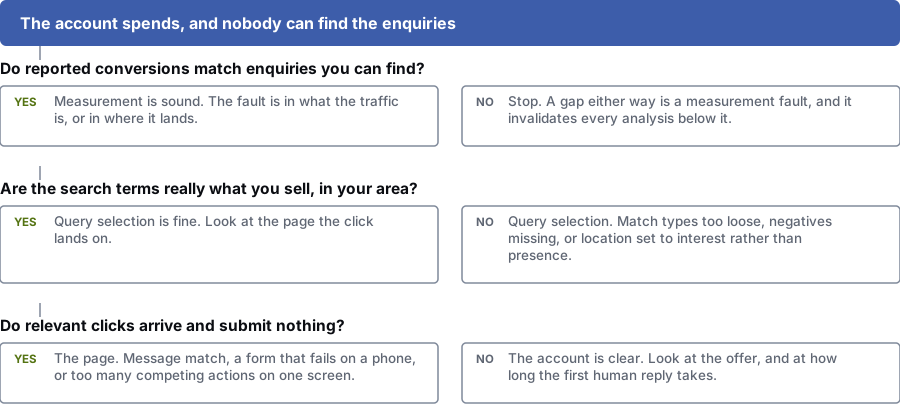
Do reported conversions match enquiries you can find?
Yes: Your tracking is sound. The problem is the traffic, or the page it lands on.
No: Stop. Any gap means the tracking is wrong, and every check below depends on it.
Are the search terms what you sell, in your area?
Yes: Your search targeting is fine. Look at the page the click lands on.
No: Fix your targeting: match types too loose, negatives missing, or location set to "presence or interest".
Do relevant clicks arrive and submit nothing?
Yes: Fix the page: the ad and page may not match, the form may fail on phones, or it offers too many actions.
No: The account is fine. Look at your offer, and at how long your first reply takes.
Step by step
Six checks to fix Google Ads that aren’t converting
Run these six checks in order and stop when one explains what you see. Don’t change bids or pause anything until you have finished.
Open the conversion actions table and see what is counted
For every conversion action, check what it counts, whether it is in the main goals that bidding works towards, and whether it counts every submission or one per click. Look for anything that fires when a page loads. A confusing account is often explained right here.
You get: A list of every conversion action, and whether each one is a real business result
Compare one week with your real enquiries
Count one full week of enquiries from your inbox, call log and CRM, and compare that with what the platform reported for the same days. A big gap either way means the tracking is wrong, and every other check depends on this.
You get: A written comparison of platform conversions against real enquiries for one week
Read the search terms report, sorted by cost
Take the last 30 to 90 days, sort by cost, and mark each of the top hundred searches relevant or not. It is the most useful hour you can spend in a Google Ads account: it tells you whether you are paying for the searches you think you are.
You get: A marked list of high-cost searches, with negative keywords identified
Check where the money went
Split spend by network to see how much went to search partners and display expansion. Check your match types, and whether a Performance Max campaign is taking searches a search campaign was meant to handle. Budget often leaks through a setting nobody chose on purpose.
You get: A breakdown of spend by network, match type and campaign type
Follow one search to the page, as a customer would
Pick an expensive, relevant search. Search it on a phone, click your own ad and go through the whole thing as a stranger would. Does the page repeat what you searched for on the first screen? Is there one clear action? Does the form send, and where does it go?
You get: A recorded walkthrough of the search, ad and landing page on a phone
Measure how long an enquiry waits for a reply
For your last twenty enquiries, record the time between each submission and the first reply from your team. People who enquire through Google Ads often contact several suppliers in one sitting. This costs nothing to fix and almost nobody measures it.
You get: The response time for your last twenty enquiries
Common causes of Google Ads not converting, and how to spot each one
Match what you found to where the problem sits, so you don’t change the account when the problem is somewhere else.
| Dimension | What you will see | Where the problem is |
|---|---|---|
| Lots of conversions, but sales hasn’t seen them | Platform numbers are far higher than the enquiries you can find, or the same enquiry appears several times. | Conversion setup. The wrong trigger, the wrong counting setting, or a minor action feeding the bidding goals. |
| Enquiries from the wrong people | The search terms report is full of searches close to what you sell, or from outside your service area. | Search targeting. Match types are too loose, negatives are missing, or location targets interest when it should target presence. |
| Relevant searches, no submissions | Good searches and decent clicks, but almost nothing submitted, and many people leave the landing page straight away. | The page. The ad and page don’t match, the form fails on mobile, or there are too many competing actions. |
| Spend rising, search impressions flat | A large share of cost goes to search partners, display expansion or a Performance Max campaign. | Where the budget is being spent. This is a settings problem. Your bidding strategy isn’t the cause. |
| Results fell after a bidding change | Results turned clearly worse from the date of a bidding change, and conversion numbers never settled. | The conversion data the automation learns from. It is buying more of what you told it to value. |
| Good leads, no customers | Enquiries are a good fit, but few become customers, or the leads go cold. | Outside the account. Your offer against competitors, or how long people wait for a reply. |
Before you start
What to have open while you check your account
No new tools, just about half a day and the full reports, not the summary screen.
- The conversion actions table, showing what each action counts and whether it feeds the bidding goals
- The search terms report for the last 30 to 90 days, sorted by cost
- Your campaigns split by network, to separate search from partners and display expansion
- Your inbox, call log or CRM for one full week, to compare with the platform
- Your landing pages, opened on a real phone. A narrowed browser window isn’t the same.
- A record of your last twenty enquiries, with the time of the first reply from your team
Outside the ads
Two causes you can’t fix inside Google Ads
The first is the offer. Search ads put you next to every other option on the same page, and people compare within minutes. If your price, guarantee, availability or pitch is weaker than theirs, better ads just send more people to the same conclusion, faster.
The second is what happens after someone submits the form. People who enquire through Google Ads often contact three or four suppliers in one sitting, and the first good reply has a big advantage. Two businesses paying the same for the same clicks get very different results if one replies within minutes and the other the next working day.
Both cost less to fix than anything inside the account, and both are usually skipped because they belong to a different team. If the checks above clear your account, look here before you raise the budget.
Questions
Common questions about Google Ads that aren’t converting
How do I know whether my conversion tracking is even correct?
Compare one week of real enquiries from your inbox, phone log and CRM with what Google Ads reported for the same week. If the numbers are close, your tracking is broadly sound. If the platform reports a lot more, it is counting something that isn’t a lead.
The usual causes: a conversion fires when a page loads, the same form is counted more than once, or a minor action such as scrolling was left in the main goals that feed bidding.
Should I pause the keywords that cost the most and produce nothing?
Not as your first move. Expensive keywords are often expensive because the people searching them are the most ready to buy. Cutting them lowers spend and revenue together, and starves automated bidding of data.
Look at the search terms report first. Often the keyword is fine but the searches it matched are wrong, which calls for negative keywords and tighter match types.
Why did performance get worse after we switched to automated bidding?
Usually because the conversions you gave it don’t match a real business result. Automated bidding is very good at buying more of whatever you tell it counts, so if your goals include page views, newsletter sign-ups or duplicate form submissions, you get more of those.
Fix the conversion actions first and give the system time to relearn. Only then judge the bidding strategy.
The clicks look relevant but nobody enquires. What now?
Check the search, the ad and the landing page as one sequence. Someone searched for something specific, the ad promised them something, and the page either repeats that promise straight away or doesn’t. Most of the loss happens at that third step.
Then check the basics. Does the form work on a phone, and does it send anywhere? Is a phone number visible? Is there one clear action on the page, or five competing ones?
How long should I leave changes before judging them?
Until you have enough conversions to judge, which depends on your volume. A small account judged every week is being judged on random swings, and reacting to them makes results worse.
Also allow for conversion lag. If enquiries usually arrive several days after the click, the most recent days will always look worse than they are.
Could the problem be nothing to do with Google Ads?
Yes, often. The first cause outside the account is your offer: if your price or pitch is weaker than the other options on the same results page, better ads just send more people to the same decision.
The second is how fast you reply. People who enquire through Google Ads are often contacting several suppliers at once, so a reply the next morning arrives after they have decided.
References
Sources for why are my Google ads not converting
The official documents and research this page is based on. Platform rules change, so check the source before you act on a detail.
- Google Ads Help: about the search terms report
- Google Ads Help: about conversion measurement
- Google Ads Help: about conversion goals
- Google Ads Help: about primary and secondary conversion actions
- Google Ads Help: about conversion counting options
- Google Ads Help: about Smart Bidding
- Google Ads Help: about keyword matching options
- Google Ads Help: search partners definition
- Google Ads Help: about Performance Max campaigns
- Google Ads Help: about advanced location options
Related
Keep reading on why are my Google ads not converting
- working out a good conversion rate for youBefore you call a rate bad, know what yours should be.
- getting conversion tracking right
- when leads arrive but cost too muchA different problem that needs a different check.
- when leads arrive and are unusable
- landing pages that match the ad
- if your website brings in no leads at all
- whether Google Ads is the right channel for you
Start here
Find out why your Google Ads aren’t converting
Give us read-only access to your account and we will find which of the three problems you have, with the evidence. If the account is fine and the problem is the offer or the reply time, the check covers that too, and it is free.
Rather check it yourself? Try our free SEO tools