
SEO
How to do keyword research: a six-step method
Published by Zubair Afzal, responsible editor
First published Updated 9 min read
What keyword research is for
Keyword research is mostly about filtering
Keyword research is mostly about deciding what to leave out. Most advice stops after collecting phrases: you type a seed phrase into a tool, export the results, and end up with more rows than your business could turn into pages in five years. Nothing in the file tells you what to do on Monday.
Out of everything people type, only a few queries pass three tests: they come from someone your business can help, that person is ready to accept help, and you can produce the kind of page they want. Good research finds those few, and says in one line each why the rest were left out.
So don’t start with the tool. Start with what you sell and who buys it, then use the tools to find the words those buyers use and check whether businesses like yours can rank for them.
Start with your own data
Start with the queries you already appear for
Search Console shows what people typed before your pages appeared in results: the only demand data about your business that is measured, not estimated. Most people check it last.
Before you open any tool, sort your Search Console queries into these three groups, each needing a different action. The first two are usually the cheapest wins, because Google already shows your pages for them.
Impressions, almost no clicks
Google already shows you. The fix is usually the format, how specific the page is, or the title; authority is rarely the problem.
- phrases where you appear low on page one or on page two
- question queries your page answers only in its fourth section
- comparison phrases where a competitor holds the top result
- queries that land on a category listing instead of an answer
Clicks arriving at the wrong page
A mapping problem. Decide which single page answers the query, then make that clear in your internal links.
- a buying query landing on a blog post
- a support query landing on a sales page
- a city query landing on a national page
- two of your own pages taking turns to rank for one phrase
Queries you would prefer not to attract
Name these clearly. Letting their traffic pad a report is how a marketing team loses the trust of its finance team.
- searches for a free version of what you sell
- searches for jobs at companies like yours
- searches from countries you don’t serve
- searches by students and researchers who won’t buy
These are example searches from keyword research and public search data. Before we suggest anything, we check how often people search for them in your area.
How the filters work
The four keyword research filters and what each removes
Collecting phrases is easy, and the result is a file nobody opens twice. Filtering is what produces decisions. Each filter narrows the list using a different kind of evidence.
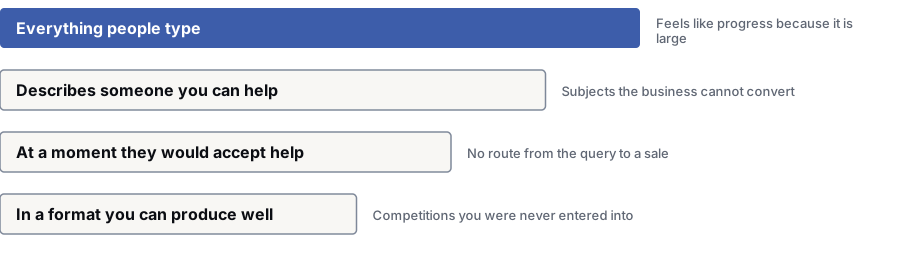
- 1Everything people type — The raw export. More rows than the business could turn into pages in five years, and none of them says what to do on Monday.Feels like progress because it is big
- 2Describes someone you can help — Checked against what you sell and who buys it. Write this down as one line per offering before you open any tool.Subjects the business can’t turn into sales
- 3At a moment they would accept help — The intent behind the query. Read it from the results page instead of a difficulty score. What ranks now shows what the query is worth.No path from the query to a sale
- 4In a format you can produce well — Whether businesses like yours can rank at all, and whether you can answer better than the pages already there.Results pages you could never have won
The method
How to do keyword research in six steps
The order matters more than the tools. Each step narrows the list with a different kind of evidence; skip one and you end up with a list nobody can act on.
Write down what you sell and who buys it
Write one line per offering: what it is, who it is for, what it replaces and what a good customer looks like. Every later step gets checked against this. Most teams skip it, which is why so many content plans are full of subjects the business can’t sell to.
You get: A one-page description of your offerings and buyers
Collect the language your customers use
Gather phrases your customers wrote or said: sales call notes, enquiry subject lines, support tickets, your site search log, review text and the questions your salespeople answer each week. Add autocomplete, related searches and the questions shown on the results page for your obvious seed terms. You’re building a vocabulary; the shortlist comes later.
You get: A vocabulary list grouped by where each phrase came from
Expand the list and estimate demand
Now open the estimate tools. Keyword Planner reports average monthly searches for advertisers; Google Trends shows relative movement and seasonality, with no raw counts. Sort your vocabulary into three rough bands: meaningful demand, thin demand and almost none. No single figure is precise enough to choose between two similar phrases.
You get: The vocabulary sorted into three demand bands
Check the results page for every candidate
This is the step that changes plans. For each serious candidate, look at what ranks now: the format, the type of organisation, national or local pages, and whether ads, a map, a shopping row or an AI answer sit at the top. This tells you what Google thinks the query means and who should answer it.
You get: A short note per candidate: format, type of site ranking, page features
Group phrases by what the searcher wants
Put phrases together when one page would satisfy anyone typing them, and split them when it wouldn’t, even if the words are nearly the same. Grouping by wording is fast but wrong; comparing results pages is slower and right. When two queries return mostly the same results, Google is treating them as one question.
You get: Groups, each with one question written in plain language
Assign pages, reject the rest, and write down why
Give every surviving group one page, existing or new, and one owner. Put everything else in a rejected column with a one-line reason: no fit with what you sell, the wrong searcher, results you can’t compete in, a format you can’t produce well, or too little demand.
You get: A map of questions to pages, plus a rejected list with reasons
Sources of keyword data
Where keyword demand data comes from
These sources do different jobs. Two measure something directly, two are estimates from a model, and one tells you nothing about volume at all.
| Dimension | What it reports | What it can’t tell you | Best used to decide |
|---|---|---|---|
| Search Console | Your own impressions, clicks and average position, plus the queries that triggered them. All measured, none estimated. | Anything about queries you have never appeared for. It also hides rare queries, so the list is never complete. | Which existing pages to improve first, and which questions you are close to winning. |
| Keyword Planner | Average monthly searches, built for advertisers estimating reach. Close variants are grouped together. | How much a query is worth to your business, or how that average spreads across the year. | A rough order of magnitude, and whether advertisers want the phrase at all. |
| Google Trends | Relative interest over time and by region, shown as an index with no raw counts. | Absolute volume, and anything about queries below its reporting threshold. | Seasonality, whether a subject is growing or fading, and differences between regions. |
| The results page itself | Who ranks now, in what format, and what Google has decided the query means. | How many people search for it, and whether those people buy anything. | Whether a business like yours can compete, and what shape the page needs to take. |
| Your own business records | The words customers use, the objections they raise, and which enquiries turned into revenue. | How many strangers type those same words into a search box. | Which questions are worth answering even when the estimated volume looks small. |
What to skip
Keyword research tasks that waste your time
These tasks are common and sound sensible, but none leads to a decision. Dropping them is usually what lets you finish.
- Chasing a target keyword density. There is no ratio to hit. Writing towards one makes the page worse to read, and readability is what gets judged.
- Treating a third-party difficulty score as the final word. It models link counts and can’t judge whether you can answer better than the pages ranking now. Check the results page instead.
- Building a huge long-tail export. Thousands of near-identical phrasings rarely mean thousands of opportunities. Usually they mean one page with a broad enough answer.
- Making a separate page for every phrasing. That is how a site ends up with several pages competing for one question and none of them clearly winning.
- Planning pages for queries you can’t serve. Where every result is a nearby business, a national page is effort spent on results you could never win.
- Rerunning the export because six months have passed. The words people search with change slowly. Your Search Console data changes weekly, so that is the file to review regularly.
- Arguing about the volume figure. If a decision depends on whether a phrase gets four hundred or seven hundred searches a month, volume isn’t what the decision depends on.
Related guides
What to read before and after keyword research
Questions
Keyword research questions
Do I need a paid keyword tool?
No, not to start. Search Console gives measured data on your own queries, Keyword Planner gives estimates built for advertisers, autocomplete and related searches show how people phrase things, and the results page shows who you’re up against. All four are free.
Paid tools earn their money on breadth and speed: what competitors rank for, large exports, movement over time. They don’t make the estimates more accurate, and can’t tell you which queries your sales team values.
How accurate are search volume numbers?
Search volume numbers are estimates from a model, so treat them as an order of magnitude. Tools disagree because each is built on different panels and extrapolations.
Don’t use the number to break ties. Use it to separate hundreds of searches a month from a handful a year, then decide on better evidence: who is searching, what the results page rewards, and whether the query links to something you sell.
Should one page target one keyword?
One page should answer one question, and all the phrasings of that question belong on the same page.
The test is whether the people typing each phrase want the same thing. "Cost of a new boiler" and "how much is a boiler installation" want the same page. "Boiler installation cost" and "boiler installers near me" don’t: the first wants a number, the second a list of suppliers.
How many keywords should be in the plan?
Fewer than you expect, and each one tied to a named page and a named owner. Thirty questions you will answer well are worth more than eight hundred rows you won’t.
Keep a rejected column too: every phrase you decided against, with one line saying why, so nobody reargues it when a new colleague reruns the export.
What if everything relevant is dominated by big publishers?
Then that part of the market is closed to you for now. Go narrower instead of writing a better version of the same article: a segment, a constraint, a location, a use case or a price point.
Or compete on what big publishers lack. Original data, a working tool or first-hand experience are hard to copy when a publisher covers a subject from a distance.
References
Sources for how to do keyword research
The official documents and research this page is based on. Platform rules change, so check the source before you act on a detail.
Start here
Bring your query data and we will go through it with you
Open your Search Console export with us, and we’ll sort the questions you’re close to winning from the ones you could never have won. It takes forty minutes, and you keep the notes.
Want to see how your own site stacks up? Get my free SEO audit