
Local search
Do I need a website for local SEO if I have a Business Profile?
Published by Zubair Afzal, responsible editor
First published Updated 8 min read
Two different jobs
What each one does for you
Your Google Business Profile is the listing that appears on Google Maps and in the map box at the top of local searches. It shows your hours, phone number, reviews and photos. For a lot of local businesses it is where the first call comes from, and it is free.
Your website is where Google learns what you actually do in detail, and where a careful customer goes before picking up the phone. A profile can say “plumber”. A website can say “boiler repair, drain unblocking and bathroom fitting in Hamilton and Burlington”, with a page for each.
The two work best together. The profile gets you into the map; the website gives Google, customers and AI assistants the detail that decides whether you are the right answer.
Side by side
Business Profile or website: what each can do
| Dimension | Google Business Profile | Your website |
|---|---|---|
| Where it shows | Google Maps and the map box in search | Ordinary search results, AI answers that link to it, and anywhere you share the address |
| Cost | Free | A domain name and hosting, plus the build |
| Who controls it | You, but Google sets the format and the rules, and others can suggest edits | You, entirely |
| Detail it can hold | Categories, a short description, services, hours, photos, reviews | A full page for each service and area, prices, your story, answers to customer questions |
| Helps you show for | Searches close to your location for your main categories | Specific services, questions and areas your pages describe |
| Reviews | Collected and shown here | You can show genuine reviews and link to the profile |
Without a website
What you miss with a profile alone
- You mostly show up for your main category
- Google’s local guidance says results are based on relevance, distance and prominence. With no pages about your individual services, Google has less to judge relevance by for the specific jobs you want.
- Customers who check you out find nothing
- Some customers look for a website before calling, especially for bigger jobs. If there is none, the competitor with a clear site, prices or examples of work often gets the call.
- AI assistants have little to describe
- When someone asks an AI assistant or Google’s AI Mode who to call, the answer draws on what the web says about you. A profile alone gives it very little, and what it does say may come from directories you do not control.
- You depend on one company’s rules
- A profile can be suspended, edited by others or changed by Google’s own updates. A website is the one place online that only you control.
Quick check
Do you need a website? A quick check
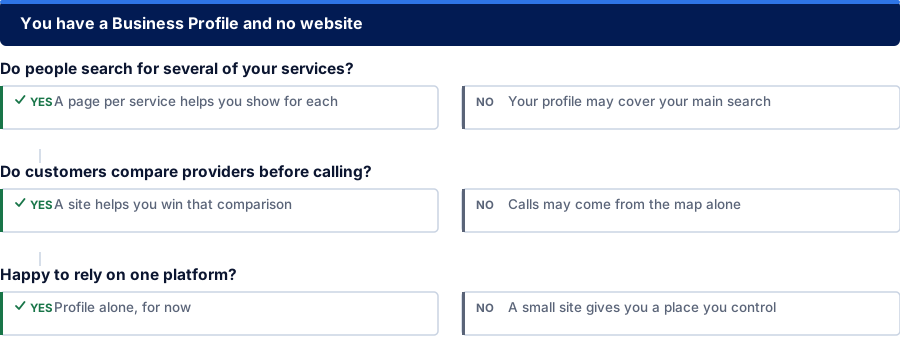
Do people search for several of your services?
Yes: A page per service helps you show for each
No: Your profile may cover your main search
Do customers compare providers before calling?
Yes: A site helps you win that comparison
No: Calls may come from the map alone
Happy to rely on one platform?
Yes: Profile alone, for now
No: A small site gives you a place you control
The minimum
A small website that does the job
You do not need a big site. For most local businesses this is enough to start:
- A home page that says what you do and where, in the first line.
- One page for each main service, in the words customers use, with what it includes and the areas you cover.
- A contact page with exactly the same business name, address and phone number as your profile.
- Real photos of your work, your team or your premises, not stock images.
- A page title on every page that names the service and the place.
- Your website address added to your Business Profile, and the site added to Google Search Console.
- Pages that load quickly and read well on a phone.
Making them agree
Four steps to make your profile and website work together
Match your details exactly
Use the same business name, address, phone number and hours on the profile, the website and the main directories. Google’s guidelines ask you to use your real business name, as customers see it, with no extra keywords added.
You get: One version of your details, used everywhere
Match your services
List the same services on the profile that you have pages for on the website. If you add a service to one, add it to the other.
You get: Profile services and website pages that line up
Link them both ways
Put the website address on the profile, and link to your profile (or embed a map) from your contact page.
You get: A link in each direction
Keep both current
Change holiday hours, prices and photos in both places at once. Out-of-date details are one of the most common reasons customers lose trust.
You get: A habit, not a project
Questions
Website and profile questions
Can I rank on Google Maps without a website?
Yes. A Business Profile can show on the map and in the map box without a website. But Google has less to go on when deciding what you are relevant for, and customers who want to check you out before calling find nothing beyond the listing.
Does Google still make free websites from a Business Profile?
No. Google turned off the simple websites it built from Business Profiles (addresses ending in business.site) in 2024. From March 2024 they redirected to the profile, and from June 2024 they stopped working. If yours was one of them, the website field on your profile may now be empty or out of date.
What is the smallest website worth having?
A home page, one page for each main service you sell, and a contact page. Every page should give the same business name, address and phone number as your profile, and the site should work well on a phone.
Is a free website builder good enough?
Often, for a start. What matters is that you can set each page’s title, write a page per service, connect your own domain name and see the site in Google Search Console. A builder that blocks those things will hold you back later.
Should my website address go on my Business Profile?
Yes. Add it in the website field. Most businesses link the profile to the home page; a business with several locations usually links each profile to that location’s own page.
References
Sources for do i need a website for local SEO
The official documents and research this page is based on. Platform rules change, so check the source before you act on a detail.
Related
Keep reading on do i need a website for local SEO
Start here
Next: the free tool Google gives you
Lesson three shows you what to look at in Google Search Console, the free report that tells you how Google sees your website.
Rather check it yourself? Try our free SEO tools