
Websites for recruiters
Staffing agency website design that fills roles from both sides
Websites for staffing agencies and recruitment firms that work for both sides of the hire: a job board candidates can search and apply from on a phone, pay ranges and AI-screening notices where the law asks for them, a request-talent form employers finish in a minute, and a portal for timesheets and applications.
- Website from $150/month, yours after 12 payments
- SEO plans from $149/month
The short answer
What should a staffing agency website have?
A staffing agency website needs a searchable job board with mobile apply, a separate path for employers to request talent, and job ads that carry the pay range, vacancy status, equal-opportunity statement and any AI-screening notice the job’s location requires. It should state that candidates are never charged a fee, show your licence number once you hold one, and protect candidate data.
- Price
- $1,500 upfront, or $150/month × 12
- Ownership
- Yours after 12 payments
- Hosting and care
- $29 or $49/month
- Build time
- About 4 weeks for a local site
Our designs
Our website and app designs for recruiters
Ready-to-launch concept designs for fictional businesses: pick one and make it yours. 6 websites, 2 apps and 1 software design, each opening on a desktop and a phone, with your brand, content and photos going in. All apps and software
9 of 9 examples shown
Concept website
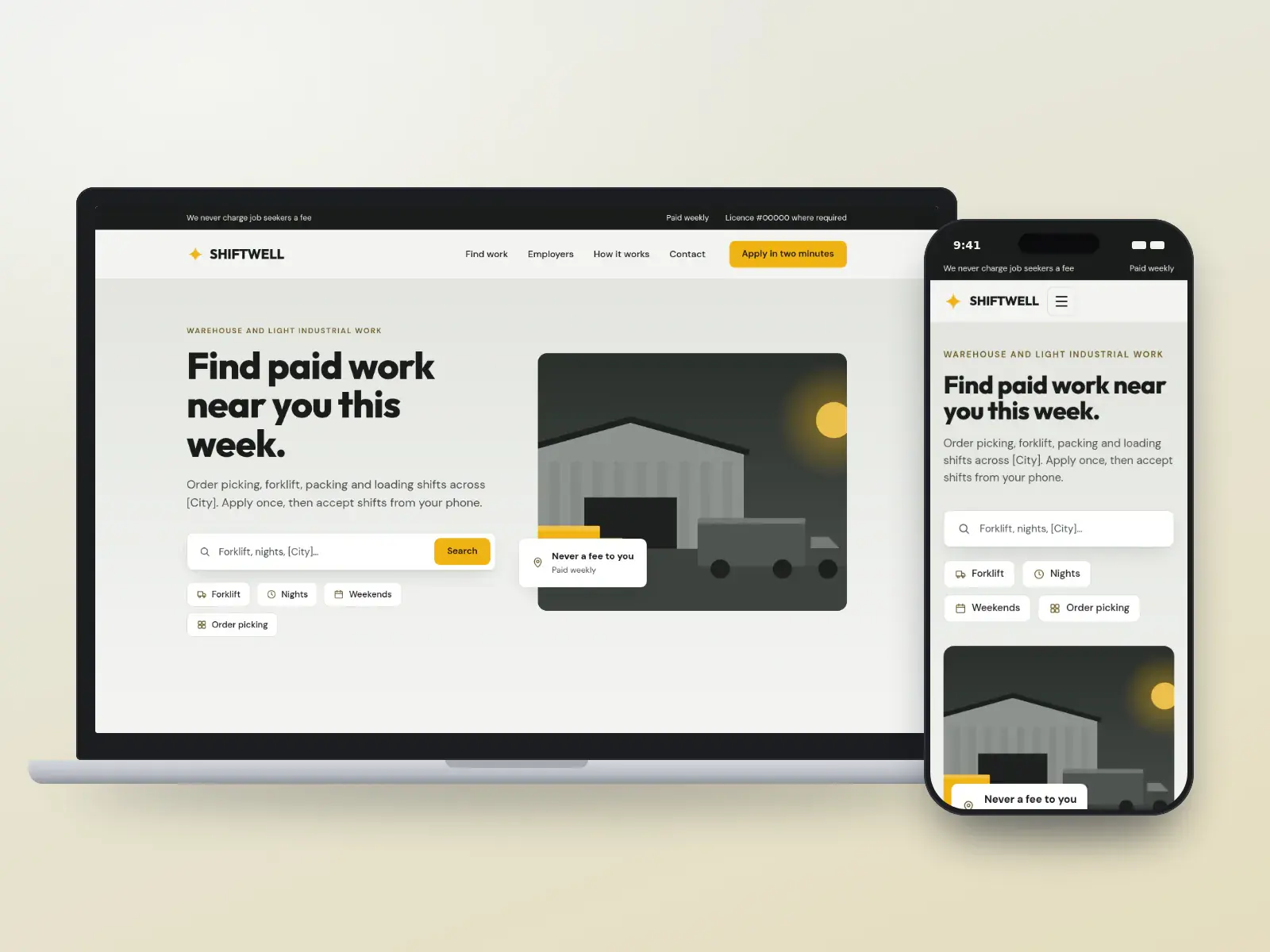
Shiftwell Staffing
Light industrial and warehouse staffing
Concept design. The business is fictional.
- Bold
- Tool-first
Local website: yours after 12 payments, or $1,500 upfront
Concept website
Brightlane Talent
Agencies selling to hiring managers
Concept design. The business is fictional.
- Friendly
- Tool-first
Local website: yours after 12 payments, or $1,500 upfront
Concept website
Ashcombe Search Partners
Retained executive search firms
Concept design. The business is fictional.
- Luxury
- Dark
Growth website: yours after 12 payments, or $4,000 upfront
Concept website
Clockwise Staffing
Temp agencies with many workers on assignment
Concept design. The business is fictional.
- Minimal
- Tool-first
Local website: yours after 12 payments, or $1,500 upfront
Concept website
Northwind Clinical Talent
Healthcare niche recruiters
Concept design. The business is fictional.
- Friendly
- Bold
Local website: yours after 12 payments, or $1,500 upfront
Concept website
Kernel Talent
Software and engineering recruiters
Concept design. The business is fictional.
- Dark
- Data-led
Local website: yours after 12 payments, or $1,500 upfront
Concept app
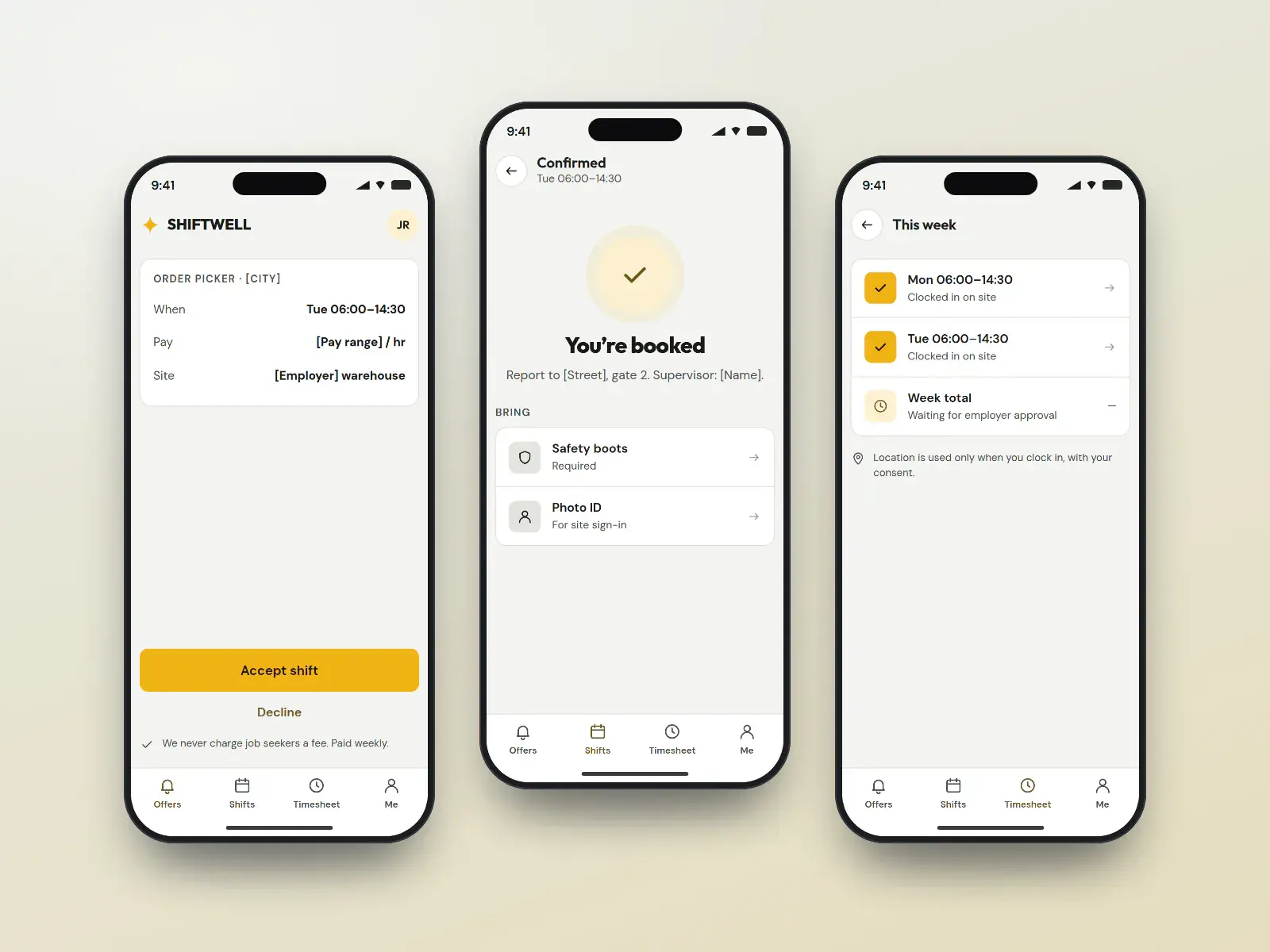
Shiftwell shift app
Workers accepting shifts and clocking in
Concept design. The business is fictional.
- Bold
- Friendly
Quoted per project after a call
Concept app
Northwind candidate app
Candidates following their application
Concept design. The business is fictional.
- Friendly
- Minimal
Quoted per project after a call
Concept software
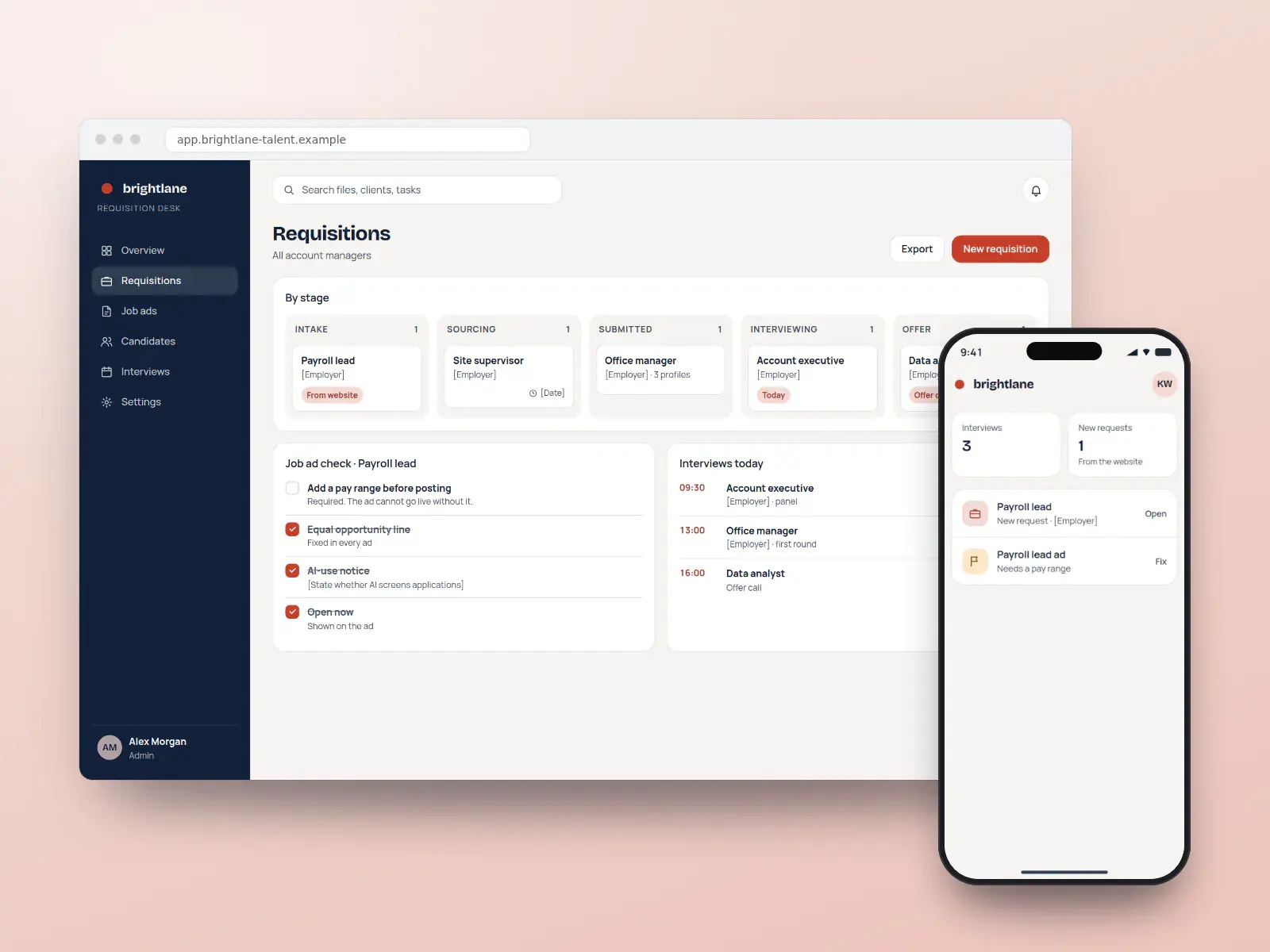
Brightlane requisition desk
Recruiters running requisitions and pipelines
Concept design. The business is fictional.
- Data-led
- Corporate
Quoted per project after a call
Pay monthly, own it
High-converting websites from $150/month
Pick a design, add your brand, content and photos, and launch. Yours after 12 payments, with SEO built in from day one.
- Local website
- $150/monthUp to 25 pages · yours after 12 payments, or $1,500 upfront
- Growth website
- $400/monthUp to 100 pages · yours after 12 payments, or $4,000 upfront
Built in
What every recruiter website includes
A job board candidates can use on a phone
Search by role, location, shift and work mode, apply with a CV upload or a short form, and get a text when a recruiter reads the application. Each job has its own page with JobPosting markup so it can appear in Google’s job search, and the markup comes off when the role closes.
Pay ranges and required notices on every posting
Job templates hold the pay range, the equal-opportunity line, the AI-screening disclosure and the vacancy-status statement as required fields, switched on by the job’s location so an ad cannot go live without them.
A request-talent path for employers
Hiring managers say what kind of hire, which role and when, and the request reaches the right desk with the details attached, separate from the candidate flow.
Timesheets and shifts in a portal
Assignment workers submit hours and accept shifts; clients approve hours online. Fewer calls on payroll day, and a record when a dispute arises.
Candidate data handled with care
CVs stored encrypted with a retention period, consent captured for talent-pool alerts, and a page explaining how candidates can see or delete what you hold on them.
Specialty and city pages that rank
A page for each profession and each city you recruit in, listing current roles and the recruiter who covers them, so both candidates and employers find the right desk.
How clients search
The searches and pages a recruiter website needs
Two very different people search for a staffing agency. Job seekers type the work and the place, usually on a phone between shifts or after one, and often meet the role first in Google’s job listings or on a job board before checking the agency itself. Employers search when a gap opens and the week is already short: a temp agency nearby, a recruiter for one sector, an executive search firm for a single appointment. Both read reviews, and hiring managers increasingly ask peers and AI assistants which agencies cover their city and trade.
- “temp agency near me”
- “warehouse jobs hiring now near me”
- “nursing agency jobs”
- “executive search firm for a cfo”
- “how much do staffing agencies charge employers”
- “temp to hire agency”
- “it recruitment agency toronto”
- “light industrial staffing company”
- 01
A page for every opening
Each job lives at its own address with the pay range, location, shift, vacancy status and JobPosting markup, so it can appear in Google’s job results and be shared by text. When the role is filled the page says so and the markup is removed.
- 02
How hiring with us works
Temporary, temp-to-hire, permanent and retained search explained for an employer, including how markups and placement fees are set and what happens if a placement leaves early, so a hiring manager understands the model before the first call.
- 03
Sector pages
Light industrial, healthcare, office, technology: one page per sector you staff, naming the roles you fill, the certificates candidates bring, and the recruiter who covers that desk. These are the pages that win searches combining a trade with a city.
- 04
Branch and city pages
Each office gets its address, hours, walk-in times and the roles open nearby. Job seekers without a car want to know whether the branch is on a bus route, and employers want proof you actually recruit in their area.
- 05
Your rights as a worker
No fees, the pay schedule, public holidays, what happens when an assignment ends, and how to ask a person to review an application that software screened. Written plainly, translated where your workers need it, and linked from every job page.
- 06
AI-use and privacy notice
Which tools read applications and what they do, the bias audit summary where New York City law requires one, which employers see a CV, and how long data is kept. One page that every posting and the apply form can point to.
- 07
Request talent
A short employer form for the kind of hire, the role, the start date and the site, routed to the right desk. It is the page most employer searches should land on, and it stays separate from anything a candidate sees.
SEO, AEO and GEO
How recruiters get found in Google and in AI answers
Google’s job search
Clean JobPosting markup on each job page, with pay, location, employment type and closing date filled in from the feed, is what lets roles show in Google’s job results. Google asks that only real, open positions be marked up, so closed roles come down promptly.
A Business Profile per branch
Each office claims its own Google Business Profile with a fitting category such as employment agency, temp agency or executive search firm, its own hours and phone. Ask every placed worker and every client for a review, never only the happy ones.
Answers assistants can quote
Short, dated answers to the questions both sides ask: what a placement fee covers, how temp-to-hire converts, when workers get paid. Clear facts in the page text are what AI Overviews and chat assistants can quote. EmploymentAgency and Organization structured data helps Google read the page; no markup makes an assistant cite you.
One feed, matching everywhere
Jobs pushed to job boards from the same feed that builds your site keep titles, pay and locations consistent, and the apply link points back to your domain. Mismatched details across boards are what candidates and search engines both distrust.
Compliance
The rules for recruiters, handled in the design
Recruitment ads are regulated in more places every year: pay ranges, AI-screening notices, equal-opportunity wording and agency licensing. These are the rules that shape a staffing site’s job postings and apply flow, and what each design does about them.
Sources gathered October 6, 2026. This is how our designs handle these rules, not legal advice: rules change and differ by province and state, so your employment lawyer has the final word, and you approve every page before it goes live.
- Ontario · ESA job postings
Pay, AI use, vacancy status and no Canadian-experience requirement
Since January 1, 2026 Ontario’s Employment Standards Act requires employers with 25 or more employees to state expected pay or a range (with a capped width) in publicly advertised postings, disclose AI used to screen, assess or select applicants, say whether the post is for an existing vacancy, and not require Canadian work experience. Interviewed applicants must hear back within 45 days. Ontario job templates make these fields required.
Ontario — Requirements related to publicly advertised job postings
- Ontario · ESA licensing
Temporary help agencies and recruiters need a licence
Since July 1, 2024 temporary help agencies and recruiters, as the Act defines them, need a licence to operate in Ontario, the province keeps a searchable register of licensees, and clients can be penalised for knowingly using an unlicensed one. Showing the licence number in every footer is a convention the designs follow, not a stated duty; it stays a placeholder until you supply yours.
Ontario — Licensing for temporary help agencies and recruiters
- Ontario · ESA Part XVIII.1
No fees charged to workers
Ontario forbids a temporary help agency from charging assignment employees a fee for becoming its employee, getting assignments, help with a CV or interview preparation, and separate Ontario law bars recruiters from charging foreign nationals for finding them work. Agency sites say plainly that workers never pay, and the apply flow asks for no payment of any kind.
- British Columbia · Pay Transparency Act
Expected pay in every BC job ad
Since November 1, 2023 British Columbia’s Pay Transparency Act requires employers to include the expected wage or salary, or its range, in publicly advertised job opportunities, and bars asking applicants about pay at past jobs. BC postings carry the range, and the apply form has no pay-history question.
Government of British Columbia — Pay Transparency Act fact sheet
- US · state pay transparency
Salary ranges in covered US job ads
Colorado, California, Washington, New York, Illinois, Minnesota, New Jersey, Vermont, Massachusetts and other states now require a good-faith pay range in covered postings, with thresholds that differ by state. New York’s law names employment agencies, and California extends the duty to third parties that post for an employer. The template blocks publishing for a covered location without a range.
- New York City · Local Law 144
Automated screening needs an audit and a notice
New York City bars employers and employment agencies from using an automated employment decision tool unless it had a bias audit within the past year, a summary of the results is public, and candidates got notice. Where a client screens NYC applicants with such a tool, the site publishes the audit summary and the notice.
NYC Department of Consumer and Worker Protection — Automated employment decision tools
- US · Title VII and ADEA
Job ads without discriminatory preferences
Title VII makes it unlawful for an employment agency to publish a job notice indicating a preference based on race, colour, religion, sex or national origin; only religion, sex or national origin can ever be a bona fide occupational qualification, never race or colour. The ADEA bars age preferences in ads. Templates flag words like “young”, “recent graduate” or “native speaker” for review.
EEOC — Prohibited employment policies and practices (job advertisements)
- Canada · PIPEDA
Candidate data used only as candidates were told
PIPEDA requires meaningful consent and limits use to the purposes identified when information was collected. The application form says which employers may see a CV and how long it is kept, and talent-pool alerts are a separate, optional consent.
Office of the Privacy Commissioner — PIPEDA requirements in brief
Everything for recruiters
Websites, apps, branding and SEO for recruiters
Websites
Recruiters websites built on the designs above, fast and set up for search.
From $150/month
Apps
Staffing runs on speed: the first agency to confirm a worker for tomorrow’s shift fills it. An app puts shift offers, timesheets and pay stubs in workers’ pockets.
Quoted per project
Apps for recruitersBranding
Recruiters need a brand two audiences trust: employers who want reliability and candidates who want to be treated fairly. Most agency brands look the same, so being recognisable is the advantage.
Quoted per project
Branding for recruitersSEO and leads
Ongoing SEO that checks your site every week and fixes what is safe to fix, for more applications and employer job orders.
From $149/month
SEO plans and prices
Pricing
What a recruiter website costs
The price of a recruiter website is the same as any website we build: pay upfront and save, or spread it over 12 months.
Local website
$150/month × 12
or $1,500 upfront. Yours after the 12th payment.
- Up to 25 pages
- Any design on this page
- Technical SEO at launch
- Hosting and care $29/month
Growth website
$400/month × 12
or $4,000 upfront. Yours after the 12th payment.
- Up to about 100 pages
- Teams, offices and more integrations
- Planned with an advisor
- Hosting and care $49/month
SEO plans
$149/month
Local $149 · Growth $399
- Checks your site every week and fixes what is safe to fix
- New pages every month
- 7-day trial
Prices in US dollars. How payments, hosting and ownership work.
How it works
How your recruiter website goes live
- 01
Pick a design
Choose one, or ask for another. Tell us whether you place temps, permanent hires or executives, and in which cities.
- 02
Send your details
Logo, recruiter bios, your agency licence number, your ATS or job feed, and the equal-opportunity and AI-use wording you use.
- 03
Review before launch
You check job templates, pay-range rules and notices against each jurisdiction you post in, and ask for changes.
- 04
Launch and grow
We connect the job feed, redirect old job URLs, go live, and build specialty and city pages that bring in applicants and clients.
Pick my design
See your website before you pay for it
Choose a design and tell us about your business. An advisor emails you to plan a preview with your name, your colours and your details, and the price options. Nothing is charged until you decide.
- 1An advisor replies by email
- 2We plan your preview and scope
- 3You decide, with every price in writing
Questions
Recruiters: common questions
- How much does a staffing agency website cost?
- A staffing agency website of up to 25 pages is $1,500 paid upfront, or $150 a month for 12 months, and it is yours after the 12th payment. A larger site of up to about 100 pages is $4,000, or $400 a month. Hosting and care is $29 or $49 a month. Prices are in US dollars.
- Do job ads on my agency website need a salary range?
- In a growing number of places, yes. Colorado, California, Washington, New York, Illinois and several other states require a good-faith pay range in covered postings, British Columbia has required one since November 2023, and Ontario has required one from employers with 25 or more staff since January 1, 2026. Our template makes the range required wherever the job’s location calls for it.The employer you recruit for sets the range; your employment lawyer confirms which rules apply to each posting.
- Do I have to tell candidates we use AI to screen applications?
- Increasingly, yes. Since January 2026 Ontario postings by employers with 25 or more staff must disclose AI used to screen, assess or select applicants, and New York City requires a bias audit, a public summary and candidate notice before an automated employment decision tool is used. Each design has an AI-use line on postings and a page for the audit summary where one applies.
- Can the website pull jobs from our applicant tracking system?
- Usually, yes. Most applicant tracking systems publish a job feed or an API, and the board reads it so recruiters post once. Each job still gets its own page on your domain with JobPosting structured data, which keeps the search traffic and the applications on your site instead of the ATS vendor’s.
- Should employers and candidates have separate sections?
- Yes. They come with different questions and rarely want to read each other’s pages. The designs split the two on the first screen, with a job search for candidates and a request-talent path for employers, and each side gets its own navigation, calls to action and contact routing.
- Does a staffing agency website need to show its licence number?
- Where you need a licence, showing its number helps. Ontario has required temporary help agencies and recruiters to hold one since July 2024 and keeps a register employers can search, so a number in your footer lets a client check you in seconds. Each design has the field, left empty until your licence is issued.Whether a rule requires the number on your site, and which licences apply elsewhere, is for your employment lawyer to confirm for each province or state you recruit in.
- Will my recruiter website rank on Google?
- It launches with the technical SEO done: fast pages, clean structure, structured data, local pages and redirects from your old site. To keep climbing, a BOOSTD SEO plan from $149 a month runs 262 checks on your site every week, fixes what is safe to fix and gets the rest ready for your OK.No one can promise a position on Google, and we never do. Google warns businesses about anyone who does.
- Can I get one of these recruitment website designs?
- Yes. Each is a complete, ready-to-launch website design BOOSTD made for recruiters. Pick one and we make it yours, with your name, colours, photos, content and the licence or compliance details your industry expects, from $150 a month and yours after 12 payments.Approved client sites are shown with a “Client work” tag, and only with the client’s written permission.
Guides for recruiters
Reading for recruiters before you build
- Planned guidePay transparency in job ads: what staffing agencies must post, by jurisdictionPlanned: written with a named author and published once reviewed
- Planned guideDisclosing AI screening to candidates without scaring them offPlanned: written with a named author and published once reviewed
- TrackingHow to set up conversion tracking for calls and forms
- Local SEOHow to do SEO for multiple locations, one branch at a time
More on staffing agency website design
- Immigration attorney websites
- Marketing for recruitment firms SEO and employer demand generation for staffing agencies.
- Websites for consultants
- Websites for immigration consultants
- Tracking applications and job orders
- A quote for a recruiter with many offices More locations than a plan covers? Tell us about the network.
Free, about a minute, nothing changes on your site
Start with a free checkup of your current site
See what holds your current website back across every point, free, before you choose a design.
- Free, no cardNo sign-up to see your preview.
- Read-onlyNothing changes on your website.
- 90-day guaranteeIf you join: a better score, or your next month free.