
Websites for orthodontists
Orthodontic website design that turns smile questions into consults
Orthodontic website design for registered orthodontists: a smile assessment that turns a curious parent or adult into a booked consult, braces and clear aligners explained side by side, a referral path for the dentists who send you patients, and virtual first looks that start from a few photos. Local SEO is built in, so families searching nearby can find the practice.
- Website from $150/month, yours after 12 payments
- SEO plans from $149/month
The short answer
What should an orthodontist website include?
An orthodontic website should open with a short smile assessment, compare braces and clear aligners honestly, explain how payment plans and insurance coverage work, give referring dentists a secure way to send records, and offer a virtual first look from photos. In Ontario only registered orthodontic specialists may use the title orthodontist, and a general dentist offering aligners must say they are a general dentist.
- Price
- $1,500 upfront, or $150/month × 12
- Ownership
- Yours after 12 payments
- Hosting and care
- $29 or $49/month
- Build time
- About 4 weeks for a local site
Our designs
Our website and app designs for orthodontists
Ready-to-launch concept designs for fictional businesses: pick one and make it yours. 7 websites, 2 apps and 2 software designs, each opening on a desktop and a phone, with your brand, content and photos going in. All apps and software
11 of 11 examples shown
Concept website
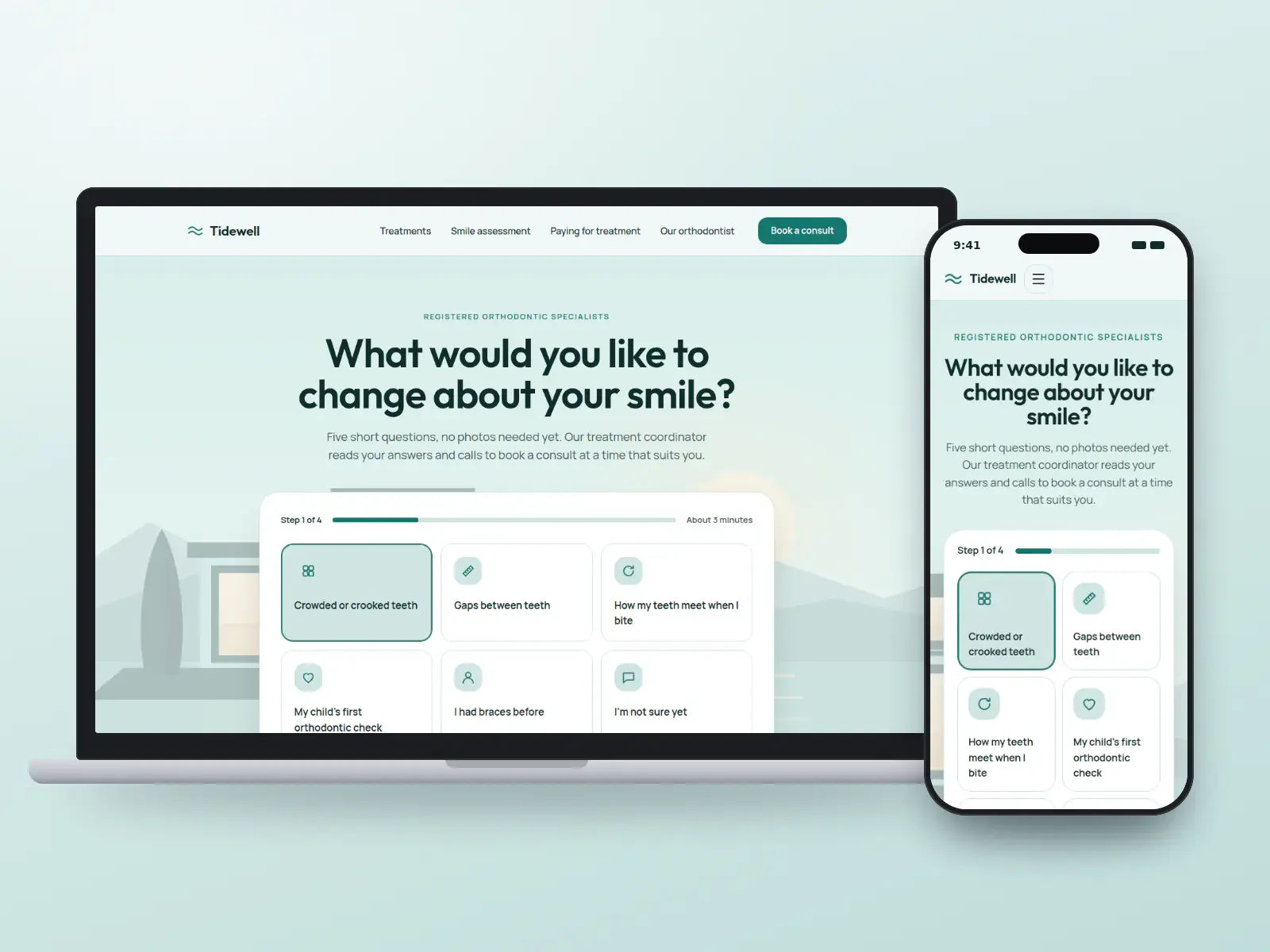
Tidewell Orthodontics
Practices that want consults from the homepage
Concept design. The business is fictional.
- Tool-first
- Friendly
Local website: yours after 12 payments, or $1,500 upfront
Concept website
Archway Orthodontic Studio
Adult-focused practices
Concept design. The business is fictional.
- Luxury
- Dark
Local website: yours after 12 payments, or $1,500 upfront
Concept website
Kestrel Orthodontics
Practices where cost questions stall the yes
Concept design. The business is fictional.
- Tool-first
- Data-led
Local website: yours after 12 payments, or $1,500 upfront
Concept website
Northbeam Orthodontics
Practices that grow through dentist referrals
Concept design. The business is fictional.
- Dark
- Data-led
Local website: yours after 12 payments, or $1,500 upfront
Concept website
Saltmarsh Orthodontics
Practices offering a first look by video
Concept design. The business is fictional.
- Minimal
- Warm
Local website: yours after 12 payments, or $1,500 upfront
Concept website
Fernway Orthodontics
Practices with offices in several towns
Concept design. The business is fictional.
- Map-led
- Friendly
Growth website: yours after 12 payments, or $4,000 upfront
Concept website
Bayleaf Orthodontics
Practices that see children for an early check
Concept design. The business is fictional.
- Editorial
- Warm
Local website: yours after 12 payments, or $1,500 upfront
Concept app
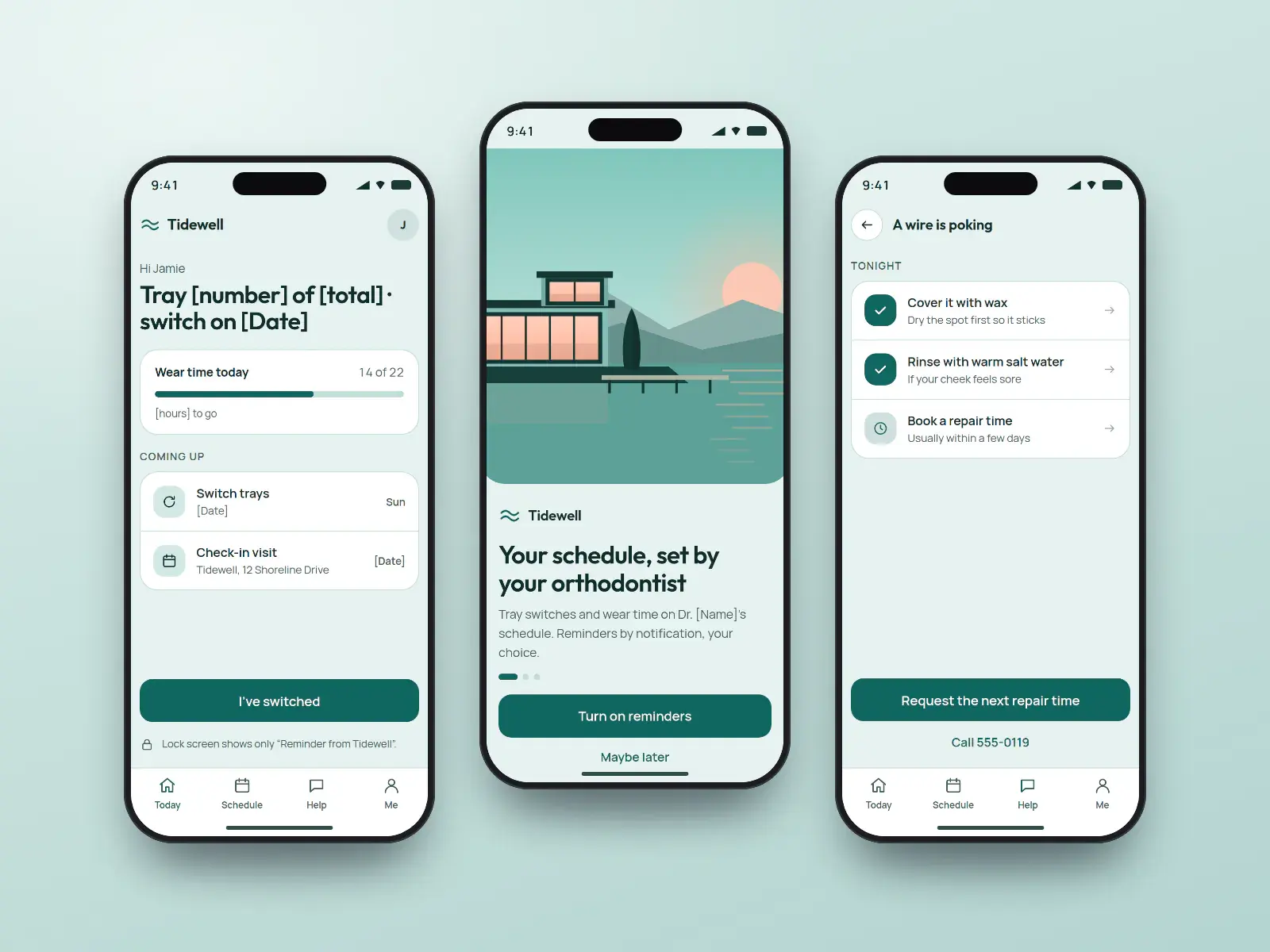
Tidewell tray app
Patients wearing clear aligners or elastics
Concept design. The business is fictional.
- Friendly
- Minimal
Quoted per project after a call
Concept app
Archway check-in app
Adults sending progress photos between visits
Concept design. The business is fictional.
- Luxury
- Minimal
Quoted per project after a call
Concept software
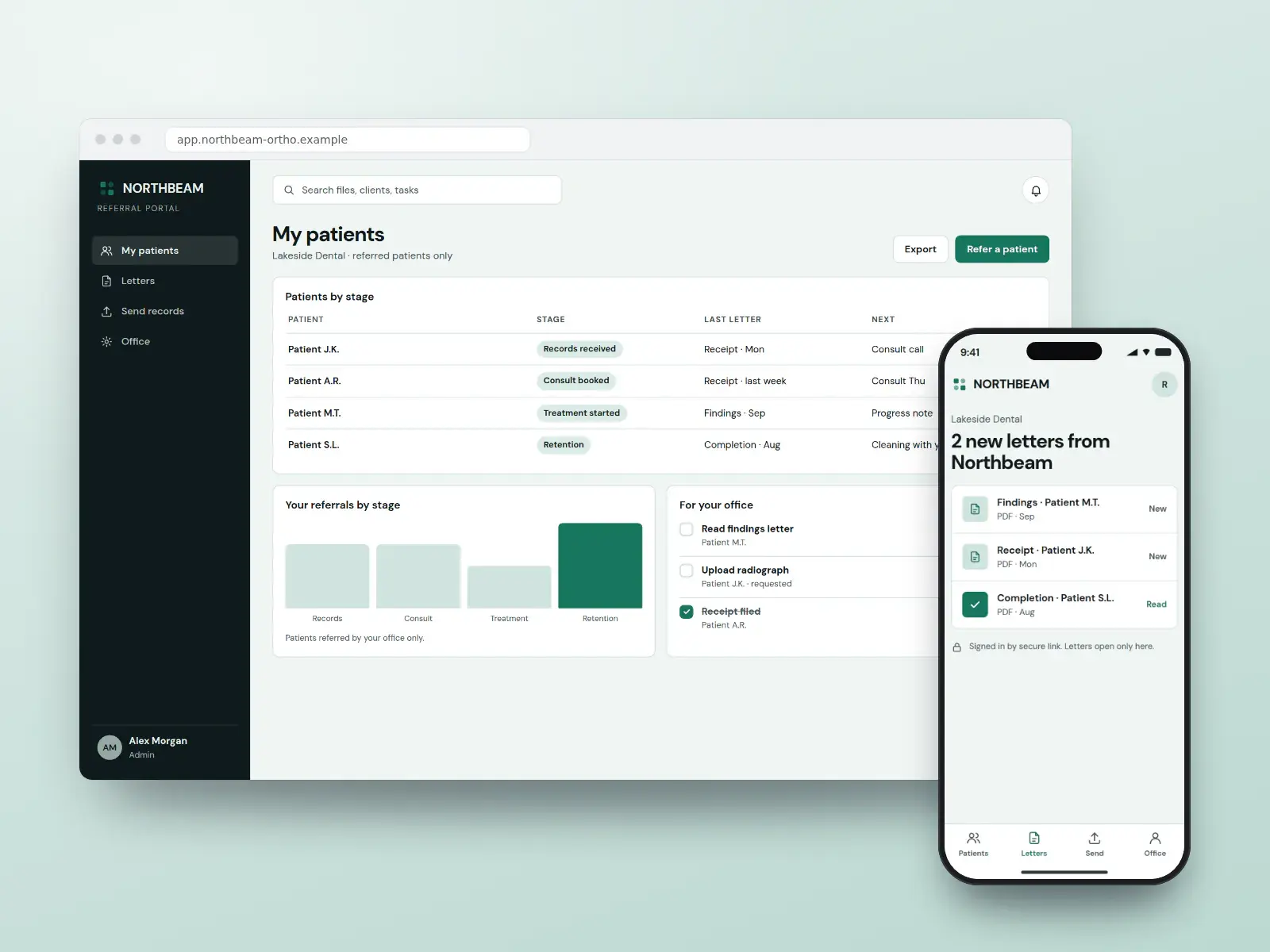
Northbeam referral portal
Referring dentists tracking shared patients
Concept design. The business is fictional.
- Dark
- Data-led
Quoted per project after a call
Concept software
Fernway coordinator desk
Treatment coordinators across several offices
Concept design. The business is fictional.
- Corporate
- Data-led
Quoted per project after a call
Pay monthly, own it
High-converting websites from $150/month
Pick a design, add your brand, content and photos, and launch. Yours after 12 payments, with SEO built in from day one.
- Local website
- $150/monthUp to 25 pages · yours after 12 payments, or $1,500 upfront
- Growth website
- $400/monthUp to 100 pages · yours after 12 payments, or $4,000 upfront
Built in
What every orthodontic practice website includes
A smile assessment that books consults
Five quick questions about what the patient wants changed, their age and how they found you, sent to your treatment coordinator over a secure form. The coordinator calls back with context, and the practice sees which questions bring in starts.
Braces and clear aligners, compared fairly
A page that sets out what each option can and cannot move, how often visits happen and what wear time means, without naming aligner brands. Adults stop asking whether aligners will work for them and start asking when they can come in.
Payment plans without a single number
How orthodontic benefits, monthly payment plans and sibling scheduling work, written as steps, with every fee kept for the consult room. A coverage-check request lets the office confirm the plan’s orthodontic benefit first.
A referral desk for general dentists
Referring dentists upload records and radiographs through an encrypted link, get a receipt, and receive your findings letter after the consult. Their practice names stay off the public site unless they agree.
Virtual consults from three photos
Patients book a video call and upload front, smile and bite photos first through a secure tool, not email. The page says plainly that a video call is a first look, and that scans and radiographs come before any plan.
Titles that match the register
Every orthodontist’s page shows their specialist registration. If a practice also employs general dentists, their pages say general dentist, so the word orthodontist never sits beside someone who is not registered as one.
Tracking kept away from teeth photos
Traffic is counted without ad pixels on the assessment, upload or booking pages, so nothing a family types or uploads leaves for an ad network. Accessibility is built to WCAG 2.2 AA, tap targets included, because many visitors are on a phone.
Must-have pages
The pages every orthodontic practice website needs
Each page answers a question people ask before they book, and each one can rank for that question on its own.
Book a consult or smile assessment
The first step for a parent or adult, on every page: a short assessment or a consult time, with what the first visit covers and how long it takes.
Braces or clear aligners
What each can and cannot move, visit frequency and wear time, with no aligner brand named. The most searched comparison in the specialty.
Paying for treatment
How the orthodontic benefit in a dental plan is claimed, how monthly plans are agreed in writing, and, in the US, whether HSA or FSA funds can be used. Fees stay in the consult.
Early checks for children
Why a first orthodontic check around age seven is common, and that watching and waiting is a normal outcome of that visit.
Refer a patient
For general dentists: what to send, an encrypted upload, and what letters they receive back at each stage of treatment.
Orthodontic emergencies
A poking wire, a loose bracket, a lost aligner or retainer: what to do tonight and how to request a repair time.
Our orthodontists
Each doctor’s specialist registration or board certification and residency, so the title can be checked, and any general dentists labelled as such.
Accessibility and visiting
An accessibility statement, step-free entry, parking, after-school hours by office, and a way to ask for help with any page.
Search, AI answers and maps
How parents and patients search for orthodontists
Orthodontic searches are rarely urgent: a parent researches for weeks after a dentist mentions crowding, and an adult compares aligners against a specialist late at night on a phone. The click usually goes to the practice whose profile and pages answer cost, treatment length and who does the work before anyone has to call.
How parents and patients search
“Orthodontist near me” and “orthodontist [town]”
Map results lead. A Google profile with the right category, after-school hours and one page per office decides which practice gets the visit.
“Braces vs clear aligners” and “am I too old for braces”
Research questions. A plain comparison page that names what each option suits wins adults who are still deciding.
“How much do braces cost” and “does insurance cover braces”
Cost is asked before anything else. A page explaining benefits, monthly plans and what the consult fee covers keeps the family on your site instead of a price aggregator.
“When should my child see an orthodontist”
Parents searching after a dental check-up. An early-check page with a booking button converts that worry into a visit.
“Orthodontist vs dentist for aligners”
Adults weighing a general dentist or a mail-order kit. A page that states the specialist registration and residency answers it without disparaging anyone.
What we build for search, AI answers and maps
- 01
Google Business Profile per office
Primary category “Orthodontist”, services listed (braces, clear aligners, early checks), office-specific hours and a booking link, matched exactly on each office page.
- 02
Structured data the page supports
Dentist markup for each office with address, hours and the orthodontist named, plus FAQ and breadcrumb markup. No rating or review markup about the practice itself.
- 03
Answers built for AI overviews
Treatment pages open with a direct two-sentence answer (who it suits, typical visit pattern, what affects length), so assistants and featured snippets can quote the practice accurately.
- 04
One set of entity facts everywhere
Practice name, offices, hours, each orthodontist’s registration and residency kept identical across the profile, dental directories, the AAO or provincial association listing where you hold one, and the site.
- 05
Reviews without testimonials on the site
Where your regulator allows review requests, every patient gets the same one, never only happy families; replies never confirm treatment. In Ontario no review appears on the site at all.
- 06
Monthly reporting
Consult requests, assessments started and finished, referral uploads and calls from search, by office, reported monthly. Rankings are tracked, never promised.
No one can promise a ranking or a place in an AI answer. We build the pages, data and profile that search engines and assistants read, and report what changes.
Compliance
The rules for orthodontists, handled in the design
Orthodontic websites answer to a dental college or state dental board, to health-privacy law and to accessibility law. Here is what each asks of an orthodontic practice site, and how every design handles it.
Sources gathered October 1, 2026. This is how our designs handle these rules, not legal advice: rules change and differ by province and state, so your dental college or state board, your privacy officer or your lawyer has the final word, and you approve every page before it goes live.
- Ontario
Who may say “orthodontist”
Ontario recognises two registration categories, general dentist and certified specialist, across eleven specialties including orthodontics, and “orthodontist” is a protected title. An RCDSO discipline panel reprimanded a general dentist whose clinic website held him out as an orthodontic specialist. A general dentist who offers braces or aligners must say they are a general dentist. Every concept carries the specialist registration line.
- US
The AAO’s position on the title
The American Association of Orthodontists says only those who completed dental school and an accredited orthodontic residency should call themselves orthodontists. That is the association’s view; each state dental board sets what is legal. The designs name the doctor’s residency on their page, and we check your state’s board rules.
- Ontario
Patient quotes and embedded reviews
RCDSO advertising guidance bars testimonials, reviews and ratings on a practice’s own site and the social accounts it runs, including patient remarks about a treatment. The Ontario designs therefore show no review feed, no star widget and no patient words. Whether and how an Ontario practice may ask patients for Google reviews is on the lawyer’s list before launch.
- US · California
Finished-case photos
Section 651 of California’s Business and Professions Code covers every healing-arts licensee, orthodontists included: before-and-after pictures must name the procedure in a prominent place, be comparable in pose and lighting, and say the same results may not occur for all patients. Each case caption names the treatment, and the gallery is shot to that standard wherever the practice is.
- US
Pixels on the assessment and booking pages
HHS’s Office for Civil Rights told HIPAA covered entities in 2022 that tracking tools must not disclose patient information to vendors. In June 2024 a Texas federal court vacated the part about public pages that merely identify a visitor, and HHS dropped its appeal; pages where people submit details, such as a smile assessment or consult request, remain the risk, so they carry no ad tracking.
- Ontario
Smile photos and referral records by email
Ontario’s privacy commissioner expects personal health information sent between custodians to be encrypted, and asks for a written policy and the patient’s consent before plain email is used with patients. Smile photos and referral radiographs therefore arrive through an encrypted upload, and the site never asks anyone to email them.
IPC Ontario — Communicating personal health information by email
- US · Virginia and other states
General dentists offering orthodontic care
Virginia’s dental board requires a general dentist who describes the practice by a specialty’s treatments to state, beside their name, that they are a general dentist providing those services; Florida, Pennsylvania and South Dakota have similar disclosure rules. Where a practice employs both, each page says which title applies, and the state’s own rule is checked before launch.
Everything for orthodontists
Websites, apps, branding and SEO for orthodontists
Websites
Orthodontists websites built on the designs above, fast and set up for search.
From $150/month
Apps
Orthodontic treatment runs for months, with aligner changes, elastics and adjustment visits in between: an app keeps patients on track between appointments.
Quoted per project
Apps for orthodontistsBranding
An orthodontic brand speaks to two audiences at once, a parent deciding for a child and an adult deciding for themselves, and it must not imply a specialty its doctors do not hold.
Quoted per project
Branding for orthodontistsSEO and leads
Ongoing SEO that checks your site every week and fixes what is safe to fix, for more consult requests and dentist referrals.
From $149/month
SEO plans and prices
Pricing
What an orthodontic practice website costs
The price of a orthodontic practice website is the same as any website we build: pay upfront and save, or spread it over 12 months.
Local website
$150/month × 12
or $1,500 upfront. Yours after the 12th payment.
- Up to 25 pages
- Any design on this page
- Technical SEO at launch
- Hosting and care $29/month
Growth website
$400/month × 12
or $4,000 upfront. Yours after the 12th payment.
- Up to about 100 pages
- Teams, offices and more integrations
- Planned with an advisor
- Hosting and care $49/month
SEO plans
$149/month
Local $149 · Growth $399
- Checks your site every week and fixes what is safe to fix
- New pages every month
- 7-day trial
Prices in US dollars. How payments, hosting and ownership work.
How it works
How your orthodontic practice website goes live
- 01
Pick a design
Choose a concept, or ask for another. Tell us the treatments you offer, your offices and how referrals reach you today.
- 02
Send your details
Each orthodontist’s specialist registration and residency, office days, consented case photos and your payment-plan wording.
- 03
Secure the forms
We connect the smile assessment, photo upload and referral desk securely, keep pixels off them, and you test every step.
- 04
Launch and grow
Old pages redirected, each office’s Google profile updated, and SEO for the treatments families search for.
Pick my design
See your website before you pay for it
Choose a design and tell us about your business. An advisor emails you to plan a preview with your name, your colours and your details, and the price options. Nothing is charged until you decide.
- 1An advisor replies by email
- 2We plan your preview and scope
- 3You decide, with every price in writing
Questions
Orthodontists: common questions
- How much does an orthodontist website cost?
- A specialist orthodontic website of up to 25 pages is $1,500 paid upfront, or $150 a month for 12 months, and it is yours after the 12th payment. A larger site of up to about 100 pages is $4,000, or $400 a month. Hosting and care is $29 or $49 a month. Prices are in US dollars.
- Can families start with a smile assessment online?
- Yes. A short assessment on the homepage asks what the patient wants changed, their age group and a good time to call, then sends the answers to your treatment coordinator over a secure form. The coordinator calls back to book the consult, already knowing why the family came.The assessment asks nothing that needs a clinical answer, and it never shows a treatment estimate.
- How do dentists send us referrals through the website?
- A referral page lets the dentist enter the reason for referral and upload radiographs and notes through an encrypted link, never plain email. The office gets a receipt straight away, and your team sends the findings letter back after the consult, so the dentist sees their patient was looked after.
- Can we offer virtual consults?
- Yes, as a first look. Patients book a video call and upload front, smile and bite photos through a secure tool beforehand. The page says plainly that a treatment plan needs records in the office, and the booking asks where the patient lives, so you only see people in places where you are licensed.
- Can a general dentist who offers braces call themselves an orthodontist?
- Not in Ontario: “orthodontist” is a protected title there, reserved for dentists the RCDSO has registered as orthodontic specialists, and a general dentist who offers braces or aligners must say they are a general dentist. In the US, state dental boards set the rule; Virginia, Florida and Pennsylvania, for example, require the general-dentist disclosure, so we check yours.
- What should an orthodontist website include?
- A smile assessment or consult booking on every page, a braces-versus-aligners comparison, a paying-for-treatment page, an early-check page for parents, a referral page for dentists, an emergency page for wires and lost aligners, each orthodontist’s registration, and an accessibility statement. Each page answers a question families search before they call.
- How do orthodontists get more patients from their website?
- Answer the cost question in words, make the first step a two-minute assessment rather than a phone call, and keep each office’s Google profile, hours and booking link identical to its page. Most families compare several practices on a phone before booking, so the one that explains payment, length and who treats them usually gets the consult.Referring dentists are the second source: a referral page that confirms receipt and sends a findings letter back keeps them sending.
- Can an orthodontic practice show before-and-after photos and reviews on its website?
- Finished-case photos, yes, with the patient’s written consent (a parent’s for a child), matching camera and light, the treatment named and a results-vary line, as California’s §651 requires. Patient testimonials depend on your regulator: Ontario’s RCDSO bars them on the site and your own social accounts, so Ontario designs show none.The basic contact form asks only for a name, a phone number and a good time to call, and says not to include health details; smile photos and records go through the encrypted assessment or referral upload instead.
- Should payment plans and fees be on the website?
- Explain how paying works, not the numbers. The site sets out how orthodontic benefits are claimed, how monthly plans are agreed in writing and when the full fee is discussed, with a coverage-check request. Fees differ case by case, so they belong in the consult, where you can explain what is included.
- Will my orthodontic practice website rank on Google?
- It launches with the technical SEO done: fast pages, clean structure, structured data, local pages and redirects from your old site. To keep climbing, a BOOSTD SEO plan from $149 a month runs 262 checks on your site every week, fixes what is safe to fix and gets the rest ready for your OK.No one can promise a position on Google, and we never do. Google warns businesses about anyone who does.
- Can I get one of these orthodontic website designs?
- Yes. Each is a complete, ready-to-launch website design BOOSTD made for orthodontists. Pick one and we make it yours, with your name, colours, photos, content and the licence or compliance details your industry expects, from $150 a month and yours after 12 payments.Approved client sites are shown with a “Client work” tag, and only with the client’s written permission.
Guides for orthodontists
Reading for orthodontists before you build
- Planned guideOrthodontic website checklist: assessments, referrals and virtual consultsPlanned: written with a named author and published once reviewed
- Planned guideShowing braces and aligner results online: consent and title rulesPlanned: written with a named author and published once reviewed
- ReviewsHow to ask for reviews without breaking the rules
- Google profileGoogle Business Profile optimization: a field-by-field guide
More on orthodontic website design
- Marketing for orthodontic practices Local SEO, referral and consult marketing for orthodontists.
- Websites for dentists and general dental practices Booking, new-patient forms and direct billing for the practices that refer to you.
- Websites for specialist physicians Referral-led specialist practices with the same title rules.
- Websites for dermatologists
- A quote for orthodontists with several locations More locations than a plan covers? Tell us about the network.
Free, about a minute, nothing changes on your site
Start with a free checkup of your current site
See what holds your current website back across every point, free, before you choose a design.
- Free, no cardNo sign-up to see your preview.
- Read-onlyNothing changes on your website.
- 90-day guaranteeIf you join: a better score, or your next month free.