
Websites for medical clinics
Medical clinic website design for family doctors and walk-in clinics
Medical clinic website design for family doctors, walk-in clinics and group practices: the first screen says whether you are taking new patients, your front desk posts today’s walk-in wait, virtual visits are offered only where your doctors are licensed, and request forms keep health information away from ad platforms. Local SEO is built in, so people nearby find the clinic.
- Website from $150/month, yours after 12 payments
- SEO plans from $149/month
The short answer
What should a medical clinic website include?
A medical clinic website should say whether the doctors are accepting new patients, post walk-in hours and the current wait, offer virtual visits only to patients where the physicians are licensed, and collect requests through secure forms. Each doctor carries their registered title, testimonials stay off the site in Ontario, and analytics never pass health information to advertisers.
- Price
- $1,500 upfront, or $150/month × 12
- Ownership
- Yours after 12 payments
- Hosting and care
- $29 or $49/month
- Build time
- About 4 weeks for a local site
Our designs
Our website and app designs for medical clinics
Ready-to-launch concept designs for fictional businesses: pick one and make it yours. 8 websites, 2 apps and 1 software design, each opening on a desktop and a phone, with your brand, content and photos going in. All apps and software
11 of 11 examples shown
Concept website
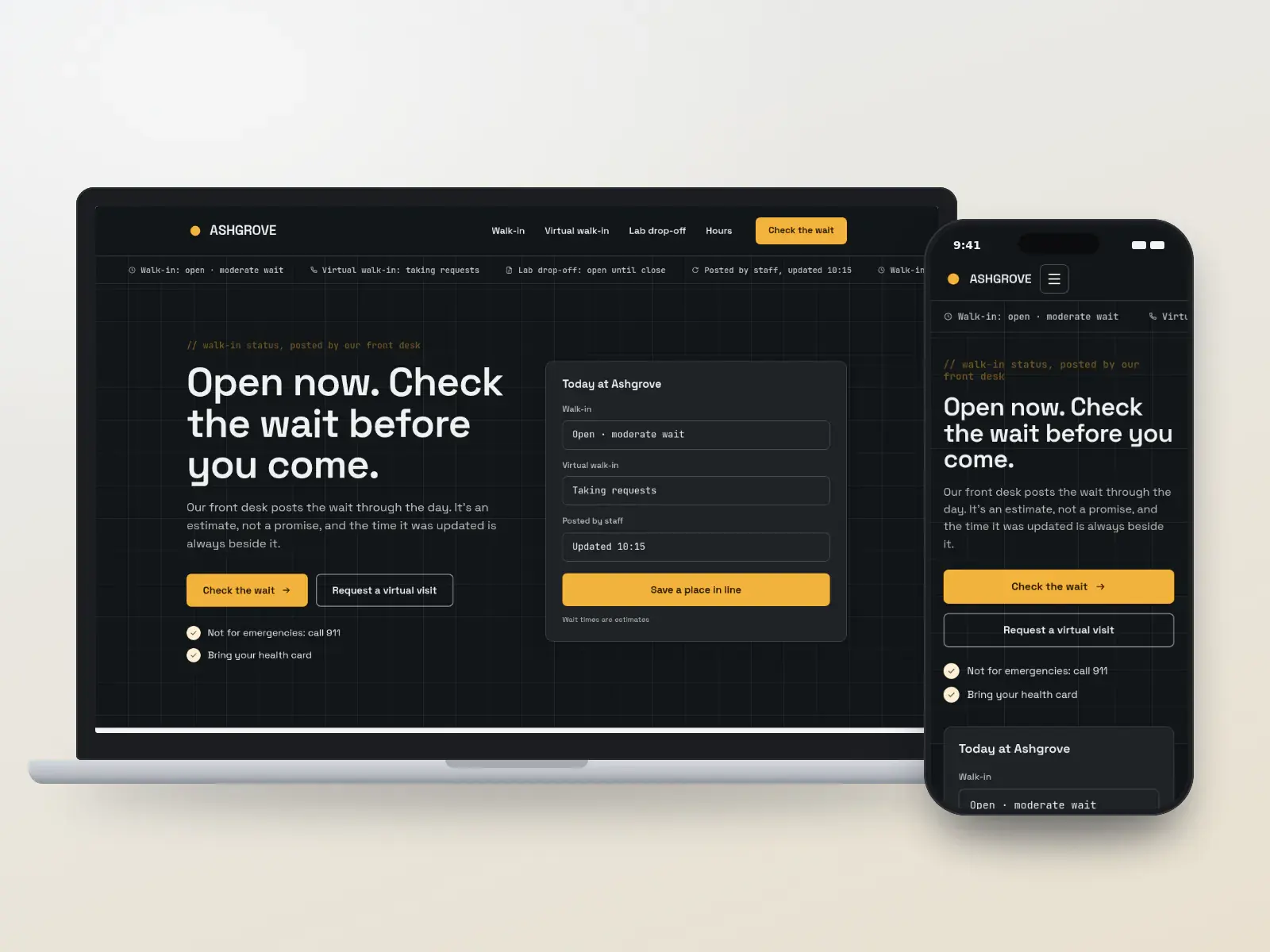
Ashgrove Walk-in Clinic
Walk-in clinics where the wait is the first question
Concept design. The business is fictional.
- Dark
- Data-led
Local website: yours after 12 payments, or $1,500 upfront
Concept website
Ridgeline Family Health
Family practices with same-day times for their patients
Concept design. The business is fictional.
- Tool-first
- Friendly
Local website: yours after 12 payments, or $1,500 upfront
Concept website
Willowmere Family Practice
Practices with a waitlist for new patients
Concept design. The business is fictional.
- Friendly
- Minimal
Local website: yours after 12 payments, or $1,500 upfront
Concept website
Clearpath Virtual Clinic
Clinics adding video and phone visits
Concept design. The business is fictional.
- Minimal
- Tool-first
Local website: yours after 12 payments, or $1,500 upfront
Concept website
Halden Medical Group
Groups running several clinics
Concept design. The business is fictional.
- Map-led
- Corporate
Growth website: yours after 12 payments, or $4,000 upfront
Concept website
Bramble Lane Family Medicine
Established practices that explain things well
Concept design. The business is fictional.
- Editorial
- Warm
Local website: yours after 12 payments, or $1,500 upfront
Concept website
Lanternlight Travel Health
Travel health and vaccine clinics
Concept design. The business is fictional.
- Luxury
- Dark
Local website: yours after 12 payments, or $1,500 upfront
Concept website
Northshore Urgent Care
US urgent care centres with self-pay patients
Concept design. The business is fictional.
- Bold
- Tool-first
Local website: yours after 12 payments, or $1,500 upfront
Concept app
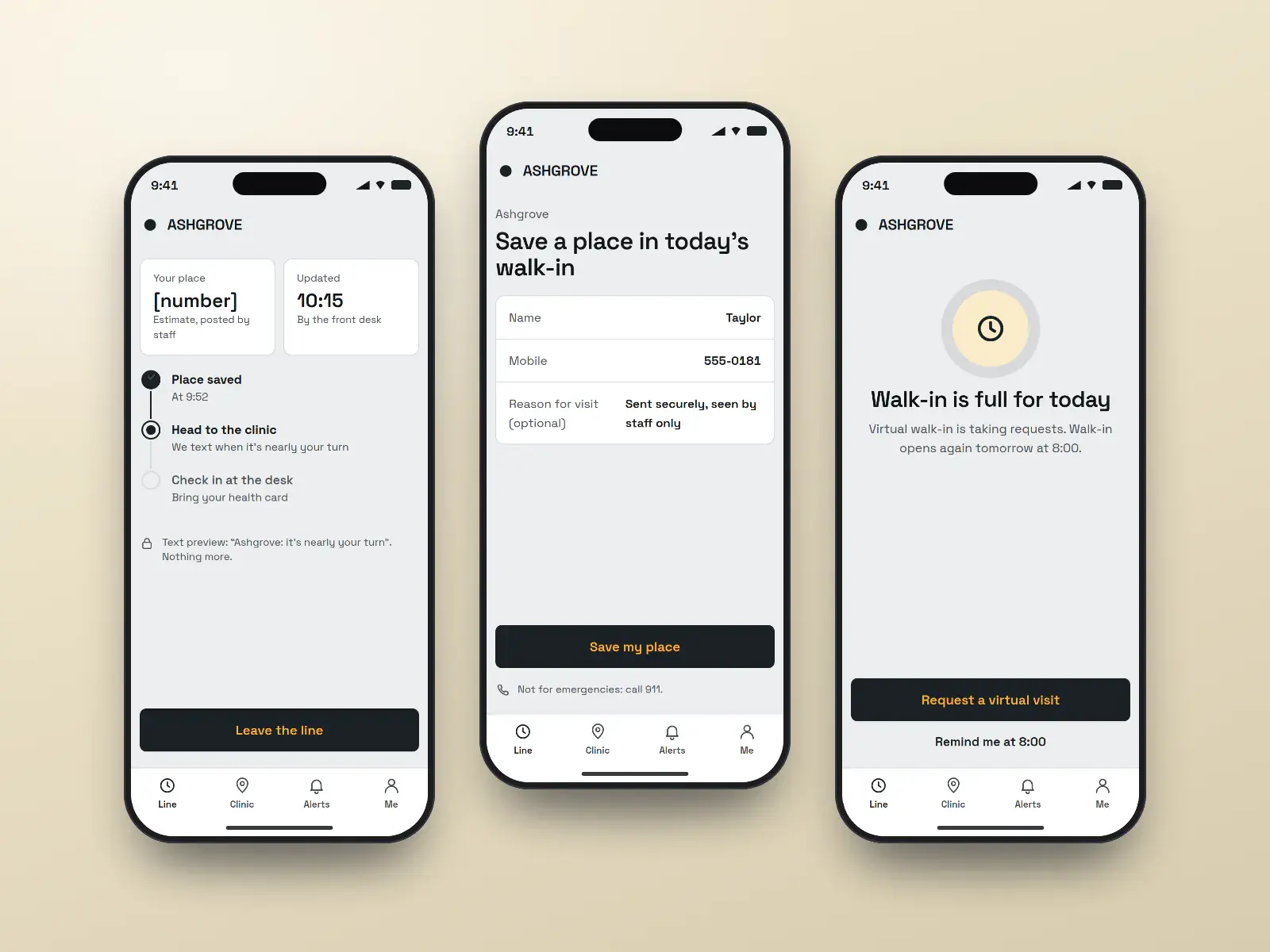
Ashgrove walk-in queue app
Patients saving a place in the walk-in line
Concept design. The business is fictional.
- Dark
- Tool-first
Quoted per project after a call
Concept app
Ridgeline patient app
Rostered patients sending renewals and requests
Concept design. The business is fictional.
- Friendly
- Minimal
Quoted per project after a call
Concept software
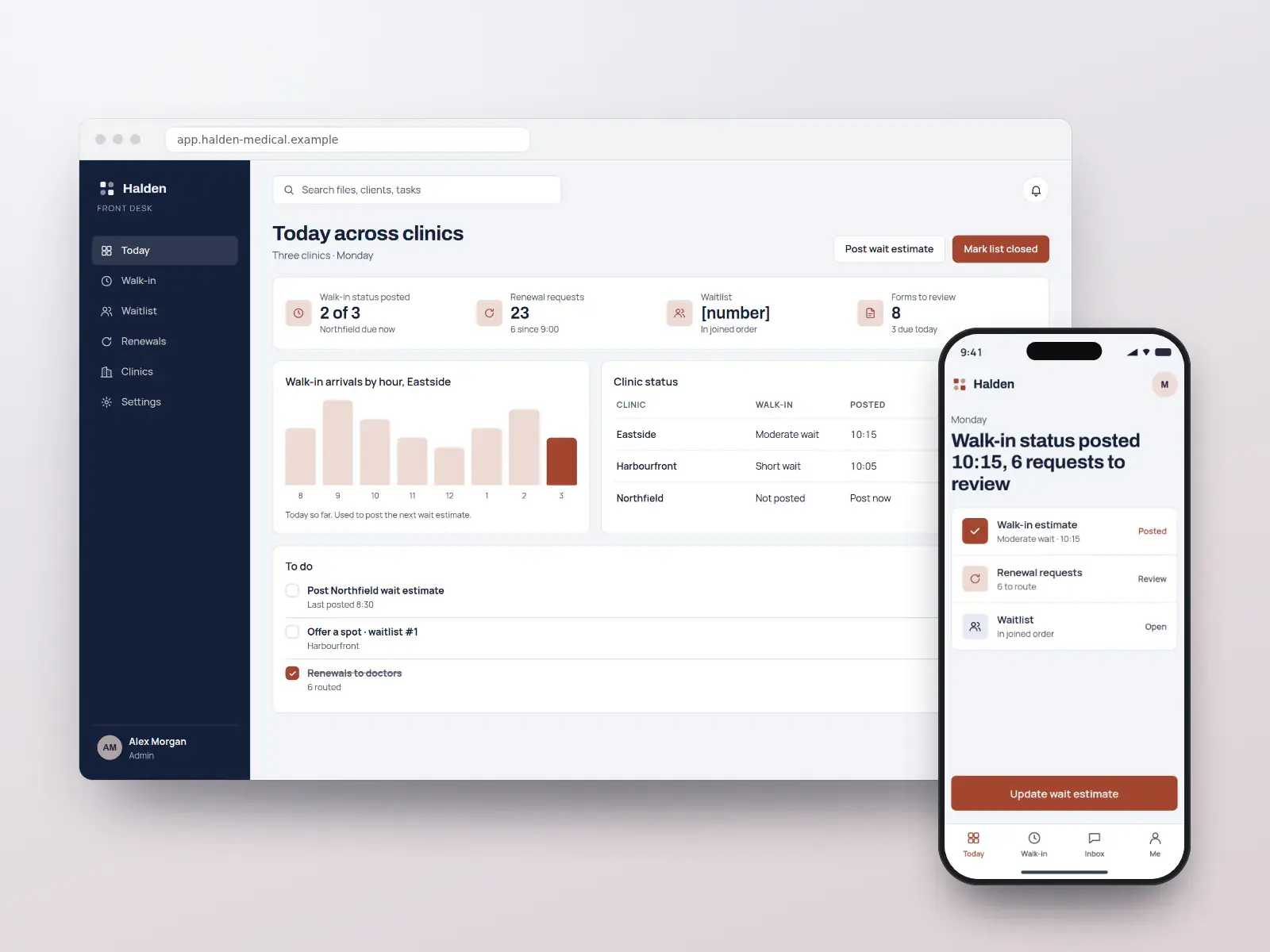
Halden front desk
Clinic managers and front desks across locations
Concept design. The business is fictional.
- Data-led
- Corporate
Quoted per project after a call
Pay monthly, own it
High-converting websites from $150/month
Pick a design, add your brand, content and photos, and launch. Yours after 12 payments, with SEO built in from day one.
- Local website
- $150/monthUp to 25 pages · yours after 12 payments, or $1,500 upfront
- Growth website
- $400/monthUp to 100 pages · yours after 12 payments, or $4,000 upfront
Built in
What every medical clinic website includes
New-patient status, said plainly
A status line the clinic manager changes in seconds, accepting, waitlist or full, shown on the homepage and every doctor’s page. A secure waitlist form asks nothing about health and explains how the clinic decides who it can take, so the front desk stops answering the same call all day.
Walk-in wait, posted by the front desk
A simple control lets staff update the walk-in status and wait through the day, with the time it was posted shown beside it. Where the clinic uses a queue tool that offers an integration, patients can save a spot and get a text.
Virtual care that checks location first
The visit request asks where the patient is before anything else and offers video or phone only where the clinic’s physicians are licensed. US pages about prescribing controlled medicines by telemedicine rely on DEA flexibilities that run to the end of 2026, so they carry a review date.
Doctor pages with registered titles
Each physician’s page shows the title their register entry supports, family physician, general practitioner or a certified specialty, with languages spoken and whether they take new patients. No page compares the clinic’s doctors to anyone else’s.
Requests that stay out of ad platforms
Prescription renewals, appointment requests and waitlist forms run over encrypted forms with no ad pixels or session replay on them. US vendors handling those forms sign a business associate agreement; Ontario vendors work as PHIPA service providers.
Accessible to every patient
Built to WCAG 2.2 AA, with large tap targets, readable type and forms that work with a screen reader, because a clinic’s visitors include older patients and people who are unwell. Clinics receiving HHS funding have a dated federal duty too.
A health library that ranks
Short, physician-reviewed pages on screening ages, vaccines and when to book versus go to emergency, each with a review date. They answer the questions patients search at night and bring them to your clinic’s booking page.
Must-have pages
The pages every medical clinic website needs
Each page answers a question people ask before they book, and each one can rank for that question on its own.
New patients and the waitlist
Whether each doctor is accepting today, how the clinic decides who it can take, and a waitlist form that asks for contact details only.
Book an appointment
Office, phone and video visit types for registered patients, with the reason kept to a word or two and confirmed by text.
Walk-in today
Walk-in hours, the wait as staff last posted it with the time, when the line closes early, and when to call 911 instead.
Virtual visits
What suits video or phone, what needs an exam, and the provinces or states the physicians are licensed in, asked before booking.
Renewals, forms and results
How to request a prescription renewal or a form, how long each takes, the fee for uninsured services, and how results are shared.
Our doctors
Each physician with the title their register entry supports, languages spoken, new-patient status and registration number.
Coverage and fees
In Canada, what the provincial plan covers and the posted fees for uninsured services; in the US, the plans billed, self-pay prices and good faith estimates.
Accessibility and getting here
Step-free entrance, parking and transit, accessible exam rooms, and an accessibility statement with a contact for help with the site.
Privacy notice
What each form collects, who hosts it, and that symptoms and medical history go only in the secure request form, never the contact form.
Search, AI answers and maps
How patients search for medical clinics, and how your site answers
People look for a clinic when they are unwell or have gone months without a family doctor, almost always on a phone and often for someone else. The map results decide most clicks, and the click goes to whichever clinic answers “can I be seen, and when” without a phone call.
How patients search
“Walk in clinic near me” and “walk in clinic open now”
Opening hours that match the Business Profile, plus the wait as staff last posted it, win the visit; a stale wait sends people elsewhere.
“Family doctor accepting new patients near me”
A plain-text status line on the homepage and each doctor page answers it, with how the waitlist works for anyone the clinic cannot take today.
“Virtual doctor appointment” and “online prescription renewal”
A virtual-care page that asks the patient’s location and names the provinces or states covered converts this search without false starts.
“Urgent care cost without insurance” and “does this clinic take my plan”
US searchers compare price; a self-pay table and a list of plans billed, in text, keep them on the page.
Late-night symptom questions, such as “child fever when to go to emergency”
Physician-reviewed library pages with a review date earn these visits and point to booking, or to 911 when it is an emergency.
What we build for search, AI answers and maps
- 01
A Business Profile for every location
Primary category “Medical clinic”, with “Walk-in clinic” or “Family practice physician” added where true, and hours, phone and booking link identical to that clinic’s own page.
- 02
MedicalClinic and Physician markup
MedicalClinic structured data on each location page and Physician on each doctor page, with address, hours and medicalSpecialty; no rating or review markup about the clinic itself.
- 03
Answers written to be quoted
Pages on new patients, walk-in and virtual care open with a two-sentence answer an AI assistant or featured snippet can lift, followed by the detail.
- 04
The same facts everywhere
Clinic name, address, hours and each doctor’s registered title kept identical across Google, Apple and Bing listings, the college’s public register and the site, so search engines and assistants trust them.
- 05
Reviews without patient details
Every patient gets the same review request, none filtered by mood, and replies thank the writer without confirming they were seen.
- 06
A monthly report
Calls, bookings and waitlist sign-ups from search per location, and which pages lost ground, in one short report.
No one can promise a ranking or a place in an AI answer. We build the pages, data and profile that search engines and assistants read, and report what changes.
Compliance
The rules for medical clinics, handled in the design
Clinic websites answer to a physicians’ college or medical board, to health-privacy law, to telehealth licensing rules and to accessibility law. Here is what each asks of a clinic site, and how every design handles it.
Sources gathered October 1, 2026. This is how our designs handle these rules, not legal advice: rules change and differ by province and state, so your physicians’ college or medical board, your privacy officer or your lawyer has the final word, and you approve every page before it goes live.
- Ontario
No testimonials in clinic advertising
Ontario Regulation 114/94 under the Medicine Act bars testimonials and comparative or superlative statements in physician advertising, and the CPSO treats a clinic website as advertising. Reviews patients post freely on outside sites are not barred, so they stay on the Google profile; the designs carry no patient quotes or review feeds.
- Ontario
How the clinic says who it can accept
The CPSO’s Accepting New Patients policy, updated in 2025, lets physicians decide whether they are accepting and use scope-based criteria, catchment areas or priority groups instead of first come, first served, but decisions must be transparent and must not discriminate. The status line and waitlist page say which approach the clinic uses.
- Ontario
Titles on doctor pages
CPSO guidance asks a named physician to use the title of their Royal College or College of Family Physicians certification, a CPSO-recognised specialty, or “General Practitioner”, and not “specialist” unless the register supports it. Each doctor page in these designs carries the title from the register.
- Ontario
Virtual care and where the patient is
The CPSO’s virtual care policy says care for patients located in Ontario generally needs a CPSO certificate, and caring for patients elsewhere means following that place’s licensing rules. The virtual visit form asks the patient’s current location first and offers no visit where the physicians are not licensed.
- US
Telehealth licensure across state lines
HHS explains that a clinician generally needs a licence, or another legal basis such as a compact, in the state where the patient is located during the visit. The US virtual-visit designs ask for the patient’s state up front and list only the states each physician is licensed in.
- US
Tracking on request and portal pages
HHS guidance says HIPAA covered entities must not let tracking technologies disclose patient information to vendors. A 2024 ruling narrowed that for public pages, but pages where patients log in or submit requests remain exposed. Booking, renewal and waitlist pages run with no ad pixel or session replay.
HHS OCR — Use of online tracking technologies by HIPAA covered entities
- Ontario
PHIPA and the clinic’s web vendors
Ontario’s Personal Health Information Protection Act makes the clinic a health information custodian, and vendors that host its forms or booking act on its behalf under the Act’s limits. Request forms are encrypted, hosted in Canada where the clinic wants it, and covered by a written agreement.
- US
Web accessibility for HHS-funded clinics
HHS rules under Section 504 ask recipients of its federal funding to make websites and apps meet WCAG 2.1 AA; a 2026 interim rule moved the dates to May 2027 for larger recipients and May 2028 for smaller ones. Whether Medicare payments alone make a practice a recipient is on our lawyer’s list. The designs meet WCAG 2.2 AA anyway.
Everything for medical clinics
Websites, apps, branding and SEO for medical clinics
Websites
Medical clinics websites built on the designs above, fast and set up for search.
From $150/month
Apps
For clinics with a large roster: an app or patient area that handles the routine requests that otherwise tie up the phone lines every morning.
Quoted per project
Apps for medical clinicsBranding
A clinic brand has to reassure people who feel unwell and look the same on a door sign, a requisition and a phone screen, without a name that suggests a specialty the doctors do not hold.
Quoted per project
Branding for medical clinicsSEO and leads
Ongoing SEO that checks your site every week and fixes what is safe to fix, for more appointment requests and new-patient sign-ups.
From $149/month
SEO plans and prices
Pricing
What a medical clinic website costs
The price of a medical clinic website is the same as any website we build: pay upfront and save, or spread it over 12 months.
Local website
$150/month × 12
or $1,500 upfront. Yours after the 12th payment.
- Up to 25 pages
- Any design on this page
- Technical SEO at launch
- Hosting and care $29/month
Growth website
$400/month × 12
or $4,000 upfront. Yours after the 12th payment.
- Up to about 100 pages
- Teams, offices and more integrations
- Planned with an advisor
- Hosting and care $49/month
SEO plans
$149/month
Local $149 · Growth $399
- Checks your site every week and fixes what is safe to fix
- New pages every month
- 7-day trial
Prices in US dollars. How payments, hosting and ownership work.
How it works
How your medical clinic website goes live
- 01
Pick a design
Choose a concept, or ask for another. Tell us your clinics, walk-in hours, new-patient status and virtual care setup.
- 02
Send your details
Each physician’s registered title and licences, languages, clinic hours, and the requests you want online.
- 03
Privacy and access
We set analytics with no health data, connect forms under the right agreement, test accessibility, and you review each page.
- 04
Launch and grow
Old pages redirected, every clinic’s Google profile updated, and local SEO for each location.
Pick my design
See your website before you pay for it
Choose a design and tell us about your business. An advisor emails you to plan a preview with your name, your colours and your details, and the price options. Nothing is charged until you decide.
- 1An advisor replies by email
- 2We plan your preview and scope
- 3You decide, with every price in writing
Questions
Medical clinics: common questions
- How much does a medical clinic website cost?
- A medical clinic website of up to 25 pages is $1,500 paid upfront, or $150 a month for 12 months, and it is yours after the 12th payment. A larger site of up to about 100 pages is $4,000, or $400 a month. Hosting and care is $29 or $49 a month. Prices are in US dollars.
- Can the website show whether we are accepting new patients?
- Yes. A status line on the homepage and every doctor’s page says accepting, waitlist or not at present, and your clinic manager changes it in seconds without calling us. When a waitlist is open, a secure form takes names in order and tells people what happens next.
- Can we post our walk-in wait time?
- Yes. Staff update the walk-in status and an estimated wait from a simple screen, and the time it was posted shows beside it, so nobody reads a stale number. Where your queue tool offers an integration, patients can also save a spot from home and get a text when it is nearly their turn.
- Can we offer virtual visits to patients anywhere?
- No. Licensing follows where the patient is during the visit. In Ontario the CPSO expects a CPSO certificate for patients located there and compliance with the other place’s rules for anyone outside it; in the US, HHS says a licence is needed in the patient’s state. The request form asks location first.US pages about prescribing controlled medicines by telemedicine carry a review date, because the DEA’s temporary flexibilities currently run to 31 December 2026.
- Is the website HIPAA and PHIPA compliant?
- The parts that handle patient information are built for it: request and waitlist forms are encrypted, carry no ad pixels or session replay, and use vendors that sign a business associate agreement in the US or act as PHIPA service providers in Ontario. Compliance also rests on your clinic’s own policies, which we document for your privacy lead.
- What should a medical clinic website include?
- At minimum: whether each doctor is accepting new patients, walk-in hours with the posted wait, booking for registered patients, a virtual-care page that asks the patient’s location, renewals and forms, doctor pages with registered titles, coverage and fees, accessibility and directions, and a privacy notice. Each answers a question people would otherwise phone about.
- Can a clinic website show patient reviews or testimonials?
- Not in Ontario: the regulation under the Medicine Act bars testimonials in physician advertising, and a clinic site counts. Reviews patients post on Google are not your advertising, so they stay there, and your replies never confirm someone is a patient. Elsewhere, US FTC rules ban fake or bought reviews and require testimonials to reflect typical experience.
- Can patients use the contact form to ask a doctor a question?
- No. A basic contact form takes a name, a phone number or email and a short non-clinical reason, and it says not to include health details. Symptoms, medication questions and anything about results go through the clinic’s secure request form or patient portal, which is encrypted, carries no tracking and is covered by your vendor agreement.
- Will my medical clinic website rank on Google?
- It launches with the technical SEO done: fast pages, clean structure, structured data, local pages and redirects from your old site. To keep climbing, a BOOSTD SEO plan from $149 a month runs 262 checks on your site every week, fixes what is safe to fix and gets the rest ready for your OK.No one can promise a position on Google, and we never do. Google warns businesses about anyone who does.
- Can I get one of these medical clinic website designs?
- Yes. Each is a complete, ready-to-launch website design BOOSTD made for medical clinics. Pick one and we make it yours, with your name, colours, photos, content and the licence or compliance details your industry expects, from $150 a month and yours after 12 payments.Approved client sites are shown with a “Client work” tag, and only with the client’s written permission.
Guides for medical clinics
Reading for medical clinics before you build
- Planned guideMedical clinic website checklist: new patients, walk-in and virtual carePlanned: written with a named author and published once reviewed
- Planned guideVirtual visits on a clinic website: licensure and privacy by province and statePlanned: written with a named author and published once reviewed
- Local SEOLocal SEO checklist: every step, in the right order
- ReviewsHow to respond to Google reviews: good, bad, fake and unfair
More on medical clinic website design
- Marketing for medical clinics Local SEO and patient communication for clinics.
- Replying to reviews without patient details
- Websites for medical specialists Referral forms, wait-time tables and procedure prep pages.
- Websites for pharmacies
- Websites for physiotherapists
- Websites for dentists
- A quote for medical clinics with several locations More locations than a plan covers? Tell us about the network.
Free, about a minute, nothing changes on your site
Start with a free checkup of your current site
See what holds your current website back across every point, free, before you choose a design.
- Free, no cardNo sign-up to see your preview.
- Read-onlyNothing changes on your website.
- 90-day guaranteeIf you join: a better score, or your next month free.