
Websites for dentists
Dental website design that fills the chair with new patients
Premium websites for dentists and dental practices: online booking that fills the chair, new-patient forms patients finish on their phone, the plans you accept and bill directly, and a before-and-after gallery that follows your college’s consent rules. SEO built in, so new patients nearby find you.
- Website from $150/month, yours after 12 payments
- SEO plans from $149/month
The short answer
What should a dental practice website include?
A dental website needs online booking on every page, secure new-patient forms, the insurance plans you accept, an emergency page, and clear titles: in Ontario only registered specialists may call themselves specialists. Analytics must not send patient details to ad platforms, and before-and-after photos need written consent.
- Price
- $1,500 upfront, or $150/month × 12
- Ownership
- Yours after 12 payments
- Hosting and care
- $29 or $49/month
- Build time
- About 4 weeks for a local site
Our designs
Our website and app designs for dentists
Ready-to-launch concept designs for fictional businesses: pick one and make it yours. 8 websites, 2 apps and 1 software design, each opening on a desktop and a phone, with your brand, content and photos going in. All apps and software
11 of 11 examples shown
Concept website
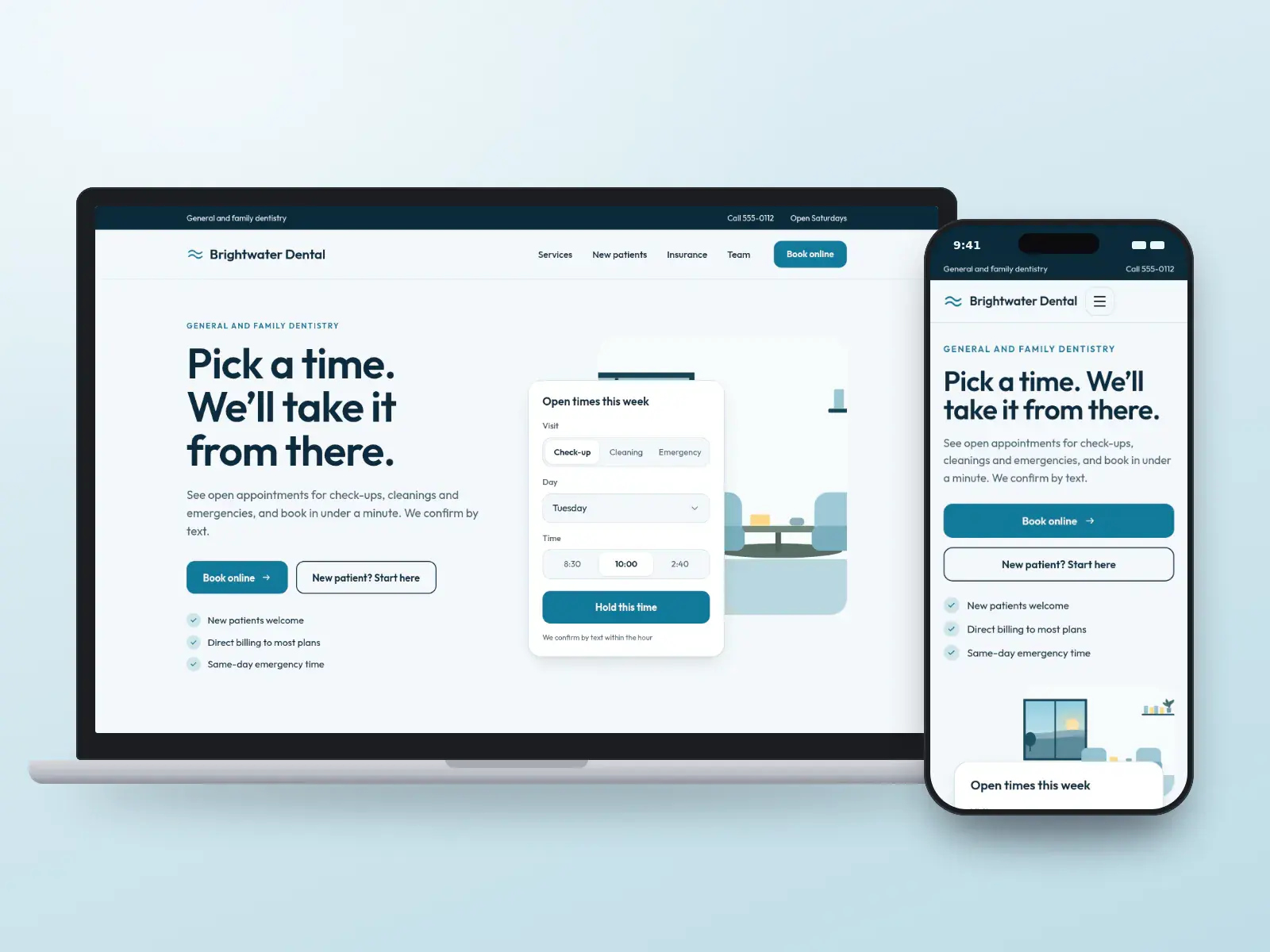
Brightwater Dental
Practices that want the chair full
Concept design. The business is fictional.
- Tool-first
- Friendly
Local website: yours after 12 payments, or $1,500 upfront
Concept website
Northgate Family Dental
Practices welcoming new families
Concept design. The business is fictional.
- Warm
- Friendly
Local website: yours after 12 payments, or $1,500 upfront
Concept website
Coverline Dental
Practices where plans decide the visit
Concept design. The business is fictional.
- Tool-first
- Minimal
Local website: yours after 12 payments, or $1,500 upfront
Concept website
Lumen Smile Studio
General practices with a cosmetic focus
Concept design. The business is fictional.
- Luxury
- Editorial
Local website: yours after 12 payments, or $1,500 upfront
Concept website
Harbour & Pine Dentistry
Established practices with a voice
Concept design. The business is fictional.
- Editorial
- Warm
Local website: yours after 12 payments, or $1,500 upfront
Concept website
Meridian Dental Group
Groups with several locations
Concept design. The business is fictional.
- Map-led
- Corporate
Growth website: yours after 12 payments, or $4,000 upfront
Concept website
Puffin Kids Dental
General practices that see mostly children
Concept design. The business is fictional.
- Playful
- Bold
Local website: yours after 12 payments, or $1,500 upfront
Concept website
Kittiwake Emergency Dental
Practices that keep same-day emergency time
Concept design. The business is fictional.
- Tool-first
- Dark
Local website: yours after 12 payments, or $1,500 upfront
Concept app
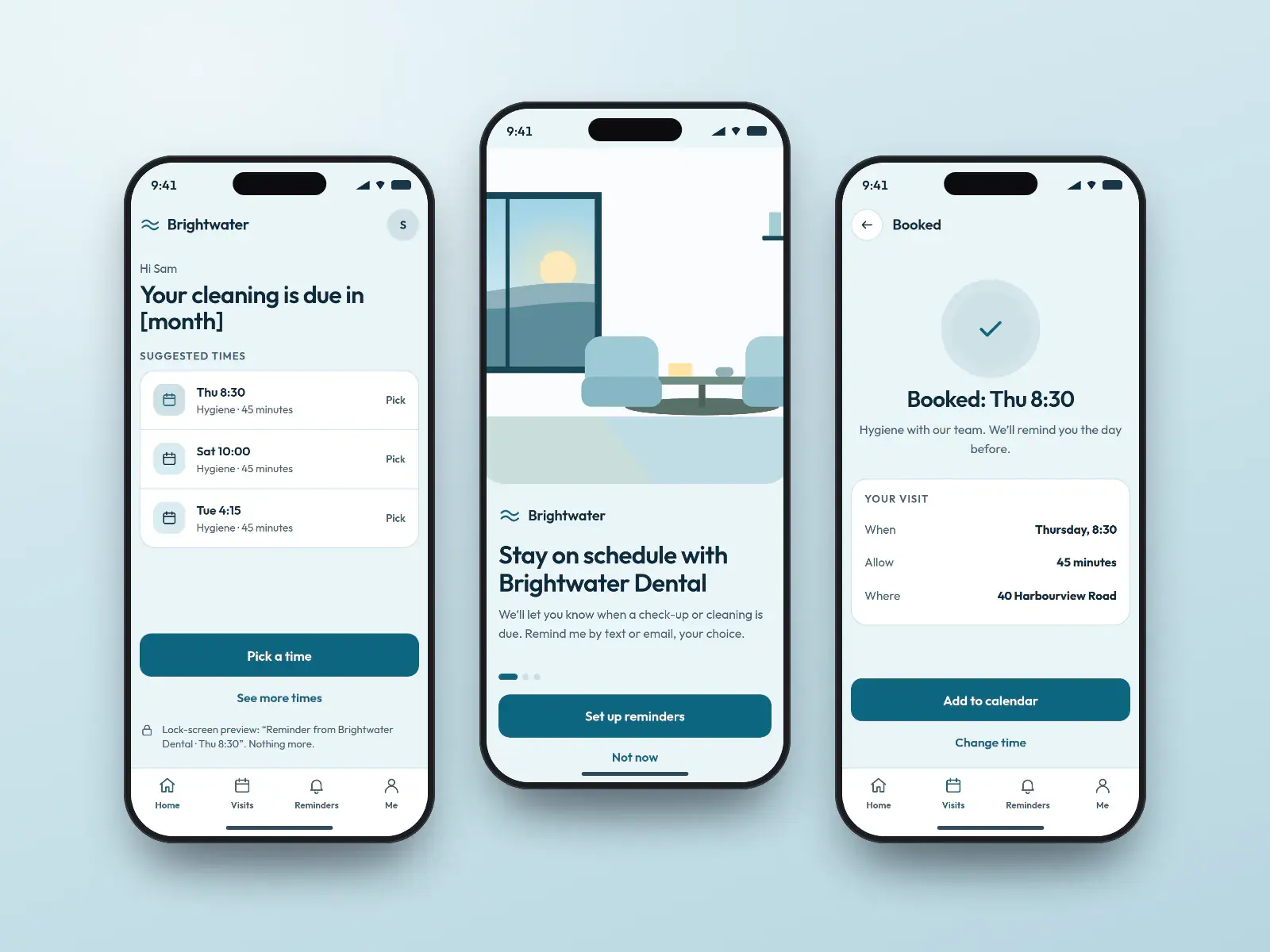
Brightwater recall app
Patients due for a cleaning or check-up
Concept design. The business is fictional.
- Friendly
- Minimal
Quoted per project after a call
Concept app
Northgate forms app
New and returning patients before a visit
Concept design. The business is fictional.
- Warm
- Friendly
Quoted per project after a call
Concept software
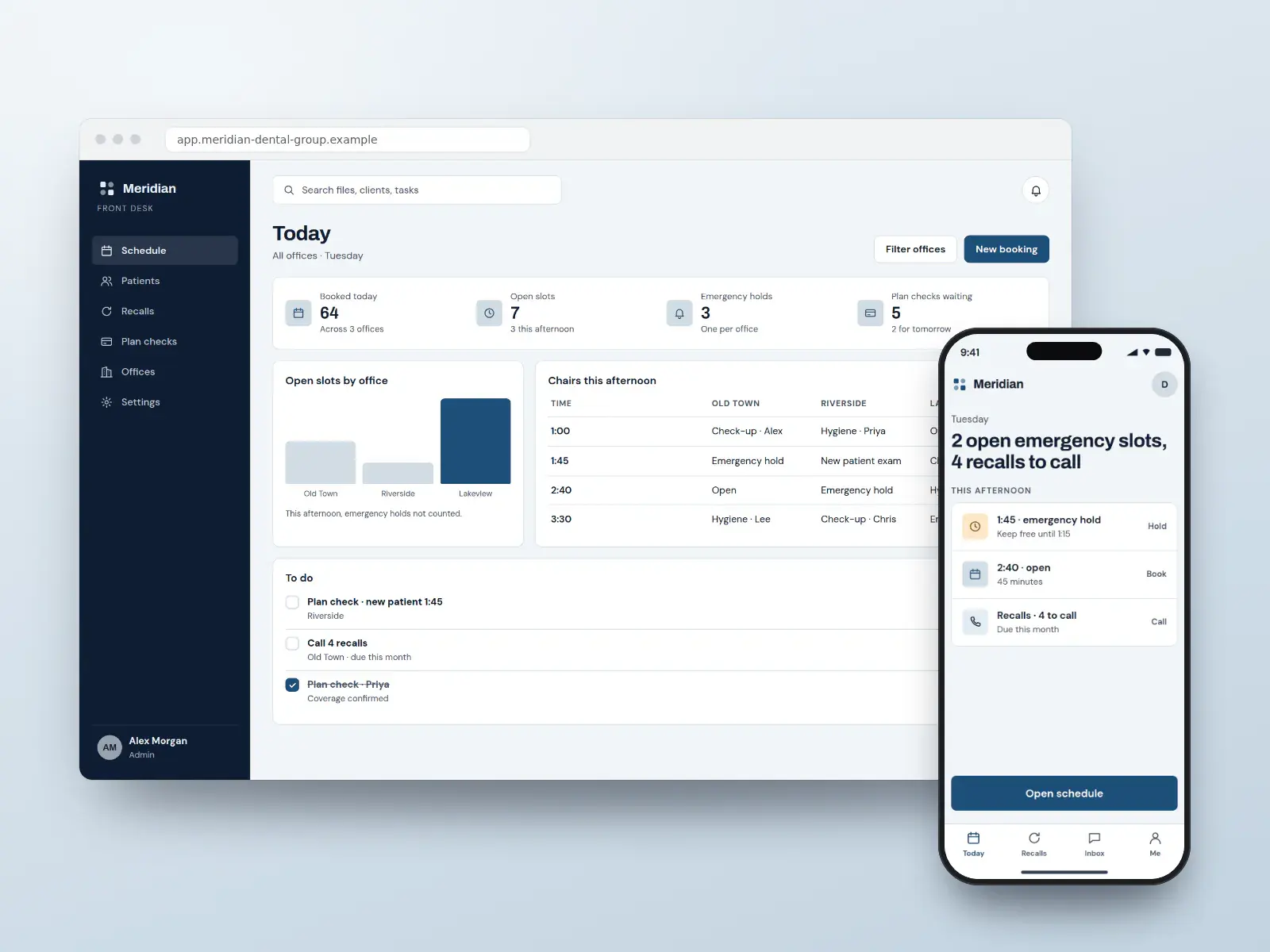
Meridian front desk
Front desks booking across several offices
Concept design. The business is fictional.
- Data-led
- Corporate
Quoted per project after a call
Pay monthly, own it
High-converting websites from $150/month
Pick a design, add your brand, content and photos, and launch. Yours after 12 payments, with SEO built in from day one.
- Local website
- $150/monthUp to 25 pages · yours after 12 payments, or $1,500 upfront
- Growth website
- $400/monthUp to 100 pages · yours after 12 payments, or $4,000 upfront
Built in
What every dental practice website includes
Online booking that fills the chair
Book on every page, linked to the booking tool your practice already uses where it offers an integration, with confirmations and reminders by text. Patients choose the visit type, so a new-patient exam is never booked into a cleaning slot.
New-patient forms, secure and mobile
Medical history, consent and plan details on a secure form that saves progress and sends answers to your team, never by plain email. Fewer clipboards in the waiting room, and the visit starts on time.
Plans you accept, explained
A page that names the insurers you bill directly and the government programs you take part in, with a plan-check request, so “do you take my plan?” is answered before the phone rings.
A smile gallery that follows the rules
Before-and-after pairs shot with matching light and angle, each naming the treatment performed, linked to the patient’s written consent and labelled “results vary”. Where your college bars testimonials, the gallery carries none.
Analytics without patient data
Traffic is measured with no ad pixel on booking, intake or portal pages, and nothing a patient types is sent to an ad platform. Vendors that touch patient information sign a business associate agreement in the US.
Titles your college will accept
Each dentist’s page shows their registered title. A general dentist offering implants, aligners or root canals says so plainly, and “specialist” appears only beside a registered specialty.
An emergency page that answers at night
Toothache, a knocked-out tooth, swelling: what to do now, when to call, and the nearest time you have open, so the after-hours search ends at your practice.
Must-have pages
The pages every dental practice website needs
Each page answers a question people ask before they book, and each one can rank for that question on its own.
Book online
Visit types, open times and a confirmation by text. The page most new patients are looking for, linked from every other page.
New patients
What the first visit involves, how long it takes, what to bring, and the secure forms to finish beforehand.
Insurance and direct billing
The plans you bill directly, government programs you take part in, and how fees are explained when there is no plan.
Dental emergencies
Toothache, a broken or knocked-out tooth, swelling: what to do now, when to call, and today’s open times.
One page per service
Cleanings, fillings, crowns, implants, whitening, children’s dentistry: each with who provides it and their registered title.
Team and titles
Each dentist and hygienist with their registered title and registration number, so patients and the college can check.
Accessibility and getting here
Step-free access, parking, transit, hours, languages spoken, and an accessibility statement with a way to ask for help.
Privacy notice
What the site collects, who receives it, and that health details belong in the secure form, not the contact form.
Search, AI answers and maps
How patients search for dentists, and how your site answers
Most people looking for a dentist search on a phone, close to home or work, and decide in a few minutes from your Google profile and one or two pages of your site. Pain changes the search: an emergency patient wants a time today, not a tour.
How patients search
“Dentist near me” and “dentist open Saturday”
Map results lead. Your Business Profile, hours and the booking link decide the click, so they must match the site exactly.
“Dentist that takes my insurance” and “direct billing dentist”
A plan page that names insurers in plain text answers it; a logo wall in a picture does not.
“Emergency dentist” and “broken tooth what to do”
Urgent, late-night searches. A short emergency page with steps and a phone number wins the call.
Questions before treatment
“Do I need a crown or a filling?”, “how long do implants take?” Plain answers on service pages bring in people still deciding.
What we build for search, AI answers and maps
- 01
Business Profile and location pages
Primary category “Dentist”, services and hours matching the site, and one page per office with its own address, team and booking.
- 02
Structured data that matches the page
Dentist and LocalBusiness markup with address, hours and accepted payment, and breadcrumb markup; FAQ markup only to describe questions the page visibly answers, since Google no longer shows FAQ rich results; no review stars marked up about yourself.
- 03
Answers assistants can quote
Each service page opens with a two-sentence answer (what it is, who it is for, how long it takes), so AI answers and featured snippets can cite you.
- 04
Reviews asked for properly
Every patient gets the same review request after a visit, never only happy ones, and replies never confirm someone is a patient.
- 05
Monthly checks
Rankings for your services in your neighbourhoods, calls and bookings from search, and pages that slip, reported every month.
No one can promise a ranking or a place in an AI answer. We build the pages, data and profile that search engines and assistants read, and report what changes.
Compliance
The rules for dentists, handled in the design
Dental websites answer to a dental college or board, to health-privacy law and to accessibility law. Here is what each asks of a practice site, and how every design handles it.
Sources gathered October 1, 2026. This is how our designs handle these rules, not legal advice: rules change and differ by province and state, so your dental college or board, your privacy officer or your lawyer has the final word, and you approve every page before it goes live.
- Ontario
Specialist titles and “cosmetic dentist”
The RCDSO lets only registered specialists in its eleven recognised specialties call themselves specialists, and names “cosmetic dentist” and “implant specialist” as titles no one may use. A general dentist advertising procedures specialists often do must say they are a general dentist. Each design’s titles follow that.
- Ontario
No testimonials, no superlatives
The RCDSO’s advertising guidelines bar patient testimonials and claims such as “best”, “number one” or “state of the art” on a practice’s website and social accounts. The designs sell on services, hours and how the visit works, and carry no patient quotes.
- US · California
Before-and-after photos
California’s Business and Professions Code §651 requires before-and-after views to be comparable, with no pose or lighting that flatters the result, to say the same results may not occur for every patient, and to name the procedures performed. The gallery is built to that standard everywhere, with each pair tied to the patient’s written consent.
- US
Tracking pixels and patient data
HHS says covered practices must not let tracking tools disclose patient information to vendors. A 2024 court ruling narrowed that for public pages, but booking, intake and portal pages remain the risk. The designs keep ad pixels off those pages and use vendors that sign a business associate agreement.
HHS OCR — Use of online tracking technologies by HIPAA covered entities
- US
Replying to reviews
HHS has fined dental practices for confirming patient details in replies to online reviews. Review replies are written never to confirm that someone is a patient or mention their care, and review requests go to every patient, not only happy ones.
HHS — Dental practice settles social media disclosures of patients’ information (2019)
- Ontario
Health information and your web vendors
Under PHIPA a practice is a health information custodian, and a website, form or booking vendor that handles patient information electronically is a service provider bound by the Act. Forms are hosted in Canada where you need it, encrypted, and covered by a written agreement.
Everything for dentists
Websites, apps, branding and SEO for dentists
Websites
Dentists websites built on the designs above, fast and set up for search.
From $150/month
Apps
For practices with a full recall list: an app or patient area that brings patients back on schedule and keeps the front desk off the phone.
Quoted per project
Apps for dentistsBranding
A dental brand has to feel calm and trustworthy, and its name has to work with the title rules: a practice name cannot claim a specialty its dentists do not hold.
Quoted per project
Branding for dentistsSEO and leads
Ongoing SEO that checks your site every week and fixes what is safe to fix, for more new-patient bookings.
From $149/month
SEO plans and prices
Pricing
What a dental practice website costs
The price of a dental practice website is the same as any website we build: pay upfront and save, or spread it over 12 months.
Local website
$150/month × 12
or $1,500 upfront. Yours after the 12th payment.
- Up to 25 pages
- Any design on this page
- Technical SEO at launch
- Hosting and care $29/month
Growth website
$400/month × 12
or $4,000 upfront. Yours after the 12th payment.
- Up to about 100 pages
- Teams, offices and more integrations
- Planned with an advisor
- Hosting and care $49/month
SEO plans
$149/month
Local $149 · Growth $399
- Checks your site every week and fixes what is safe to fix
- New pages every month
- 7-day trial
Prices in US dollars. How payments, hosting and ownership work.
How it works
How your dental practice website goes live
- 01
Pick a design
Choose a concept, or ask for something new. Tell us your services, plans and the booking tool you use.
- 02
Send your details
Logo, team photos, each dentist’s registered title, hours, and any before-and-after pairs with their consent forms.
- 03
Privacy and review
We set analytics without patient data, connect forms securely, and you review every page before launch.
- 04
Launch and grow
Old pages redirected, Google profile updated, and SEO added to keep new patients booking.
Pick my design
See your website before you pay for it
Choose a design and tell us about your business. An advisor emails you to plan a preview with your name, your colours and your details, and the price options. Nothing is charged until you decide.
- 1An advisor replies by email
- 2We plan your preview and scope
- 3You decide, with every price in writing
Questions
Dentists: common questions
- How much does a dental website cost?
- A dental practice website of up to 25 pages is $1,500 paid upfront, or $150 a month for 12 months, and it is yours after the 12th payment. A larger site of up to about 100 pages is $4,000, or $400 a month. Hosting and care is $29 or $49 a month. Prices are in US dollars.
- Can patients book appointments online?
- Yes. Every page has a booking button, and the booking page can connect to the scheduling tool your practice already uses where that tool offers an integration, or take requests your front desk confirms. Patients choose the visit type, get a confirmation by text, and reminders before the visit.A direct link to a specific practice-management system is scoped and quoted, because each vendor’s access rules differ.
- Is the website HIPAA compliant?
- The parts that handle patient information are built for it: intake and booking forms are encrypted, hosted by vendors that sign a business associate agreement in the US, and carry no ad pixels. HIPAA compliance also depends on your practice’s own policies, so we set up the site and document it for your privacy officer.In Canada the same forms follow PHIPA in Ontario or PIPEDA elsewhere, with Canadian hosting available.
- Can I show before-and-after photos and patient reviews?
- Before-and-after photos, yes, with each patient’s written consent, matching light and angle, the treatment named under each pair, and a line that results vary, as California law and most colleges expect. Testimonials depend on where you practise: Ontario’s RCDSO bars them, so in Ontario the site shows no patient quotes and reviews stay on your Google profile.
- Can I call myself a cosmetic dentist on my website?
- Not in Ontario: the RCDSO names “cosmetic dentist” as a title no dentist may use, because cosmetic dentistry is not a recognised specialty. You can say you are a general dentist who provides cosmetic treatment, and the site is worded that way. Other provinces and states have their own rules, which we follow for yours.
- What pages should a dental website have?
- At minimum: online booking, a new-patient page with secure forms, insurance and direct billing, dental emergencies, one page per service, the team with each dentist’s registered title, accessibility and directions, and a privacy notice. Each answers a question patients ask before they book, and each can rank for it.
- How do dentists get more new patients from their website?
- Make booking the easiest thing on every page, answer the insurance question in plain text, and keep your Google Business Profile, hours and site identical. Most new patients pick from the map results on a phone, so a fast mobile page with open times converts the visit the profile earned.Then ask every patient for a review the same way, and publish plain answers to the questions patients search before treatment.
- Can a dental practice use a contact form for patient questions?
- Use the contact form for name, phone and the reason for calling only. The form says not to include health details, and anything clinical (medical history, symptoms, X-rays) goes through the secure new-patient form or the patient portal, which is encrypted and covered by your vendor agreement.
- Will my dental practice website rank on Google?
- It launches with the technical SEO done: fast pages, clean structure, structured data, local pages and redirects from your old site. To keep climbing, a BOOSTD SEO plan from $149 a month runs 262 checks on your site every week, fixes what is safe to fix and gets the rest ready for your OK.No one can promise a position on Google, and we never do. Google warns businesses about anyone who does.
- Can I get one of these dental website designs?
- Yes. Each is a complete, ready-to-launch website design BOOSTD made for dentists. Pick one and we make it yours, with your name, colours, photos, content and the licence or compliance details your industry expects, from $150 a month and yours after 12 payments.Approved client sites are shown with a “Client work” tag, and only with the client’s written permission.
Guides for dentists
Reading for dentists before you build
- Planned guideDental website checklist: booking, forms, plans and privacyPlanned: written with a named author and published once reviewed
- Planned guideBefore-and-after photos on a dental website: consent and college rulesPlanned: written with a named author and published once reviewed
- ReviewsHow to ask for reviews without breaking the rules
- Local SEOLocal SEO checklist: what to do, and in what order
More on dental website design
- Marketing for dental practices Local SEO, recall and review marketing for practices.
- Asking every patient for a review
- Websites for orthodontists Referral forms, aligner consults and treatment-length pages.
- Websites for med spas and aesthetic clinics
- Websites for medical clinics and family doctors
- A quote for a dental practice with many offices More locations than a plan covers? Tell us about the network.
Free, about a minute, nothing changes on your site
Start with a free checkup of your current site
See what holds your current website back across every point, free, before you choose a design.
- Free, no cardNo sign-up to see your preview.
- Read-onlyNothing changes on your website.
- 90-day guaranteeIf you join: a better score, or your next month free.