
Email, SMS and tracking
Email deliverability basics: what SPF, DKIM and DMARC check
Published by Zubair Afzal, responsible editor
First published Updated 6 min readWe check this page every three months. Next check: .
Deliverability is decided by three DNS records and a sending habit, not by a subject line. Fix the mechanics first, because no amount of good copy reaches an inbox that never received the message.
Most conversations about email deliverability start with content: send times, subject lines, personalisation. Those matter once a message is being delivered. They do nothing for a domain mailbox providers can’t verify, or one whose complaint rate has told Gmail or Yahoo to route it away from the inbox.
The mechanical layer comes first because it’s checked first, automatically, before anyone sees the subject line.
The mechanics
What SPF, DKIM and DMARC each check
SPF, Sender Policy Framework, is a DNS record listing which mail servers may send email claiming to be from your domain. The receiving server checks the sending server’s address against that list. It checks the server, not the message, so SPF alone can’t catch a message altered after it left an approved server.
DKIM, DomainKeys Identified Mail, works differently. Your sending platform signs each message with a private key, and a matching public key sits in your DNS. The receiving server recalculates the signature and compares it to what arrived. A mismatch means the message changed in transit, or wasn’t signed by the key it claims. Google recommends a key of at least 1024 bits, with 2048 bits preferred for stronger security.
DMARC, Domain-based Message Authentication, Reporting and Conformance, doesn’t check the message at all. It’s a policy record telling a mailbox provider what to do when SPF or DKIM fail to align with the domain in the visible From address, set to none, quarantine or reject. It can also request reports on failing messages, which is how most senders find out someone is spoofing their domain.
Together they answer three questions: is this server allowed to send for this domain, did this message arrive unchanged, and what should happen when either check fails. Treating them as one setting called "authentication" is how a business gets one right and wrongly believes the domain is fully protected.
Before the inbox
What Gmail and Yahoo check before deciding where mail lands
Inbox placement comes down to two separate questions, checked in sequence. Getting the first one right doesn’t excuse the second.
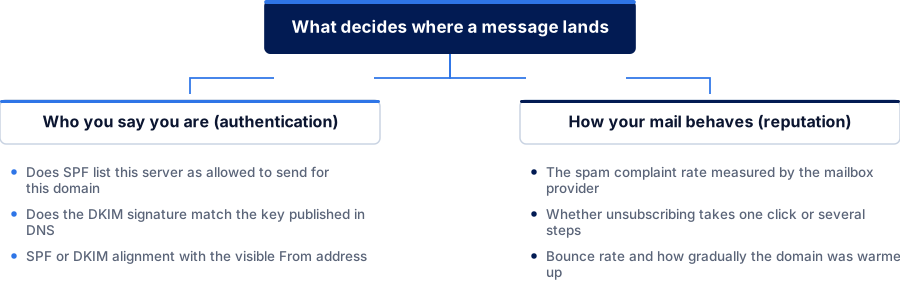
Who you say you are (authentication)
- Does SPF list this server as allowed to send for this domain
- Does the DKIM signature match the key published in DNS
- SPF or DKIM alignment with the visible From address
How your mail behaves (reputation)
- The spam complaint rate measured by the mailbox provider
- Whether unsubscribing takes one click or several steps
- Bounce rate and how gradually the domain was warmed up
Gmail’s and Yahoo’s bulk sender rules, side by side
Both published stricter rules for high-volume senders that took effect in 2024. Here’s what each asks for, from their own guidance.
| Dimension | Gmail | Yahoo |
|---|---|---|
| Who counts as a bulk sender | Senders reaching 5,000 or more messages to Gmail accounts in a single day. | Senders of marketing and subscribed messages at meaningful volume, without a single published numeric cutoff. |
| Authentication required | Both SPF and DKIM, where general senders only need one of the two. | Both SPF and DKIM, with alignment to either domain required. |
| DMARC policy | Required, and a policy of p=none satisfies the requirement. | A valid DMARC policy of at least p=none, with alignment. |
| Unsubscribe | One-click unsubscribe required for marketing and subscribed mail, using the List-Unsubscribe header. | A functioning one-click List-Unsubscribe header, with requests processed within two days. |
| Spam rate to stay under | Below 0.3% as a hard ceiling, with 0.10% recommended as a safer working target. | Below 0.3%, measured against mail that reached the inbox. |
What to check
Email authentication mistakes that quietly hurt deliverability
Most of these produce no error message. They make the domain look a little less trustworthy to every mailbox provider, week by week.
- DKIM set up years ago, on a platform the business no longer uses
- Switching email or marketing platforms usually means a new signing key. If the DNS record wasn’t updated, DKIM has been failing since the switch, flagged only by a slow decline in inbox placement.
- An SPF record that lists too many included services
- SPF checks are limited to 10 DNS lookups under the standard. A record that includes several marketing platforms, a CRM and a support tool can exceed that, and the whole check then fails outright.
- DMARC published once, at p=none, and never revisited
- A p=none policy asks for reports and takes no action on failures. If nobody reads the reports or moves towards quarantine or reject, a spoofed message using your domain is never stopped.
- Marketing mail sent from the same subdomain as receipts and invoices
- A spam complaint against a promotional campaign can drag down the reputation of transactional mail sharing the same sending domain. Separating marketing onto its own subdomain contains the damage to the traffic that caused it.
- Nobody is reading the DMARC aggregate reports
- DMARC can email a daily or weekly report showing every source claiming to send as your domain, including ones you didn’t authorise. Unread, those reports protect nobody.
Questions
Common questions about email authentication
What’s the difference between SPF, DKIM and DMARC?
SPF checks whether the server that sent a message is authorised to send for that domain, by listing approved servers in a DNS record. DKIM checks whether the message was altered in transit, using a cryptographic signature verified against a public key published in DNS. DMARC is a policy layer on top: it tells a mailbox provider what to do when SPF or DKIM fail to align with the visible From address, and can request a report when that happens.
In short: SPF is about the server, DKIM is about the message, and DMARC is the instruction for when either fails.
Do we need all three, or is one enough?
Google’s guidance asks every sender to set up SPF or DKIM at minimum, and asks high-volume senders, defined as 5,000 or more messages a day, to set up both plus a DMARC policy. DMARC needs at least one of SPF or DKIM to align before it can do anything.
Setting up all three once is far less work than debugging a deliverability problem later without them.
What happens if we publish a DMARC policy of p=none?
Nothing gets blocked or quarantined. A p=none policy tells mailbox providers to take no action on messages that fail alignment, and only asks for reports. Google accepts p=none for its bulk sender requirement, but a policy that stays there never stops someone impersonating your domain.
p=none is a reasonable start while reports are reviewed. Protection begins when you move to quarantine or reject.
Does Gmail’s bulk sender rule apply if we send a few hundred a day?
The strictest requirements, both SPF and DKIM together, a DMARC policy and one-click unsubscribe for marketing mail, are aimed at senders reaching 5,000 or more messages to Gmail accounts in a single day. Below that, Google still asks every sender to set up at least SPF or DKIM as a baseline.
Low volume today isn’t a reason to skip the setup. Volume can grow past a threshold nobody was tracking, and catching up under pressure is harder than doing it now.
Can DKIM break even if we haven’t changed anything on our own systems?
Yes. DKIM depends on the key in your DNS matching the key your sending platform signs with. If the platform rotates its key, or you switch providers and leave an old DNS record in place, DKIM starts failing even though nothing changed on your side.
So check authentication after any platform migration, not just at first setup.
How do we find out if our current setup already passes?
Send a test message to an account you control and view the original message (most email clients offer this). The Authentication-Results header shows SPF, DKIM and DMARC each as pass or fail, pointing at which needs attention.
If DMARC reporting is enabled, its aggregate reports show the same result across your real sending traffic, not just one test message.
References
Sources for email deliverability basics
The official documents and research this page is based on. Platform rules change, so check the source before you act on a detail.
Related
Keep reading on email deliverability basics
Start here
Get your SPF, DKIM and DMARC checked
Our specialists check your current authentication against what your sending platform uses, fix what’s misaligned, and set a DMARC policy that does more than collect reports.
Rather check it yourself? Try our free SEO tools